Ruters digitale plattform
This specification contains interfaces to be used between PTOs (operators) and Ruter. The API describes a set of MQTT topics which are used to distribute data onboard public transport vehicles/vessels as well as between the vehicle/vessel and Ruter’s Back Office or vv.
General information
Upgrades to the API
The API follows the upgrade cycles of ADT. Major releases are done more or less once a year and usually include breaking changes.
Minor/build releases are performed as continual deliveries and are non-breaking. New versions of this document will be published when new topics and/or fields are added.
Consumer Client Requirements
Clients consuming information posted on the topics must be tolerant to:
- That optional properties can be null or left out.
- That arrays can contain any number of elements including zero.
- That returned data can be extended with new properties without notice.
Quality of Service, Retained Flag and Persistence
Generally, QoS level 1 is applied for most topics and the retain flag is true for most topics. See the respective topic for precise info.
Subscribers should start with Clean Session set to True to assure that they get the latest information at reconnection (the retained info) and avoid first having to process a long queue of outdated old information that in reality hinders new relevant information to reach the subscriber.
Translation of topic names
Global topic names are generally written on the format of {recipient}/{sender}/{vehicleid}/{topic} to make it easy to identify the source and destination of the messages.
Local topic names have omitted the {recipient}/{sender}/{vehicleid} part in order to have onboard equipment pre-configured with vehicle independent settings.
All topic names must thus be rewritten local/global in the MQTT bridge according to a provided configuration file.
Data format
All data must be JSON and UTF-8 encoded.
Overview
The diagram below shows an overview of the most important messages that manage the assignment and journey of a vehicle.
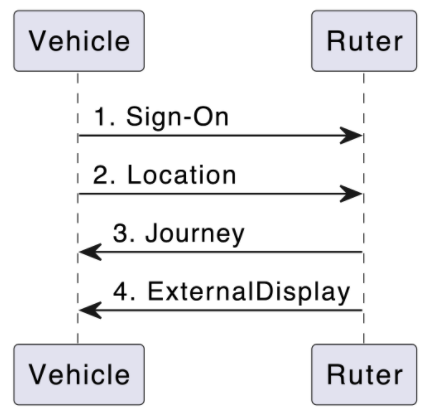
- The vehicle signs on. (In ADT4, this is a synchronous REST call.)
- Based on the location of the vehicle, Ruter calculates which journey in the assignment the vehicle is on, which stop it is going to next, etc.
- If the position matches a journey in the assignmment, Ruter sends a journey message to the vehicle,
- ...and Ruter changes external display
More info
For more information, please go to: Ruter’s ADT agreement.
Comments or suggestions
Please open an issue here: ADT-DOC Issues
Servers
- mqtt://mqtt.transhub.io/mqttmqttTranshub
Ruters central MQTT broker
objectstringrequiredThe mqtt broker is available through TCP (:8883) and Websockets (:9883)
Security:
- User/Password
Please reach out to rdp-support@ruter.no to request access.
Operations
RECEIVE di/available_destination_displays
Available Destination Displays Message
Field Value Central Topic {operatorId}/{authorityId}/backoffice/adt/v4/di/available_destination_displays Schema available-destination-displays.json Maintainer Assignment Producer Assignment Consumer PTO Service Level ✅ External API. Restrictions apply. Only backward compatible changes may happen within the major version. Provides a list of available destination displays. The list should be used for external displays, in case the vehicle has lost connection to the backoffice.
Note that the list of available destination displays is no longer available per vehicle. The topic structure includes
backofficeat the vehicleId position. This is an effort to reduce the amount of data stored on the brokerOperation IDreceiveAvailableDestinationDisplaysAvailable only on servers:
objectAccepts the following message:
Message IDAvailableDestinationDisplaysobject [AvailableDestinationDisplays]uid: https://schemas.ruter.no/adt/ota/api/v4.x/di/available-destination-displays/available-destination-displays.jsonExamples
#1 Example - Available Destination Displays
{
  "eventTimestamp": "2017-10-31T12:45:50.749Z",
  "traceId": "3841a268-0c03-4588-b476-211be0f26a0d",
  "availableDestinationDisplays": [
    {
      "publicCode": "20",
      "destination": "  Galgeberg"
    },
    {
      "destination": "  Ikke i trafikk "
    },
    {
      "publicCode": "N160",
      "destination": "  Oslo Bussterminal",
      "alternativeMessage": "  Ingen påstigning"
    }
  ]
}
SEND di/override_attempt/destination_display
Destination Display Override Message
Field Value Central Topic {authorityId}/{operatorId}/{vehicleId}/adt/v4/di/override_attempt/destination_display Schema destination-display-override.json Maintainer Assignment Producer PTO Consumer Assignment Service Level ✅ External API. Restrictions apply. Only backward compatible changes may happen within the major version. To construct a message, refer to the Available Destination Displays Message list and ensure that all fields provided in the list are included in the message.
If an entry contains publicCode, destination, and alternativeMessage, all three fields must be included exactly as specified in the list. The only additional fields you need to provide are a current eventTimestamp and a unique traceId.
Operation IDsendDestinationDisplayOverrideAvailable only on servers:
objectAccepts the following message:
Message IDDestinationDisplayOverrideobject [DestinationDisplayOverride]uid: https://schemas.ruter.no/adt/ota/api/v4.x/di/override_attempt/destination_display/destination-display-override.jsonDescribes a request from MADT or other GUI to manually override the information shown on the destination display. It is up to the presenting system to decide how and for how long the override will apply. A rule could be until next journey begins or a new override_attempt/destination_display is received. The topic could be blanked (provided with a zero-byte payload) to indicate that any overriding information is no longer valid and that the destination display can return to normal
Examples
#1 Example - Destination Display Override
{
  "eventTimestamp": "2023-04-10T16:45:33.901Z",
  "traceId": "3841a268-0c03-4588-b476-211be0f26a0d",
  "publicCode": "250",
  "destination": "  Oslo bussterminal",
  "alternativeMessage": "  Ingen påstigning"
}
SEND pe/active_cab
ActiveCab Message
Field Value Central Topic {authorityId}/{operatorId}/{vehicleId}/adt/v4/pe/active_cab Schema active-cab.json Maintainer DPI Producer PTO Consumer DPI, Progress Service Level ✅ External API. Restrictions apply. Only backward compatible changes may happen within the major version. Operation IDsendActiveCabAvailable only on servers:
objectAccepts the following message:
Message IDActiveCabobject [ActiveCab]uid: https://schemas.ruter.no/adt/ota/api/v4.x/pe/active-cab/active-cab.jsonUsed to keep track of what direction the train is driving
Examples
#1 Example - Active CAB
{
  "eventTimestamp": "2020-10-31T08:38:02.749Z",
  "traceId": "3841a268-0c03-4588-b476-211be0f26a0d",
  "activeCab": "c1"
}
RECEIVE pe/audio
Audio Message
Field Value Central Topic {operatorId}/{authorityId}/{vehicleId}/adt/v4/pe/audio Schema audio.json Maintainer DPI Producer DPI Consumer PTO Service Level ✅ External API. Restrictions apply. Only backward compatible changes may happen within the major version. The topic used for transmitting these audio messages is dedicated exclusively to audio playback through the vehicle's speaker system. The audio messages may contain an array of sound clips that should be played sequentially as they were received.
In some cases, multiple speaker groups may be targeted by the same audio message.
Audio Message Playback
- When a vehicle receives an MQTT message containing audio content, the PTO must play the audio, which can be in either OPUS or MP3 format.
- If the message defines an expiration timestamp that has passed, the audio content must not be played.
- If a message contains multiple audio files, these must be played in the order in which they appear in the message.
- MQTT messages with audio content must be processed synchronously, ensuring that new messages are only played after the previous one has finished.
Operation IDreceiveAudioAvailable only on servers:
objectAccepts the following message:
Message IDAudioobject [Audio]uid: https://schemas.ruter.no/adt/ota/api/v4.x/pe/audio/audio.jsonThis topic provides an audio message intended for passengers onboard the vehicle that should be played on speaker(s) defined in the speaker property of the payload.
Examples
#1 Example - Audio MP3
{
  "traceId": "3841a268-0c03-4588-b476-211be0f26a0d",
  "eventTimestamp": "2018-11-13T11:40:02.749Z",
  "expiryDateTime": "2018-11-13T08:40:32.249Z",
  "preferredStartDateTime": "2018-11-13T08:39:32.749Z",
  "ref": "RUT:StopPlace:03012453",
  "source": "campaign",
  "audio": [
    {
      "encoding": "MP3",
      "content": "SUQzBAAAAAAAI1RTU0UAAAAPAAADTGF2ZjU3...",
      "speakers": {
        "INTERNAL": 70
      }
    },
    {
      "encoding": "MP3",
      "content": "SUQzBAAAAAAAI1RTU0UAAAAPAAADTGF2ZjU3...",
      "speakers": {
        "INTERNAL": 70,
        "EXTERNAL": 40
      }
    }
  ]
}
#2 Example - Audio local files
{
  "traceId": "3841a268-0c03-4588-b476-211be0f26a0d",
  "eventTimestamp": "2018-11-13T11:40:02.749Z",
  "expiryDateTime": "2018-11-13T08:40:32.249Z",
  "preferredStartDateTime": "2018-11-13T08:39:32.749Z",
  "ref": "RUT:StopPlace:03012453",
  "source": "situation",
  "audio": [
    {
      "encoding": "OPUS",
      "contentUrl": "http://webserver.local/resources/safety_long.opus",
      "speakers": {
        "INTERNAL": 70
      }
    },
    {
      "encoding": "MP3",
      "content": "SUQzBAAAAAAAI1RTU0UAAAAPAAADTGF2ZjU3...",
      "speakers": {
        "INTERNAL": 70
      }
    }
  ]
}
SEND pe/cardreader_diagnostics/vix/{deviceRef}
VIX Card Reader Diagnostics MQTT Message
Field Value Central Topic {authorityId}/{operatorId}/{vehicleId}/adt/v4/pe/cardreader_diagnostics/vix/{deviceRef} Schema vix-cardreader_diagnostics.json Maintainer Betjent salg Producer VIX Consumer PTA Service Level ⛔ PTA internal API. No restrictions apply. May be removed or modified freely by the PTA Diagnostics message sent from any Vix-validator running Ruter-firmware in the vehicle. Can be used by both PTA and PTO to monitor the operational status of these units.
Operation IDsendVixCardreaderDiagnosticsAvailable only on servers:
objectdeviceRefstringrequiredAn unique ID of the unit.
objectAccepts the following message:
Message IDVixCardreaderDiagnosticsobject [VixCardreaderDiagnostics]uid: https://schemas.ruter.no/adt/ota/api/v4.x/pe/cardreader-diagnostics/vix/vix-cardreader_diagnostics.jsonExamples
#1 Example - VIX Card Reader Diagnostics
{
  "eventTimestamp": "2022-05-24T07:00:25Z",
  "traceId": "3841a268-0c03-4588-b476-211be0f26a0d",
  "deviceRef": "RUT1234",
  "inService": true
}
SEND pe/doors_individually
DoorsIndividually Message
Field Value Central Topic {authorityId}/{operatorId}/{vehicleId}/adt/v4/pe/doors_individually Schema doors-individually.json Maintainer Passasjertelling Producer PTO Consumer PTA Service Level ✅ External API. Restrictions apply. Only backward compatible changes may happen within the major version. This topic is used to track the individual status of doors. One use case is to improve the data quality of APC counts. See also topic sensors/door for status of anyDoorOpen/allDoorsClosed.
Operation IDsendDoorsIndividuallyAvailable only on servers:
objectAccepts the following message:
Message IDDoorsIndividuallyobject [DoorsIndividually]uid: https://schemas.ruter.no/adt/ota/api/v4.x/pe/doors-individually/doors-individually.jsonThis object is used to represent a door individually.
Examples
#1 Example - Door Individually
{
  "traceId": "3841a268-0c03-4588-b476-211be0f26a0d",
  "eventTimestamp": "2021-10-31T12:45:50.749Z",
  "messageNumber": 123456,
  "doorRef": "1",
  "isOpen": true
}
SEND pe/dpi/ack
Acknowledge Message
Field Value Central Topic {authorityId}/{operatorId}/{vehicleId}/adt/v4/pe/dpi/ack Schema dpi-acknowledge.json Maintainer DPI Producer PTO, DPI Consumer DPI Service Level ✅ External API. Restrictions apply. Only backward compatible changes may happen within the major version. The DPI Ack topic is used to inform the
PTA Backofficeabout the correct transfer and interpretation of messages to the vehicle.PTA shall receive an acknowledgment message for the following topics:
Topic Responsible for producing ack External display messages PTO Audio messages PTO Journey messages DPI application NextStop messages DPI application The ack message should be produced as soon as the message is received and validated. This is a confirmation that the system on board the vehicle have received the data and is capable of acting on it.
No confirmation message should be returned if the system is unable to playback the content. (e.g. invalid message format)
Operation IDsendDpiAcknowledgeAvailable only on servers:
objectAccepts the following message:
Message IDDpiAcknowledgeobject [DpiAcknowledge]uid: https://schemas.ruter.no/adt/ota/api/v4.x/pe/dpi/ack/dpi-acknowledge.jsonThe DPI Ack topic.
Examples
#1 Example - DPI Acknowledge
{
  "eventTimestamp": "2017-10-31T12:45:50.749Z",
  "traceId": "2ccf77aa-463f-4b98-ad19-61ec5d213e36",
  "clientId": "8fac6c64la4cap4b21R90d",
  "physicalId": "screen1",
  "messageReceived": {
    "topic": "pe/dpi/journey",
    "eventTimestamp": "2017-10-31T12:45:50.749Z",
    "traceId": "b88aaf6a-b15b-415a-8c44-ac7ad42de59e"
  }
}
RECEIVE pe/dpi/arriving
Arriving Message
Field Value Central Topic {operatorId}/{authorityId}/{vehicleId}/adt/v4/pe/dpi/arriving Schema dpi-arriving.json Maintainer DPI Producer DPI Consumer DPI Service Level ⛔ PTA internal API. No restrictions apply. May be removed or modified freely by the PTA Notice to passengers that the bus is approaching a stop.
Operation IDreceiveDpiArrivingAvailable only on servers:
objectAccepts the following message:
Message IDDpiArrivingobject [DpiArriving]uid: https://schemas.ruter.no/adt/ota/api/v4.x/pe/dpi/arriving/dpi-arriving.jsonFor display of arriving information to passengers
Examples
#1 Example - Arriving
{
  "eventTimestamp": "2024-11-28T13:51:06.337903113Z",
  "traceId": "1acad49e-da9c-4ecc-8704-7b881d6cccc9",
  "expiryTimestamp": "2024-11-28T13:51:21.337909232Z",
  "ref": "NSR:StopPlace:6671",
  "order": 29,
  "journeyRef": "RUT:ServiceJourney:011578-018334-132500-31-2-Weekday-125",
  "message": {
    "en": {
      "title": "Arriving at",
      "text": "Kastellet"
    },
    "no": {
      "title": "Ankommer",
      "text": "Kastellet"
    }
  }
}
RECEIVE pe/dpi/command
Command Message
Field Value Central Topic {operatorId}/{authorityId}/{vehicleId}/adt/v4/pe/dpi/command Schema dpi-command.json Maintainer DPI Producer DPI Consumer DPI Service Level ⛔ PTA internal API. No restrictions apply. May be removed or modified freely by the PTA This channel is highly unstable and should only be used by developers in TET.
This channel makes it possible for developers to debug the running application by providing real-time commands to it.
The results from each requested command is sent to pe/dpi/command_response.
Operation IDreceiveDpiCommandAvailable only on servers:
objectAccepts the following message:
Message IDDpiCommandobject [DpiCommand]uid: https://schemas.ruter.no/adt/ota/api/v4.x/pe/dpi/command/dpi-command.jsonMessage sent to bus to control DPI functions
Examples
#1 Example - DPI Command
{
  "eventTimestamp": "2025-04-03T13:18:26.337178538Z",
  "traceId": "2fccd221-f879-43e8-9e45-62abf54a9688",
  "clientId": "*",
  "command": "GET_STATUS"
}
SEND pe/dpi/command_response
Command response message
Responses generated from requests sent on
/pe/dpi/commandField Value Central Topic {authorityId}/{operatorId}/{vehicleId}/adt/v4/pe/dpi/command_response Schema dpi-command_response.json Maintainer DPI Producer DPI Consumer DPI Service Level ⛔ PTA internal API. No restrictions apply. May be removed or modified freely by the PTA This message is a response to another message sent on pe/dpi/command. It contains the result of the command.
Operation IDsendDpiCommandResponseAvailable only on servers:
objectAccepts the following message:
Message IDDpiCommandResponseobject [DpiCommandResponse]uid: https://schemas.ruter.no/adt/ota/api/v4.x/pe/dpi/command_response/dpi-command_response.jsonMessage sent from vehicle as response to DPI commands
Examples
#1 Example - DPI Command response
{
  "eventTimestamp": "2025-04-03T13:18:26.337178538Z",
  "traceId": "2fccd221-f879-43e8-9e45-62abf54a9688",
  "correlationId": "aeaa339e-cbd0-43d9-a4a8-7053d12e1a64",
  "clientId": "866f85ac-ab5a-48e2-b2db-5e9813e58a71",
  "command": "GET_FEATURES",
  "payload": {
    "feature_1": false,
    "feature_2": true
  }
}
SEND pe/dpi/connection_status
Connection Status Message
Field Value Central Topic {authorityId}/{operatorId}/{vehicleId}/adt/v4/pe/dpi/connection_status Schema dpi-connection-status.json Maintainer DPI Producer DPI Consumer DPI Service Level ⛔ PTA internal API. No restrictions apply. May be removed or modified freely by the PTA Connection messages sent when the DPI client connects and disconnects from the MQTT broker. It is used to monitor the connection status of the DPI client and detect screens where the browser may be in restart loop.
Operation IDsendDpiConnectionStatusAvailable only on servers:
objectAccepts the following message:
Message IDDpiConnectionStatusobject [DpiConnectionStatus]uid: https://schemas.ruter.no/adt/ota/api/v4.x/pe/dpi/connection_status/dpi-connection-status.jsonDPI Connection status topic
Examples
#1 Example - Connection Status disconnected
{
  "eventTimestamp": "2018-10-31T12:45:45Z",
  "traceId": "2de04b7c-321a-4ad2-b545-b8cb971e0550",
  "clientId": "ad71dba8-c881-11e8-a8d5-f2801f1b9fd1",
  "connected": false
}
#2 Example - Connection Status connected
{
  "eventTimestamp": "2018-10-31T12:45:45Z",
  "traceId": "2de04b7c-321a-4ad2-b545-b8cb971e0550",
  "clientId": "ad71dba8-c881-11e8-a8d5-f2801f1b9fd1",
  "connected": true
}
RECEIVE pe/dpi/connections
Connections Message
Field Value Central Topic {operatorId}/{authorityId}/{vehicleId}/adt/v4/pe/dpi/connections Schema dpi-connections.json Maintainer DPI Producer DPI Consumer DPI Service Level ⛔ PTA internal API. No restrictions apply. May be removed or modified freely by the PTA List of connections for the remaining stops on a journey with expected departures.
Operation IDreceiveDpiConnectionsAvailable only on servers:
objectAccepts the following message:
Message IDDpiConnectionsobject [DpiConnections]uid: https://schemas.ruter.no/adt/ota/api/v4.x/pe/dpi/connections/dpi-connections.jsonThis schema defines the connection message sent as an MQTT message to buses
Examples
#1 Example - Connections
{ "eventTimestamp": "2017-10-31T12:45:50.749Z", "traceId": "3841a268-0c03-4588-b476-211be0f26a0d", "expiryTimestamp": "2020-03-16T14:35:08.762206Z", "nextStop": { "stopPlaceId": "NSR:StopPlace:6498", "quayId": "NSR:Quay:11950" }, "journeyId": "RUT:ServiceJourney:60-138542-15631728", "routeId": "RUT:Route:60-4", "calls": [ { "name": "Tøyenkirken", "stopPlaceId": "NSR:StopPlace:6498", "quayId": "NSR:Quay:11950", "index": 4, "connections": [] }, { "name": "Tøyen skole", "stopPlaceId": "NSR:StopPlace:6480", "quayId": "NSR:Quay:11910", "index": 5, "connections": [] }, { "name": "Tøyen", "stopPlaceId": "NSR:StopPlace:6478", "quayId": "NSR:Quay:11908", "index": 6, "connections": [ { "line": { "id": "RUT:Line:20", "publicCode": "20", "transportMode": "bus" }, "direction": "1", "departures": [ { "destination": "Galgeberg", "text": "5 min", "departureTime": "2020-03-16T14:35:37Z", "delay": "PT1M37S", "journeyId": "RUT:ServiceJourney:20-131531-15685688" }, { "destination": "Galgeberg", "text": "10 min", "departureTime": "2020-03-16T14:40:58Z", "delay": "PT1M58S", "journeyId": "RUT:ServiceJourney:20-131531-15685689" }, { "destination": "Galgeberg", "text": "15:45", "departureTime": "2020-03-16T14:45:09Z", "delay": "PT1M9S", "journeyId": "RUT:ServiceJourney:20-131531-15685690" } ] }, { "line": { "id": "RUT:Line:20", "publicCode": "20", "transportMode": "bus" }, "quay": { "id": "NSR:Quay:11906", "description": "i Kjølberggata" }, "direction": "2", "departures": [ { "destination": "Skøyen", "text": "3 min", "departureTime": "2020-03-16T14:34:00Z", "delay": "PT0S", "journeyId": "RUT:ServiceJourney:20-131531-15685534" }, { "destination": "Skøyen", "text": "8 min", "departureTime": "2020-03-16T14:39:00Z", "delay": "PT0S", "journeyId": "RUT:ServiceJourney:20-131531-15685535" }, { "destination": "Skøyen", "text": "13 min", "departureTime": "2020-03-16T14:44:00Z", "delay": "PT0S", "journeyId": "RUT:ServiceJourney:20-131531-15685536" } ] } ] }, { "name": "Brinken", "stopPlaceId": "NSR:StopPlace:6562", "quayId": "NSR:Quay:12119", "index": 7, "connections": [] }, { "name": "Kampen kirke", "stopPlaceId": "NSR:StopPlace:6564", "quayId": "NSR:Quay:12123", "index": 8, "connections": [] }, { "name": "Kampen park", "stopPlaceId": "NSR:StopPlace:6571", "quayId": "NSR:Quay:12135", "index": 9, "connections": [] }, { "name": "Ensjøveien", "stopPlaceId": "NSR:StopPlace:6046", "quayId": "NSR:Quay:11097", "index": 10, "connections": [] }, { "name": "Tøyen stasjon", "stopPlaceId": "NSR:StopPlace:6044", "quayId": "NSR:Quay:11092", "index": 11, "connections": [] }, { "name": "Hasle kirke", "stopPlaceId": "NSR:StopPlace:6049", "quayId": "NSR:Quay:11101", "index": 12, "connections": [] }, { "name": "Hasle", "stopPlaceId": "NSR:StopPlace:6031", "quayId": "NSR:Quay:11076", "index": 13, "connections": [ { "line": { "id": "RUT:Line:21", "publicCode": "21", "transportMode": "bus" }, "quay": { "id": "NSR:Quay:11069", "publicCode": "D" }, "direction": "1", "departures": [ { "destination": "Helsfyr T", "text": "13 min", "departureTime": "2020-03-16T14:44:00Z", "delay": "PT0S", "journeyId": "RUT:ServiceJourney:21-131531-15685155" }, { "destination": "Helsfyr T", "text": "15:49", "departureTime": "2020-03-16T14:49:00Z", "delay": "PT0S", "journeyId": "RUT:ServiceJourney:21-131531-15685156" }, { "destination": "Helsfyr T", "text": "15:54", "departureTime": "2020-03-16T14:54:00Z", "delay": "PT0S", "journeyId": "RUT:ServiceJourney:21-131531-15685157" } ] }, { "line": { "id": "RUT:Line:21", "publicCode": "21", "transportMode": "bus" }, "quay": { "id": "NSR:Quay:11070", "publicCode": "C" }, "direction": "2", "departures": [ { "destination": "Tjuvholmen", "text": "13 min", "departureTime": "2020-03-16T14:44:00Z", "delay": "PT0S", "journeyId": "RUT:ServiceJourney:21-131531-15685274" }, { "destination": "Tjuvholmen", "text": "15:49", "departureTime": "2020-03-16T14:49:00Z", "delay": "PT0S", "journeyId": "RUT:ServiceJourney:21-131531-15685275" }, { "destination": "Tjuvholmen", "text": "15:54", "departureTime": "2020-03-16T14:54:00Z", "delay": "PT0S", "journeyId": "RUT:ServiceJourney:21-131531-15685276" } ] }, { "line": { "id": "RUT:Line:28", "publicCode": "28", "transportMode": "bus" }, "quay": { "id": "NSR:Quay:11075", "publicCode": "B" }, "direction": "2", "departures": [ { "destination": "Fornebu", "text": "15:47", "departureTime": "2020-03-16T14:47:00Z", "delay": "PT0S", "journeyId": "RUT:ServiceJourney:28-131531-15685026" }, { "destination": "Fornebu", "text": "15:54", "departureTime": "2020-03-16T14:54:00Z", "delay": "PT0S", "journeyId": "RUT:ServiceJourney:28-131531-15685039" }, { "destination": "Fornebu", "text": "16:02", "departureTime": "2020-03-16T15:02:00Z", "delay": "PT0S", "journeyId": "RUT:ServiceJourney:28-131531-15685027" } ] }, { "line": { "id": "RUT:Line:28", "publicCode": "28", "transportMode": "bus" }, "direction": "1", "departures": [ { "destination": "Økern T", "text": "15:48", "departureTime": "2020-03-16T14:48:00Z", "delay": "PT0S", "journeyId": "RUT:ServiceJourney:28-131531-15685014" }, { "destination": "Økern T", "text": "15:57", "departureTime": "2020-03-16T14:57:43Z", "delay": "PT1M43S", "journeyId": "RUT:ServiceJourney:28-131531-15685006" }, { "destination": "Økern T", "text": "16:03", "departureTime": "2020-03-16T15:03:00Z", "delay": "PT0S", "journeyId": "RUT:ServiceJourney:28-131531-15685015" } ] } ] }, { "name": "Haslevangen", "stopPlaceId": "NSR:StopPlace:6036", "quayId": "NSR:Quay:11080", "index": 14, "connections": [ { "line": { "id": "RUT:Line:28", "publicCode": "28", "transportMode": "bus" }, "direction": "1", "departures": [ { "destination": "Økern T", "text": "15:49", "departureTime": "2020-03-16T14:49:00Z", "delay": "PT0S", "journeyId": "RUT:ServiceJourney:28-131531-15685014" }, { "destination": "Økern T", "text": "15:58", "departureTime": "2020-03-16T14:58:43Z", "delay": "PT1M43S", "journeyId": "RUT:ServiceJourney:28-131531-15685006" }, { "destination": "Økern T", "text": "16:04", "departureTime": "2020-03-16T15:04:00Z", "delay": "PT0S", "journeyId": "RUT:ServiceJourney:28-131531-15685015" } ] }, { "line": { "id": "RUT:Line:28", "publicCode": "28", "transportMode": "bus" }, "quay": { "id": "NSR:Quay:11079" }, "direction": "2", "departures": [ { "destination": "Fornebu", "text": "15:46", "departureTime": "2020-03-16T14:46:00Z", "delay": "PT0S", "journeyId": "RUT:ServiceJourney:28-131531-15685026" }, { "destination": "Fornebu", "text": "15:53", "departureTime": "2020-03-16T14:53:00Z", "delay": "PT0S", "journeyId": "RUT:ServiceJourney:28-131531-15685039" }, { "destination": "Fornebu", "text": "16:01", "departureTime": "2020-03-16T15:01:00Z", "delay": "PT0S", "journeyId": "RUT:ServiceJourney:28-131531-15685027" } ] } ] }, { "name": "Økern", "stopPlaceId": "NSR:StopPlace:5907", "quayId": "NSR:Quay:10835", "index": 15, "connections": [ { "line": { "id": "RUT:Line:23", "publicCode": "23", "transportMode": "bus" }, "quay": { "id": "NSR:Quay:10834", "publicCode": "B" }, "direction": "1", "departures": [ { "destination": "Simensbråten", "text": "15:55", "departureTime": "2020-03-16T14:55:18Z", "delay": "PT18S", "journeyId": "RUT:ServiceJourney:23-137908-16794834" }, { "destination": "Simensbråten", "text": "16:05", "departureTime": "2020-03-16T15:05:00Z", "delay": "PT0S", "journeyId": "RUT:ServiceJourney:23-137908-16794835" }, { "destination": "Simensbråten", "text": "16:15", "departureTime": "2020-03-16T15:15:00Z", "delay": "PT0S", "journeyId": "RUT:ServiceJourney:23-137908-16794836" } ] }, { "line": { "id": "RUT:Line:23", "publicCode": "23", "transportMode": "bus" }, "quay": { "id": "NSR:Quay:10832", "publicCode": "A" }, "direction": "2", "departures": [ { "destination": "Lysaker", "text": "16:06", "departureTime": "2020-03-16T15:06:00Z", "delay": "PT0S", "journeyId": "RUT:ServiceJourney:23-137908-16794741" }, { "destination": "Lysaker", "text": "15:56", "departureTime": "2020-03-16T14:56:00Z", "delay": "PT0S", "journeyId": "RUT:ServiceJourney:23-137908-16794740" }, { "destination": "Lysaker", "text": "16:16", "departureTime": "2020-03-16T15:16:00Z", "delay": "PT0S", "journeyId": "RUT:ServiceJourney:23-137908-16794742" } ] }, { "line": { "id": "RUT:Line:24", "publicCode": "24", "transportMode": "bus" }, "quay": { "id": "NSR:Quay:10834", "publicCode": "B" }, "direction": "1", "departures": [ { "destination": "Brynseng T", "text": "15:55", "departureTime": "2020-03-16T14:55:46Z", "delay": "PT5M46S", "journeyId": "RUT:ServiceJourney:24-137908-16794944" }, { "destination": "Brynseng T", "text": "16:00", "departureTime": "2020-03-16T15:00:00Z", "delay": "PT0S", "journeyId": "RUT:ServiceJourney:24-137908-16794945" }, { "destination": "Brynseng T", "text": "16:10", "departureTime": "2020-03-16T15:10:00Z", "delay": "PT0S", "journeyId": "RUT:ServiceJourney:24-137908-16794946" } ] }, { "line": { "id": "RUT:Line:24", "publicCode": "24", "transportMode": "bus" }, "quay": { "id": "NSR:Quay:10832", "publicCode": "A" }, "direction": "2", "departures": [ { "destination": "Fornebu", "text": "16:11", "departureTime": "2020-03-16T15:11:00Z", "delay": "PT0S", "journeyId": "RUT:ServiceJourney:24-137908-16794982" }, { "destination": "Fornebu", "text": "16:41", "departureTime": "2020-03-16T15:41:00Z", "delay": "PT0S", "journeyId": "RUT:ServiceJourney:24-137908-16794985" }, { "destination": "Fornebu", "text": "16:31", "departureTime": "2020-03-16T15:31:00Z", "delay": "PT0S", "journeyId": "RUT:ServiceJourney:24-137908-16794984" } ] }, { "line": { "id": "RUT:Line:28", "publicCode": "28", "transportMode": "bus" }, "quay": { "id": "NSR:Quay:10832", "publicCode": "A" }, "direction": "2", "departures": [ { "destination": "Fornebu", "text": "16:43", "departureTime": "2020-03-16T15:43:00Z", "delay": "PT0S", "journeyId": "RUT:ServiceJourney:28-131531-15685030" }, { "destination": "Fornebu", "text": "16:05", "departureTime": "2020-03-16T15:05:00Z", "delay": "PT0S", "journeyId": "RUT:ServiceJourney:28-131531-15685040" }, { "destination": "Fornebu", "text": "16:35", "departureTime": "2020-03-16T15:35:00Z", "delay": "PT0S", "journeyId": "RUT:ServiceJourney:28-131531-15685042" } ] }, { "line": { "id": "RUT:Line:345", "publicCode": "345", "transportMode": "bus" }, "direction": "2", "departures": [ { "destination": "Vestvollen", "text": "15:50", "departureTime": "2020-03-16T14:50:00Z", "delay": "PT0S", "journeyId": "RUT:ServiceJourney:345-138458-16752823" }, { "destination": "Vestvollen", "text": "16:00", "departureTime": "2020-03-16T15:00:00Z", "delay": "PT0S", "journeyId": "RUT:ServiceJourney:345-138458-16752806" }, { "destination": "Vestvollen", "text": "16:01", "departureTime": "2020-03-16T15:01:22Z", "delay": "PT21M22S", "journeyId": "RUT:ServiceJourney:345-138458-16752805" } ] }, { "line": { "id": "RUT:Line:67", "publicCode": "67", "transportMode": "bus" }, "direction": "1", "departures": [ { "destination": "Lørenskog sentrum", "text": "15:51", "departureTime": "2020-03-16T14:51:00Z", "delay": "PT0S", "journeyId": "RUT:ServiceJourney:67-138542-15631987" }, { "destination": "Lørenskog sentrum", "text": "16:01", "departureTime": "2020-03-16T15:01:00Z", "delay": "PT0S", "journeyId": "RUT:ServiceJourney:67-138542-15631988" }, { "destination": "Lørenskog sentrum", "text": "16:11", "departureTime": "2020-03-16T15:11:00Z", "delay": "PT0S", "journeyId": "RUT:ServiceJourney:67-138542-15631989" } ] } ] }, { "name": "Økern næringspark", "stopPlaceId": "NSR:StopPlace:5916", "quayId": "NSR:Quay:10849", "index": 16, "connections": [] }, { "name": "Lånekassen", "stopPlaceId": "NSR:StopPlace:5918", "quayId": "NSR:Quay:10852", "index": 17, "connections": [] }, { "name": "Nedre Risløkka", "stopPlaceId": "NSR:StopPlace:5928", "quayId": "NSR:Quay:10872", "index": 18, "connections": [] }, { "name": "Rabbeveien", "stopPlaceId": "NSR:StopPlace:5930", "quayId": "NSR:Quay:10875", "index": 19, "connections": [] }, { "name": "Anton Tschudis vei", "stopPlaceId": "NSR:StopPlace:5932", "quayId": "NSR:Quay:10878", "index": 20, "connections": [] }, { "name": "Kroklia", "stopPlaceId": "NSR:StopPlace:5941", "quayId": "NSR:Quay:10894", "index": 21, "connections": [] }, { "name": "Øvre Risløkka", "stopPlaceId": "NSR:StopPlace:5943", "quayId": "NSR:Quay:10898", "index": 22, "connections": [] }, { "name": "Økernbråten", "stopPlaceId": "NSR:StopPlace:5945", "quayId": "NSR:Quay:10902", "index": 23, "connections": [ { "line": { "id": "RUT:Line:58", "publicCode": "58", "transportMode": "bus" }, "quay": { "id": "NSR:Quay:10901" }, "direction": "1", "departures": [ { "destination": "Tveita T", "text": "15:57", "departureTime": "2020-03-16T14:57:00Z", "delay": "PT0S", "journeyId": "RUT:ServiceJourney:58-138542-17261911" }, { "destination": "Tveita T", "text": "16:12", "departureTime": "2020-03-16T15:12:00Z", "delay": "PT0S", "journeyId": "RUT:ServiceJourney:58-138542-17261912" }, { "destination": "Tveita T", "text": "16:27", "departureTime": "2020-03-16T15:27:00Z", "delay": "PT0S", "journeyId": "RUT:ServiceJourney:58-138542-17261913" } ] } ] }, { "name": "Linne hotell", "stopPlaceId": "NSR:StopPlace:5952", "quayId": "NSR:Quay:10916", "index": 24, "connections": [] }, { "name": "Linderud T", "stopPlaceId": "NSR:StopPlace:5950", "quayId": "NSR:Quay:10911", "index": 25, "connections": [] }, { "name": "Veitvetstubben", "stopPlaceId": "NSR:StopPlace:5967", "quayId": "NSR:Quay:10946", "index": 26, "connections": [] }, { "name": "Linderud senter", "stopPlaceId": "NSR:StopPlace:5974", "quayId": "NSR:Quay:10960", "index": 27, "connections": [ { "line": { "id": "RUT:Line:25", "publicCode": "25", "transportMode": "bus" }, "quay": { "id": "NSR:Quay:10959" }, "direction": "1", "departures": [ { "destination": "Lørenskog stasjon", "text": "16:02", "departureTime": "2020-03-16T15:02:00Z", "delay": "PT0S", "journeyId": "RUT:ServiceJourney:25-138571-16843154" }, { "destination": "Lørenskog stasjon", "text": "16:09", "departureTime": "2020-03-16T15:09:00Z", "delay": "PT0S", "journeyId": "RUT:ServiceJourney:25-138571-16843009" }, { "destination": "Lørenskog stasjon", "text": "16:17", "departureTime": "2020-03-16T15:17:00Z", "delay": "PT0S", "journeyId": "RUT:ServiceJourney:25-138571-16843010" } ] }, { "line": { "id": "RUT:Line:31", "publicCode": "31", "transportMode": "bus" }, "quay": { "id": "NSR:Quay:10959" }, "direction": "1", "departures": [ { "destination": "Grorud T", "text": "16:04", "departureTime": "2020-03-16T15:04:11Z", "delay": "PT2M11S", "journeyId": "RUT:ServiceJourney:31-138571-15639652" }, { "destination": "Grorud T", "text": "16:12", "departureTime": "2020-03-16T15:12:01Z", "delay": "PT1H10M1S", "journeyId": "RUT:ServiceJourney:31-138571-15639647" }, { "destination": "Grorud T", "text": "16:14", "departureTime": "2020-03-16T15:14:00Z", "delay": "PT0S", "journeyId": "RUT:ServiceJourney:31-138571-15639653" } ] }, { "line": { "id": "RUT:Line:33", "publicCode": "33", "transportMode": "bus" }, "quay": { "id": "NSR:Quay:10959" }, "direction": "1", "departures": [ { "destination": "Ellingsrudåsen T", "text": "16:03", "departureTime": "2020-03-16T15:03:00Z", "delay": "PT0S", "journeyId": "RUT:ServiceJourney:33-138542-15632327" }, { "destination": "Ellingsrudåsen T", "text": "16:18", "departureTime": "2020-03-16T15:18:00Z", "delay": "PT0S", "journeyId": "RUT:ServiceJourney:33-138542-15632328" }, { "destination": "Ellingsrudåsen T", "text": "16:33", "departureTime": "2020-03-16T15:33:00Z", "delay": "PT0S", "journeyId": "RUT:ServiceJourney:33-138542-15632329" } ] } ] }, { "name": "Linderudsletta", "stopPlaceId": "NSR:StopPlace:5972", "quayId": "NSR:Quay:10956", "index": 28, "connections": [ { "line": { "id": "RUT:Line:25", "publicCode": "25", "transportMode": "bus" }, "direction": "2", "departures": [ { "destination": "Majorstuen", "text": "16:01", "departureTime": "2020-03-16T15:01:00Z", "delay": "PT0S", "journeyId": "RUT:ServiceJourney:25-138571-16843093" }, { "destination": "Majorstuen", "text": "16:09", "departureTime": "2020-03-16T15:09:00Z", "delay": "PT0S", "journeyId": "RUT:ServiceJourney:25-138571-16843094" }, { "destination": "Majorstuen", "text": "16:16", "departureTime": "2020-03-16T15:16:00Z", "delay": "PT0S", "journeyId": "RUT:ServiceJourney:25-138571-16843170" } ] }, { "line": { "id": "RUT:Line:31", "publicCode": "31", "transportMode": "bus" }, "direction": "2", "departures": [ { "destination": "Snarøya", "text": "16:07", "departureTime": "2020-03-16T15:07:00Z", "delay": "PT0S", "journeyId": "RUT:ServiceJourney:31-138571-15639845" }, { "destination": "Snarøya", "text": "16:19", "departureTime": "2020-03-16T15:19:00Z", "delay": "PT0S", "journeyId": "RUT:ServiceJourney:31-138571-15639846" }, { "destination": "Snarøya", "text": "16:27", "departureTime": "2020-03-16T15:27:31Z", "delay": "PT56M31S", "journeyId": "RUT:ServiceJourney:31-138571-15639842" } ] }, { "line": { "id": "RUT:Line:2031", "publicCode": "31E", "transportMode": "bus" }, "quay": { "id": "NSR:Quay:10950" }, "direction": "1", "departures": [ { "destination": "Kalbakken", "text": "16:03", "departureTime": "2020-03-16T15:03:55Z", "delay": "PT1M55S", "journeyId": "RUT:ServiceJourney:2031-138571-15640592" }, { "destination": "Kalbakken", "text": "16:12", "departureTime": "2020-03-16T15:12:00Z", "delay": "PT0S", "journeyId": "RUT:ServiceJourney:2031-138571-15640593" }, { "destination": "Kalbakken", "text": "16:22", "departureTime": "2020-03-16T15:22:00Z", "delay": "PT0S", "journeyId": "RUT:ServiceJourney:2031-138571-15640594" } ] }, { "line": { "id": "RUT:Line:33", "publicCode": "33", "transportMode": "bus" }, "direction": "2", "departures": [ { "destination": "Filipstad", "text": "16:09", "departureTime": "2020-03-16T15:09:00Z", "delay": "PT0S", "journeyId": "RUT:ServiceJourney:33-138542-15632358" }, { "destination": "Filipstad", "text": "16:24", "departureTime": "2020-03-16T15:24:00Z", "delay": "PT0S", "journeyId": "RUT:ServiceJourney:33-138542-15632359" }, { "destination": "Filipstad", "text": "16:39", "departureTime": "2020-03-16T15:39:00Z", "delay": "PT0S", "journeyId": "RUT:ServiceJourney:33-138542-15632360" } ] }, { "line": { "id": "RUT:Line:380", "publicCode": "380", "transportMode": "bus" }, "quay": { "id": "NSR:Quay:10955" }, "direction": "1", "departures": [ { "destination": "Oslo bussterminal", "text": "16:17", "departureTime": "2020-03-16T15:17:00Z", "delay": "PT0S", "journeyId": "RUT:ServiceJourney:380-136266-16659813" }, { "destination": "Oslo bussterminal", "text": "16:37", "departureTime": "2020-03-16T15:37:00Z", "delay": "PT0S", "journeyId": "RUT:ServiceJourney:380-136266-16659814" }, { "destination": "Oslo bussterminal", "text": "16:57", "departureTime": "2020-03-16T15:57:00Z", "delay": "PT0S", "journeyId": "RUT:ServiceJourney:380-136266-16659815" } ] }, { "line": { "id": "RUT:Line:380", "publicCode": "380", "transportMode": "bus" }, "quay": { "id": "NSR:Quay:10950" }, "direction": "2", "departures": [ { "destination": "Lillestrøm", "text": "16:17", "departureTime": "2020-03-16T15:17:00Z", "delay": "PT0S", "journeyId": "RUT:ServiceJourney:380-136266-16659969" }, { "destination": "Lillestrøm", "text": "16:37", "departureTime": "2020-03-16T15:37:00Z", "delay": "PT0S", "journeyId": "RUT:ServiceJourney:380-136266-16659970" }, { "destination": "Lillestrøm", "text": "16:57", "departureTime": "2020-03-16T15:57:00Z", "delay": "PT0S", "journeyId": "RUT:ServiceJourney:380-136266-16659971" } ] }, { "line": { "id": "RUT:Line:390", "publicCode": "390", "transportMode": "bus" }, "quay": { "id": "NSR:Quay:10950" }, "direction": "2", "departures": [ { "destination": "Kongskog", "text": "16:08", "departureTime": "2020-03-16T15:08:19Z", "delay": "PT42M19S", "journeyId": "RUT:ServiceJourney:390-136266-16660240" }, { "destination": "Nittedal sentrum", "text": "16:16", "departureTime": "2020-03-16T15:16:00Z", "delay": "PT0S", "journeyId": "RUT:ServiceJourney:390-136266-16660219" }, { "destination": "Nittedal sentrum", "text": "16:46", "departureTime": "2020-03-16T15:46:00Z", "delay": "PT0S", "journeyId": "RUT:ServiceJourney:390-136266-16660220" } ] }, { "line": { "id": "RUT:Line:390", "publicCode": "390", "transportMode": "bus" }, "quay": { "id": "NSR:Quay:10955" }, "direction": "1", "departures": [ { "destination": "Oslo bussterminal", "text": "16:03", "departureTime": "2020-03-16T15:03:04Z", "delay": "PT1M4S", "journeyId": "RUT:ServiceJourney:390-136266-16660178" }, { "destination": "Oslo bussterminal", "text": "16:17", "departureTime": "2020-03-16T15:17:00Z", "delay": "PT0S", "journeyId": "RUT:ServiceJourney:390-136266-16660203" }, { "destination": "Oslo bussterminal", "text": "16:32", "departureTime": "2020-03-16T15:32:00Z", "delay": "PT0S", "journeyId": "RUT:ServiceJourney:390-136266-16660179" } ] } ] }, { "name": "Kolåsbakken", "stopPlaceId": "NSR:StopPlace:5978", "quayId": "NSR:Quay:10969", "index": 29, "connections": [ { "line": { "id": "RUT:Line:25", "publicCode": "25", "transportMode": "bus" }, "quay": { "id": "NSR:Quay:10968" }, "direction": "1", "departures": [ { "destination": "Lørenskog stasjon", "text": "16:01", "departureTime": "2020-03-16T15:01:00Z", "delay": "PT0S", "journeyId": "RUT:ServiceJourney:25-138571-16843154" }, { "destination": "Lørenskog stasjon", "text": "16:08", "departureTime": "2020-03-16T15:08:00Z", "delay": "PT0S", "journeyId": "RUT:ServiceJourney:25-138571-16843009" }, { "destination": "Lørenskog stasjon", "text": "16:16", "departureTime": "2020-03-16T15:16:00Z", "delay": "PT0S", "journeyId": "RUT:ServiceJourney:25-138571-16843010" } ] }, { "line": { "id": "RUT:Line:25", "publicCode": "25", "transportMode": "bus" }, "direction": "2", "departures": [ { "destination": "Majorstuen", "text": "16:02", "departureTime": "2020-03-16T15:02:00Z", "delay": "PT0S", "journeyId": "RUT:ServiceJourney:25-138571-16843093" }, { "destination": "Majorstuen", "text": "16:10", "departureTime": "2020-03-16T15:10:00Z", "delay": "PT0S", "journeyId": "RUT:ServiceJourney:25-138571-16843094" }, { "destination": "Majorstuen", "text": "16:17", "departureTime": "2020-03-16T15:17:00Z", "delay": "PT0S", "journeyId": "RUT:ServiceJourney:25-138571-16843170" } ] }, { "line": { "id": "RUT:Line:31", "publicCode": "31", "transportMode": "bus" }, "quay": { "id": "NSR:Quay:10968" }, "direction": "1", "departures": [ { "destination": "Grorud T", "text": "16:02", "departureTime": "2020-03-16T15:02:05Z", "delay": "PT1M5S", "journeyId": "RUT:ServiceJourney:31-138571-15639652" }, { "destination": "Grorud T", "text": "16:11", "departureTime": "2020-03-16T15:11:01Z", "delay": "PT1H10M1S", "journeyId": "RUT:ServiceJourney:31-138571-15639647" }, { "destination": "Grorud T", "text": "16:14", "departureTime": "2020-03-16T15:14:24Z", "delay": "PT1M24S", "journeyId": "RUT:ServiceJourney:31-138571-15639653" } ] }, { "line": { "id": "RUT:Line:31", "publicCode": "31", "transportMode": "bus" }, "direction": "2", "departures": [ { "destination": "Snarøya", "text": "16:08", "departureTime": "2020-03-16T15:08:00Z", "delay": "PT0S", "journeyId": "RUT:ServiceJourney:31-138571-15639845" }, { "destination": "Snarøya", "text": "16:20", "departureTime": "2020-03-16T15:20:00Z", "delay": "PT0S", "journeyId": "RUT:ServiceJourney:31-138571-15639846" }, { "destination": "Snarøya", "text": "16:28", "departureTime": "2020-03-16T15:28:31Z", "delay": "PT56M31S", "journeyId": "RUT:ServiceJourney:31-138571-15639842" } ] }, { "line": { "id": "RUT:Line:33", "publicCode": "33", "transportMode": "bus" }, "direction": "2", "departures": [ { "destination": "Filipstad", "text": "16:09", "departureTime": "2020-03-16T15:09:00Z", "delay": "PT0S", "journeyId": "RUT:ServiceJourney:33-138542-15632358" }, { "destination": "Filipstad", "text": "16:24", "departureTime": "2020-03-16T15:24:00Z", "delay": "PT0S", "journeyId": "RUT:ServiceJourney:33-138542-15632359" }, { "destination": "Filipstad", "text": "16:39", "departureTime": "2020-03-16T15:39:00Z", "delay": "PT0S", "journeyId": "RUT:ServiceJourney:33-138542-15632360" } ] }, { "line": { "id": "RUT:Line:33", "publicCode": "33", "transportMode": "bus" }, "quay": { "id": "NSR:Quay:10968" }, "direction": "1", "departures": [ { "destination": "Ellingsrudåsen T", "text": "16:03", "departureTime": "2020-03-16T15:03:00Z", "delay": "PT0S", "journeyId": "RUT:ServiceJourney:33-138542-15632327" }, { "destination": "Ellingsrudåsen T", "text": "16:18", "departureTime": "2020-03-16T15:18:00Z", "delay": "PT0S", "journeyId": "RUT:ServiceJourney:33-138542-15632328" }, { "destination": "Ellingsrudåsen T", "text": "16:33", "departureTime": "2020-03-16T15:33:00Z", "delay": "PT0S", "journeyId": "RUT:ServiceJourney:33-138542-15632329" } ] } ] }, { "name": "Tonsenhagen", "stopPlaceId": "NSR:StopPlace:6008", "quayId": "NSR:Quay:11023", "index": 30, "connections": [ { "line": { "id": "RUT:Line:25", "publicCode": "25", "transportMode": "bus" }, "direction": "2", "departures": [ { "destination": "Majorstuen", "text": "16:19", "departureTime": "2020-03-16T15:19:00Z", "delay": "PT0S", "journeyId": "RUT:ServiceJourney:25-138571-16843170" }, { "destination": "Majorstuen", "text": "16:35", "departureTime": "2020-03-16T15:35:36Z", "delay": "PT1M36S", "journeyId": "RUT:ServiceJourney:25-138571-16843096" }, { "destination": "Majorstuen", "text": "16:42", "departureTime": "2020-03-16T15:42:00Z", "delay": "PT0S", "journeyId": "RUT:ServiceJourney:25-138571-16843097" } ] }, { "line": { "id": "RUT:Line:25", "publicCode": "25", "transportMode": "bus" }, "quay": { "id": "NSR:Quay:11024" }, "direction": "1", "departures": [ { "destination": "Lørenskog stasjon", "text": "16:15", "departureTime": "2020-03-16T15:15:00Z", "delay": "PT0S", "journeyId": "RUT:ServiceJourney:25-138571-16843010" }, { "destination": "Lørenskog stasjon", "text": "16:37", "departureTime": "2020-03-16T15:37:00Z", "delay": "PT0S", "journeyId": "RUT:ServiceJourney:25-138571-16843012" }, { "destination": "Lørenskog stasjon", "text": "16:45", "departureTime": "2020-03-16T15:45:00Z", "delay": "PT0S", "journeyId": "RUT:ServiceJourney:25-138571-16843013" } ] }, { "line": { "id": "RUT:Line:31", "publicCode": "31", "transportMode": "bus" }, "direction": "2", "departures": [ { "destination": "Fornebu", "text": "16:04", "departureTime": "2020-03-16T15:04:00Z", "delay": "PT0S", "journeyId": "RUT:ServiceJourney:31-138571-15639929" }, { "destination": "Fornebu", "text": "17:04", "departureTime": "2020-03-16T16:04:00Z", "delay": "PT0S", "journeyId": "RUT:ServiceJourney:31-138571-15639934" }, { "destination": "Fornebu", "text": "16:28", "departureTime": "2020-03-16T15:28:00Z", "delay": "PT0S", "journeyId": "RUT:ServiceJourney:31-138571-15639931" } ] }, { "line": { "id": "RUT:Line:31", "publicCode": "31", "transportMode": "bus" }, "quay": { "id": "NSR:Quay:11024" }, "direction": "1", "departures": [ { "destination": "Grorud T", "text": "16:48", "departureTime": "2020-03-16T15:48:00Z", "delay": "PT0S", "journeyId": "RUT:ServiceJourney:31-138571-15639656" }, { "destination": "Grorud T", "text": "16:12", "departureTime": "2020-03-16T15:12:00Z", "delay": "PT0S", "journeyId": "RUT:ServiceJourney:31-138571-15639653" }, { "destination": "Grorud T", "text": "16:58", "departureTime": "2020-03-16T15:58:28Z", "delay": "PT22M28S", "journeyId": "RUT:ServiceJourney:31-138571-15639655" } ] }, { "line": { "id": "RUT:Line:33", "publicCode": "33", "transportMode": "bus" }, "quay": { "id": "NSR:Quay:11024" }, "direction": "1", "departures": [ { "destination": "Ellingsrudåsen T", "text": "16:17", "departureTime": "2020-03-16T15:17:00Z", "delay": "PT0S", "journeyId": "RUT:ServiceJourney:33-138542-15632328" }, { "destination": "Ellingsrudåsen T", "text": "17:02", "departureTime": "2020-03-16T16:02:00Z", "delay": "PT0S", "journeyId": "RUT:ServiceJourney:33-138542-15632331" }, { "destination": "Ellingsrudåsen T", "text": "16:32", "departureTime": "2020-03-16T15:32:00Z", "delay": "PT0S", "journeyId": "RUT:ServiceJourney:33-138542-15632329" } ] }, { "line": { "id": "RUT:Line:33", "publicCode": "33", "transportMode": "bus" }, "direction": "2", "departures": [ { "destination": "Filipstad", "text": "16:10", "departureTime": "2020-03-16T15:10:00Z", "delay": "PT0S", "journeyId": "RUT:ServiceJourney:33-138542-15632358" }, { "destination": "Filipstad", "text": "16:40", "departureTime": "2020-03-16T15:40:00Z", "delay": "PT0S", "journeyId": "RUT:ServiceJourney:33-138542-15632360" }, { "destination": "Filipstad", "text": "16:25", "departureTime": "2020-03-16T15:25:00Z", "delay": "PT0S", "journeyId": "RUT:ServiceJourney:33-138542-15632359" } ] } ] } ] }
SEND pe/dpi/diagnostics
Diagnostics Message
Field Value Central Topic {authorityId}/{operatorId}/{vehicleId}/adt/v4/pe/dpi/diagnostics Schema dpi-diagnostics.json Maintainer DPI Producer DPI Consumer DPI Service Level ⛔ PTA internal API. No restrictions apply. May be removed or modified freely by the PTA Report to PTA BO about a screen.
The DPI application itself produces diagnostic messages. The payload is defined as an object with no pre-defined structure to provide flexibility.
Operation IDsendDpiDiagnosticsAvailable only on servers:
objectAccepts the following message:
Message IDDpiDiagnosticsobject [DpiDiagnostics]uid: https://schemas.ruter.no/adt/ota/api/v4.x/pe/dpi/diagnostics/dpi-diagnostics.jsonExamples
#1 Example - Diagnostics Heartbeat
{
  "eventTimestamp": "2019-10-09T10:16:07.000Z",
  "traceId": "3841a268-0c03-4588-b476-211be0f26a0d",
  "clientId": "638f47b7-d0d4-4043-9125-2dd8db6b8a84",
  "type": "HEARTBEAT",
  "payload": {
    "client": {
      "version": "2019-08-16T08-11-58Z",
      "display": "1",
      "windowHeight": 1080,
      "windowWidth": 1920
    },
    "routeId": "RUT:Route:0-54012"
  }
}
#2 Example - DPI Diagnostics
{
  "eventTimestamp": "2018-10-31T12:45:50.010Z",
  "traceId": "3841a268-0c03-4588-b476-211be0f26a0d",
  "clientId": "ad71dba8-c881-11e8-a8d5-f2801f1b9fd1",
  "type": "STATUS",
  "payload": {
    "version": {
      "application": "2018-10-03T12:45:50Z",
      "media": "2018-10-05T12:45:50Z"
    },
    "display": {
      "type": "1",
      "res": {
        "height": 360,
        "width": 1080
      }
    },
    "stats": {
      "logEntries": {
        "error": 0,
        "warning": 14,
        "info": 123
      },
      "lastLoaded": "2018-10-31T12:45:45Z",
      "pingFreq": 3600,
      "usedStorage": "124kb"
    }
  }
}
SEND pe/dpi/display_status
DPI Display Status
Field Value Central Topic {authorityId}/{operatorId}/{vehicleId}/adt/v4/pe/dpi/display_status Schema dpi-display-status.json Maintainer DPI Producer DPI Consumer PTO, DPI Service Level ✅ External API. Restrictions apply. Only backward compatible changes may happen within the major version. The DPI Display status topic is used to inform the Ruter BO about the current state (Tilstandsmelding) for DPI.
This messages is produced every fifth minute and every time a message is received on
pe/dpi/journeyand used in SLA measurement.Operation IDsendDpiDisplayStatusAvailable only on servers:
objectAccepts the following message:
Message IDDpiDisplayStatusobject [DpiDisplayStatus]uid: https://schemas.ruter.no/adt/ota/api/v4.x/pe/dpi/display_status/dpi-display-status.jsonDPI Display status topic
Examples
#1 Example - DPI Display Status
{
  "eventTimestamp": "2025-05-20T15:45:22.789Z",
  "traceId": "cd5cfa81-8e44-4205-b6be-a753259b8976",
  "type": "DISPLAY_STATUS",
  "browser": {
    "userAgent": "Mozilla/5.0 (X11; Linux x86_64) AppleWebKit/537.36 (KHTML, like Gecko) Chrome/73.0.3683.75 Safari/537.36"
  },
  "client": {
    "url": "http://webserver.local/app?clientId=bdfc2922-38e6-4dec-9421-da902277e645&physicalId=127.0.0.1#/display/1",
    "version": "2025-05-12T08-21-51Z",
    "screenTypeId": "1",
    "clientId": "bdfc2922-38e6-4dec-9421-da902277e645",
    "physicalId": "127.0.0.1",
    "connectivity": "ONLINE"
  },
  "media": {
    "version": "2025-05-14T10:17:21Z"
  },
  "journey": {
    "traceId": "550e8400-e29b-41d4-a716-446655440002",
    "journeyRef": "820-2025-05-20T07:45:00+02:00",
    "assignmentId": "ab599917ed214472a40c79c18e6cb6b0"
  }
}
RECEIVE pe/dpi/eta
Eta Message
Field Value Central Topic {operatorId}/{authorityId}/{vehicleId}/adt/v4/pe/dpi/eta Schema dpi-eta.json Maintainer DPI Producer DPI Consumer DPI Service Level ⛔ PTA internal API. No restrictions apply. May be removed or modified freely by the PTA Estimated arrival at the remaining stops.
Operation IDreceiveDpiEtaAvailable only on servers:
objectAccepts the following message:
Message IDDpiEtaobject [DpiEta]uid: https://schemas.ruter.no/adt/ota/api/v4.x/pe/dpi/eta/dpi-eta.jsonEstimated time of arrival for future stops on a journey
Examples
#1 Example - Eta
{
  "eventTimestamp": "2026-06-04T13:20:55.653945494Z",
  "traceId": "bca6ee72-6ca7-49d1-8ecf-3fde8b34f17e",
  "status": "NORMAL",
  "estimatedCalls": [
    {
      "eta": "2026-06-04T13:18:33.000Z",
      "stopPlaceId": "NSR:StopPlace:5900",
      "text": "Nå"
    },
    {
      "eta": "2026-06-04T13:19:38.000Z",
      "stopPlaceId": "NSR:StopPlace:5917",
      "text": "1 min"
    },
    {
      "eta": "2026-06-04T13:21:38.000Z",
      "stopPlaceId": "NSR:StopPlace:5935",
      "text": "1 min"
    },
    {
      "eta": "2026-06-04T13:22:38.000Z",
      "stopPlaceId": "NSR:StopPlace:6086",
      "text": "1 min"
    },
    {
      "eta": "2026-06-04T13:24:38.000Z",
      "stopPlaceId": "NSR:StopPlace:6068",
      "text": "3 min"
    },
    {
      "eta": "2026-06-04T13:26:38.000Z",
      "stopPlaceId": "NSR:StopPlace:6051",
      "text": "5 min"
    },
    {
      "eta": "2026-06-04T13:28:38.000Z",
      "stopPlaceId": "NSR:StopPlace:6473",
      "text": "7 min"
    },
    {
      "eta": "2026-06-04T13:30:38.000Z",
      "stopPlaceId": "NSR:StopPlace:6488",
      "text": "9 min"
    },
    {
      "eta": "2026-06-04T13:31:38.000Z",
      "stopPlaceId": "NSR:StopPlace:3990",
      "text": "10 min"
    },
    {
      "eta": "2026-06-04T13:32:38.000Z",
      "stopPlaceId": "NSR:StopPlace:4029",
      "text": "11 min"
    },
    {
      "eta": "2026-06-04T13:34:38.000Z",
      "stopPlaceId": "NSR:StopPlace:4067",
      "text": "13 min"
    },
    {
      "eta": "2026-06-04T13:37:38.000Z",
      "stopPlaceId": "NSR:StopPlace:4452",
      "text": "15:37"
    },
    {
      "eta": "2026-06-04T13:39:38.000Z",
      "stopPlaceId": "NSR:StopPlace:6332",
      "text": "15:39"
    },
    {
      "eta": "2026-06-04T13:40:38.000Z",
      "stopPlaceId": "NSR:StopPlace:6342",
      "text": "15:40"
    },
    {
      "eta": "2026-06-04T13:42:38.000Z",
      "stopPlaceId": "NSR:StopPlace:6149",
      "text": "15:42"
    },
    {
      "eta": "2026-06-04T13:45:38.000Z",
      "stopPlaceId": "NSR:StopPlace:6073",
      "text": "15:45"
    },
    {
      "eta": "2026-06-04T13:46:38.000Z",
      "stopPlaceId": "NSR:StopPlace:6057",
      "text": "15:46"
    },
    {
      "eta": "2026-06-04T13:48:38.000Z",
      "stopPlaceId": "NSR:StopPlace:6035",
      "text": "15:48"
    },
    {
      "eta": "2026-06-04T13:50:38.000Z",
      "stopPlaceId": "NSR:StopPlace:58163",
      "text": "15:50"
    },
    {
      "eta": "2026-06-04T13:52:38.000Z",
      "stopPlaceId": "NSR:StopPlace:5905",
      "text": "15:52"
    },
    {
      "eta": "2026-06-04T13:54:38.000Z",
      "stopPlaceId": "NSR:StopPlace:5922",
      "text": "15:54"
    },
    {
      "eta": "2026-06-04T13:55:38.000Z",
      "stopPlaceId": "NSR:StopPlace:5936",
      "text": "15:55"
    },
    {
      "eta": "2026-06-04T13:56:38.000Z",
      "stopPlaceId": "NSR:StopPlace:5947",
      "text": "15:56"
    },
    {
      "eta": "2026-06-04T13:57:38.000Z",
      "stopPlaceId": "NSR:StopPlace:5963",
      "text": "15:57"
    },
    {
      "eta": "2026-06-04T14:00:38.000Z",
      "stopPlaceId": "NSR:StopPlace:5803",
      "text": "16:00"
    },
    {
      "eta": "2026-06-04T14:01:38.000Z",
      "stopPlaceId": "NSR:StopPlace:5810",
      "text": "16:01"
    },
    {
      "eta": "2026-06-04T14:02:38.000Z",
      "stopPlaceId": "NSR:StopPlace:5829",
      "text": "16:02"
    },
    {
      "eta": "2026-06-04T14:03:38.000Z",
      "stopPlaceId": "NSR:StopPlace:5848",
      "text": "16:03"
    },
    {
      "eta": "2026-06-04T14:04:38.000Z",
      "stopPlaceId": "NSR:StopPlace:5780",
      "text": "16:04"
    },
    {
      "eta": "2026-06-04T14:06:38.000Z",
      "stopPlaceId": "NSR:StopPlace:5705",
      "text": "16:06"
    },
    {
      "eta": "2026-06-04T14:07:38.000Z",
      "stopPlaceId": "NSR:StopPlace:5720",
      "text": "16:07"
    },
    {
      "eta": "2026-06-04T14:11:38.000Z",
      "stopPlaceId": "NSR:StopPlace:5730",
      "text": "16:11"
    }
  ]
}
RECEIVE pe/dpi/externaldisplay
Externaldisplay Message
Field Value Central Topic {operatorId}/{authorityId}/{vehicleId}/adt/v4/pe/dpi/externaldisplay Schema dpi-externaldisplay.json Maintainer DPI Producer DPI Consumer PTO Service Level ✅ External API. Restrictions apply. Only backward compatible changes may happen within the major version. Message to be shown on the external destination display. Usually line number (publicCode) and routeName, with support for alternative message.
Operation IDreceiveDpiExternaldisplayAvailable only on servers:
objectAccepts the following message:
Message IDDpiExternaldisplayobject [DpiExternaldisplay]uid: https://schemas.ruter.no/adt/ota/api/v4.x/pe/dpi/externaldisplay/dpi-externaldisplay.jsonNotification that the external displays should show new destination information
Examples
#1 Example - External Display
{
  "eventTimestamp": "2017-10-31T08:38:02.749Z",
  "traceId": "3841a268-0c03-4588-b476-211be0f26a0d",
  "publicCode": "20",
  "destination": "Galgeberg",
  "alternativeMessage": "Duis aute irure dolor"
}
#2 Example - External Display - Deadrun
{
  "eventTimestamp": "2021-03-04T15:08:07.519Z",
  "traceId": "3841a268-0c03-4588-b476-211be0f26a0d",
  "destination": "Ikke i trafikk"
}
RECEIVE pe/dpi/feature_toggle
Feature Toggle Message
Field Value Central Topic {operatorId}/{authorityId}/{vehicleId}/adt/v4/pe/dpi/feature_toggle Schema dpi-feature-toggle.json Maintainer DPI Producer DPI Consumer DPI Service Level ⛔ PTA internal API. No restrictions apply. May be removed or modified freely by the PTA Message with all active and inactive features.
Operation IDreceiveDpiFeatureToggleAvailable only on servers:
objectAccepts the following message:
Message IDDpiFeatureToggleobject [DpiFeatureToggle]uid: https://schemas.ruter.no/adt/ota/api/v4.x/pe/dpi/feature_toggle/dpi-feature-toggle.jsonMessage sent to vehicle to feature toggle DPI functions
Examples
#1 Example - DPI Feature Toggle
{
  "eventTimestamp": "2025-05-20T09:07:39.927Z",
  "traceId": "f59a4ade-1e65-4b02-8def-edd3641852e8",
  "features": {
    "qr_feedback": true,
    "other_feedback": false
  }
}
RECEIVE pe/dpi/journey
Journey Message
Field Value Central Topic {operatorId}/{authorityId}/{vehicleId}/adt/v4/pe/dpi/journey Schema dpi-journey.json Maintainer DPI Producer DPI Consumer DPI Service Level ⛔ PTA internal API. No restrictions apply. May be removed or modified freely by the PTA Message containing the stops included in the journey, connections to other lines, positions ++.
Operation IDreceiveDpiJourneyAvailable only on servers:
objectAccepts the following message:
Message IDDpiJourneyobject [DpiJourney]uid: https://schemas.ruter.no/adt/ota/api/v4.x/pe/dpi/journey/dpi-journey.jsonList of stops for current journey in block
Examples
#1 Example - Journey
{
  "eventTimestamp": "2025-03-15T07:59:00.000Z",
  "traceId": "3841a268-0c03-4588-b476-211be0f26a0d",
  "journeyId": "RUT:ServiceJourney:31-117215-13227462",
  "journeyRef": "31001-2025-03-15T08:00:00+01:00",
  "assignmentId": "ab599917ed214472a40c79c18e6cb6b0",
  "route": {
    "id": "RUT:Route:31-1041",
    "name": "Fornebu vest-Tonsenhagen",
    "line": {
      "id": "RUT:Line:31",
      "name": "Snarøya - Fornebu - Tonsenhagen - Grorud",
      "publicCode": "31",
      "color": {
        "default": {
          "background": "#E60000",
          "text": "#FFFFFF"
        },
        "dark": {
          "background": "#E60000",
          "text": "#FFFFFF"
        }
      }
    },
    "journeyPatternRef": "RUT:JourneyPattern:011579",
    "stopPlaces": [
      {
        "id": "RUT:StopPlace:02190017",
        "name": "Fornebu vest",
        "cancelled": false,
        "location": {
          "latitude": 12.33345,
          "longitude": 12.33345
        },
        "tariffZones": [
          "OST:TariffZone:227",
          "RUT:TariffZone:1"
        ],
        "plannedDepartureTime": "2025-03-15T08:00:00Z"
      },
      {
        "id": "RUT:StopPlace:03010013",
        "name": "Jernbanetorget",
        "cancelled": false,
        "location": {
          "latitude": 12.33345,
          "longitude": 12.33345
        },
        "tariffZones": [
          "RUT:TariffZone:1"
        ],
        "plannedArrivalTime": "2025-03-15T08:22:00Z",
        "plannedDepartureTime": "2025-03-15T08:23:00Z"
      },
      {
        "id": "RUT:StopPlace:03012345",
        "name": "Tonsenhagen",
        "cancelled": false,
        "location": {
          "latitude": 12.33345,
          "longitude": 12.33345
        },
        "tariffZones": [
          "RUT:TariffZone:1"
        ],
        "plannedArrivalTime": "2025-03-15T08:45:00Z"
      }
    ]
  }
}
RECEIVE pe/dpi/key_stops
Key Stops Message
Field Value Central Topic {operatorId}/{authorityId}/{vehicleId}/adt/v4/pe/dpi/key_stops Schema dpi-key_stops.json Maintainer DPI Producer DPI Consumer DPI Service Level ⛔ PTA internal API. No restrictions apply. May be removed or modified freely by the PTA List of X number of most trafficked stops in the rest of the journey. Based on predicted number of passengers leaving on each stop
Operation IDreceiveDpiKeyStopsAvailable only on servers:
objectAccepts the following message:
Message IDDpiKeyStopsobject [DpiKeyStops]uid: https://schemas.ruter.no/adt/ota/api/v4.x/pe/dpi/key_stops/dpi-key_stops.jsonThis schema defines the Key Stops message sent as an MQTT message to vehicles
Examples
#1 Example - Key Stops
{
  "eventTimestamp": "2022-05-10T10:35:16.708Z",
  "traceId": "3841a268-0c03-4588-b476-211be0f26a0d",
  "id": "RUT:ServiceJourney:18-164036-22694106",
  "lineId": "RUT:Line:18",
  "linePublicCode": "18",
  "stopPlaces": [
    {
      "stopPlaceId": "NSR:StopPlace:3986",
      "stopPlaceIndex": 11,
      "boarding": {
        "predictedValue": 0.33333334,
        "qualityIndicator": "GOOD"
      },
      "alighting": {
        "predictedValue": 5.233333,
        "qualityIndicator": "GOOD"
      }
    },
    {
      "stopPlaceId": "NSR:StopPlace:6258",
      "stopPlaceIndex": 16,
      "boarding": {
        "predictedValue": 1.4375,
        "qualityIndicator": "GOOD"
      },
      "alighting": {
        "predictedValue": 0.28125,
        "qualityIndicator": "GOOD"
      }
    },
    {
      "stopPlaceId": "NSR:StopPlace:6269",
      "stopPlaceIndex": 20,
      "boarding": {
        "predictedValue": 6.6968083,
        "qualityIndicator": "GOOD"
      },
      "alighting": {
        "predictedValue": 12.484042,
        "qualityIndicator": "GOOD"
      }
    },
    {
      "stopPlaceId": "NSR:StopPlace:6266",
      "stopPlaceIndex": 26,
      "boarding": {
        "predictedValue": 1.5,
        "qualityIndicator": "GOOD"
      },
      "alighting": {
        "predictedValue": 0.4375,
        "qualityIndicator": "GOOD"
      }
    }
  ]
}
SEND pe/dpi/logs
Command Message
Field Value Central Topic {authorityId}/{operatorId}/{vehicleId}/adt/v4/pe/dpi/logs Schema dpi-logs.json Maintainer DPI Producer DPI Consumer DPI Service Level ⛔ PTA internal API. No restrictions apply. May be removed or modified freely by the PTA Logs from the DPI client are published to this topic. The payload includes the log level and message, and may include a stack trace when available.
Operation IDsendDpiLogsAvailable only on servers:
objectAccepts the following message:
Message IDDpiLogsobject [DpiLogs]uid: https://schemas.ruter.no/adt/ota/api/v4.x/pe/dpi/logs/dpi-logs.jsonLogs from the DPI client
Examples
#1 Example - DPI Logs
{
  "eventTimestamp": "2017-10-31T12:45:50.749Z",
  "traceId": "3841a268-0c03-4588-b476-211be0f26a0d",
  "payload": {
    "level": "ERROR",
    "message": "Connection timed out"
  }
}
RECEIVE pe/dpi/nextstop
Nextstop Message
Field Value Central Topic {operatorId}/{authorityId}/{vehicleId}/adt/v4/pe/dpi/nextstop Schema dpi-nextstop.json Maintainer DPI Producer DPI Consumer DPI Service Level ⛔ PTA internal API. No restrictions apply. May be removed or modified freely by the PTA Next stop on the buss route after leaving a stop.
Operation IDreceiveDpiNextstopAvailable only on servers:
objectAccepts the following message:
Message IDDpiNextstopobject [DpiNextstop]uid: https://schemas.ruter.no/adt/ota/api/v4.x/pe/dpi/nextstop/dpi-nextstop.jsonNotification that vehicle has a new next stop
Examples
#1 Example - NextStop
{
  "eventTimestamp": "2017-10-31T08:38:02.749Z",
  "traceId": "3841a268-0c03-4588-b476-211be0f26a0d",
  "stopPlaceId": "RUT:StopPlace:03012453",
  "index": 0
}
RECEIVE pe/dpi/pa
Pa Message
Field Value Central Topic {operatorId}/{authorityId}/{vehicleId}/adt/v4/pe/dpi/pa Schema dpi-pa.json Maintainer DPI Producer DPI Consumer DPI Service Level ⛔ PTA internal API. No restrictions apply. May be removed or modified freely by the PTA Message to be shown on internal displays. May contain references to videos, html, images, text etc.
Operation IDreceiveDpiPaAvailable only on servers:
objectAccepts the following message:
Message IDDpiPaobject [DpiPa]uid: https://schemas.ruter.no/adt/ota/api/v4.x/pe/dpi/pa/dpi-pa.jsonExamples
#1 Example - Passenger Announcement - Clear display
{
  "eventTimestamp": "2022-05-09T13:27:59.624Z",
  "traceId": "3841a268-0c03-4588-b476-211be0f26a0d",
  "ref": "CLEAR_SCREEN"
}
#2 Example - Passenger Announcement - Multiple contents
{
  "eventTimestamp": "2022-05-09T13:27:59.624Z",
  "traceId": "3841a268-0c03-4588-b476-211be0f26a0d",
  "ref": "757fd8b4-2e57-4ad3-9aee-76e793c514d9",
  "content": [
    {
      "type": "IMAGE",
      "duration": 5,
      "src": "../media/logo.png"
    },
    {
      "type": "HTML",
      "duration": 10,
      "src": "../media/kampanje.html"
    }
  ]
}
#3 Example - Passenger Announcement - Text
{
  "eventTimestamp": "2022-05-09T13:27:59.624Z",
  "traceId": "3841a268-0c03-4588-b476-211be0f26a0d",
  "ref": "757fd8b4-2e57-4ad3-9aee-76e793c514d9",
  "content": [
    {
      "type": "TEXT",
      "duration": 10,
      "colorScheme": "INFO",
      "icon": "ARROW_UP",
      "iconAnchor": "LEFT",
      "message": {
        "no": {
          "title": "Tittel på melding",
          "paragraphs": [
            "En tekst",
            "En annen tekst"
          ]
        }
      }
    }
  ]
}
#4 Example - Passenger Announcement - Video
{
  "eventTimestamp": "2022-05-09T13:27:59.624Z",
  "traceId": "3841a268-0c03-4588-b476-211be0f26a0d",
  "ref": "757fd8b4-2e57-4ad3-9aee-76e793c514d9",
  "content": [
    {
      "type": "VIDEO",
      "duration": 10,
      "src": "../media/1080p_Ruter_Takk.mp4"
    }
  ]
}
RECEIVE pe/input/stop_button
Remote Stop Button Message
Field Value Central Topic {operatorId}/ruter/{vehicleId}/adt/v3/pe/input/stop_button Schema stop-button.json Producer Ruter DPI Consumer PTO Service Level ✅ External API. Restrictions apply. Only backward compatible changes may happen within the major version. This message should be interpreted as if the stop button, accessibility button or the stop was served by the vehicle.
A corresponding message should be produced on
/sensors/stop_buttonas normal, confirming that the stop signal lights was lit and the vehicle actually served the stop.Frequency: on change
Operation IDreceiveStopButtonMessageAvailable only on servers:
objectAccepts the following message:
Message IDStopButtonMessageobject [StopButton]uid: https://schemas.ruter.no/adt/ota/api/v4.x/sensors/stop-button/stop-button.jsonDescribes if passengers have requested that the bus should stop (stop button pressed).
Examples
#1 Example - Stop Button - button pressed
{
  "eventTimestamp": "2021-11-30T23:45:52.006Z",
  "traceId": "c26f450f-2418-4792-a567-05f6771cba7a",
  "stopPressed": true,
  "accessibility": false
}
#2 Example - Stop Button - accessebility button pressed
{
  "eventTimestamp": "2021-11-30T23:45:52.006Z",
  "traceId": "c26f450f-2418-4792-a567-05f6771cba7a",
  "stopPressed": true,
  "accessibility": true
}
RECEIVE pe/sales/current_stop
RuterSalg current_stop
Field Value Central Topic {operatorId}/{authorityId}/{vehicleId}/adt/v4/pe/sales/current_stop Schema sales-current_stop.json Maintainer Betjent salg Producer Betjent salg Consumer Betjent salg Service Level ⛔ PTA internal API. No restrictions apply. May be removed or modified freely by the PTA Used to alert the RuterSalg app about the current stop. This message is triggered when the Progress entity determines that the bus is arriving at the quay, meaning it is maximum 35 meters from the quay, approaching it. Contains information about the zone the current stop belongs to.
The message also contains information about the NEXT stop and its zone. This is used to determine if the bus is approaching a zone border. One use for this is whether or not to sell a "smart ticket" if the passenger has funds in their travel purse.
Operation IDreceiveSalesCurrentStopAvailable only on servers:
objectAccepts the following message:
Message IDSalesCurrentStopobject [SalesCurrentStop]uid: https://schemas.ruter.no/adt/ota/api/v4.x/pe/sales/current_stop/sales-current_stop.jsonExamples
#1 Example - SalesCurrentStop
{
  "eventTimestamp": "2025-02-14T12:21:10Z",
  "traceId": "50168016-ee07-4943-bf79-2c11c175500f",
  "progressRef": "6edad7a4-6ccc-4403-9157-5471aa4704e9",
  "actualCallRef": "2abec1bf-c5b2-4671-85b7-b8e3111fb363",
  "vehicleRef": "XNL404P500D041753",
  "assignmentRef": "9c720d43bba44dcd89b22ce98b07f8af",
  "chainId": "130",
  "journeyRef": "8169-2025-02-14T12:51:00+01:00",
  "lineRef": "RUT:Line:580",
  "lineName": "Kolbotn - Ski",
  "blockId": "a83fc5a7-1002-4f34-b778-ca5ec85751f4",
  "quayId": "NSR:Quay:6220",
  "stopPlaceId": "NSR:StopPlace:3503",
  "contractRef": "RUT:OperatorContract:1234",
  "tariffZones": {
    "onCurrentStop": {
      "id": "RUT:TariffZone:228",
      "name": "2S",
      "nodId": "228",
      "fareZoneId": "RUT:FareZone:10"
    },
    "onNextStop": {
      "id": "RUT:TariffZone:228",
      "name": "2S",
      "nodId": "228",
      "fareZoneId": "RUT:FareZone:10"
    }
  }
}
SEND pe/sales/diagnostics
RuterSalg diagnostics
Field Value Central Topic {authorityId}/{operatorId}/{vehicleId}/adt/v4/pe/sales/diagnostics Schema sales-diagnostics.json Maintainer Betjent salg Producer Betjent salg Consumer Betjent salg Service Level ⛔ PTA internal API. No restrictions apply. May be removed or modified freely by the PTA Diagnostics message generated by
BetjentSalg.This topic is intended for applications interested in health status for the
BetjentSalgapplication on each vehicle. The health status is intended both as a real time surveillance of health status for each individual vehicle as well as for aggregating data per operator to see larger, more general issues. The topic can also, when enriched by other data, determine whether or notBetjentSalgwas used and working on a specific departure.Below we list possible values for two important enumerations:
context.trigger
This value explains what triggered the dispatching of this message.
Trigger Description StartupThe application process started. Delivery of this message is not guaranteed - it depends on BetjentSalg connecting to the MQTT broker within two minutes, otherwise the message is discarded. LoginStatusChangedThe user or system logs the user in or out. StopPlaceThe vehicle has received information about the next stop on the route. PrinterStatusChangedA printer has connected or disconnected. NfcStatusChangedAn NFC reader has connected or disconnected. InternetConnectionStatusChangedThe device has connected to or disconnected from the Internet. MqttBrokerStatusChangedThe device has connected to or disconnected from the onboard MQTT broker. context.logoutReason
This value is set when
context.triggerisLoginStatusChangedand the user is logging out. It can be any of the following values:LogoutReason Description USER_MANUAL_LOGOUTThe user has actively logged out. USER_COMPLETED_SETTLEMENTThe user has actively ended the shift and completed settlement. INACTIVITYThe user has been inactive beyond the configured threshold - 6 hours for bus setups, never for merchants. MISSING_LOGGED_IN_TIMESystem state discrepancy causing logout. MISSING_USER_IDSystem state discrepancy causing logout. MISSING_KB_NUMBERSystem state discrepancy related to merchants causing logout. MQTT_ADT_2_SIGN_OFFA signal from the bus (ADT2 protocol signoff) indicates the assignment is over and the application should log the user out.MQTT_ADT_2_NOT_ASSIGNEDA signal from the bus (ADT2 protocol di/assignment_attempt) indicates the assignment is over and the application should log the user out.MQTT_ADT_3_NOT_ASSIGNEDA signal from the bus (ADT3 protocol operational/assignment/attempt) indicates the assignment is over and the application should log the user out.OKTA_TOKEN_EXPIREDThe OAuth2 access token used for authenticating against Tet's backend has expired and the system was unable to renew it. OKTA_TOKEN_CHECK_FAILEDA technical error occurred when attempting to check or renew the OAuth2 token. OKTA_REFRESH_TOKEN_EXPIREDThe OAuth2 refresh token used for authenticating against Tet's backend has expired and the system was unable to renew it. SHIFT_ENDEDThe user has actively ended the shift. DEVICE_SHUTDOWNThe application reacts to a system shutdown event and logs out the user. PREFERENCES_RESETA user with elevated permissions has opted to reset the application to default settings. CANCELLED_REGION_PICKFor setups that are forced through a ship region selector in the login process, this reason is set if the user cancels the dialog. UNKNOWN_MARKED_LOGOUTA default reason that normally should be used when the diagnostics message is dispatched. UNKNOWNA default reason that normally should be used when the diagnostics message is dispatched. Operation IDsendSalesDiagnosticsAvailable only on servers:
objectAccepts the following message:
Message IDSalesDiagnosticsobject [SalesDiagnostics]uid: https://schemas.ruter.no/adt/ota/api/v4.x/pe/sales/diagnostics/sales-diagnostics.jsonExamples
#1 Example - SalesDiagnostics
{
  "eventTimestamp": "2020-04-28T13:49:50.814Z",
  "traceId": "3841a268-0c03-4588-b476-211be0f26a0d",
  "spanId": "76867064-33bb-4c3a-b692-1b688253441a",
  "metrics": {
    "nfcStatus": {
      "interfaceType": "usb",
      "connected": true,
      "errorMessage": ""
    },
    "printerStatus": {
      "connected": false,
      "errorMessage": "Connection failed with error code 12345"
    },
    "internetConnectionStatus": {
      "connected": true,
      "errorMessage": ""
    },
    "mqttBrokerStatus": {
      "connected": true,
      "errorMessage": ""
    },
    "loggedIn": false
  },
  "context": {
    "vehicleRef": "XNL404P500D041745",
    "lineRef": "RUT:Line:81",
    "journeyRef": "42911-2020-05-25T16:42:00+02:00",
    "stopPlaceId": "NSR:StopPlace:3996",
    "tariffZone": "RUT:TariffZone:227",
    "contractRef": "RUT:OperatorContract:1234",
    "trigger": "StopPlace",
    "appVersion": "2.7.1",
    "userId": "nor12345",
    "appApiVersion": "4",
    "logoutReason": "USER_MANUAL_LOGOUT"
  }
}
SEND pe/sales/sla
Betjent Salg diagnostics
Field Value Central Topic {authorityId}/{operatorId}/{vehicleId}/adt/v4/pe/sales/sla Schema sales-sla.json Maintainer Betjent salg Producer Betjent salg Consumer Betjent salg Service Level ✅ External API. Restrictions apply. Only backward compatible changes may happen within the major version. SLA message generated by Betjent salg (RuterSalg app and clones).
The topic is used in SLA measurements. The 'metrics' section contains the SLA-related fields, while the 'context' section contains meta data related to a potential breach.
Operation IDsendSalesSlaAvailable only on servers:
objectAccepts the following message:
Message IDSalesSlaobject [SalesSla]uid: https://schemas.ruter.no/adt/ota/api/v4.x/pe/sales/sla/sales-sla.jsonExamples
#1 Example - SalesSla
{
  "eventTimestamp": "2020-04-28T13:49:50.814Z",
  "traceId": "c6494c5c-eff7-45ec-a8d9-722a387eefb2",
  "spanId": "76867064-33bb-4c3a-b692-1b688253441a:bdda2da8-72e7-467e-940c-21173b4aa3d9",
  "metrics": {
    "loggedIn": true
  },
  "context": {
    "vehicleRef": "XNL404P500D041745",
    "lineRef": "RUT:Line:81",
    "progressRef": "3841a268-0c03-4588-b476-211be0f26a0d",
    "currentStopTimestamp": "2020-04-28T13:49:50.814Z",
    "assignmentRef": "bdc4e54425fb418fa7ca5ea769d18416",
    "actualCallRef": "bd58550c-bd45-4047-adf5-a7f8cab3ff05",
    "chainId": "130",
    "journeyRef": "42911-2020-05-25T16:42:00+02:00",
    "stopPlaceId": "NSR:StopPlace:3996",
    "tariffZone": "RUT:TariffZone:227",
    "appVersion": "2.7.1",
    "userId": "nor12345",
    "adtApiVersion": "3"
  }
}
RECEIVE pe/vehicle/api
Vehicle API
Field Value Central Topic {operatorId}/{authorityId}/{vehicleId}/adt/v4/pe/vehicle/api Schema api.json Maintainer DPI Producer DPI Consumer DPI, Betjent salg Service Level ⛔ PTA internal API. No restrictions apply. May be removed or modified freely by the PTA Message used by the PTA to distribute information about the vehicle and it's supported APIs as provided by the PTO.
Operation IDreceiveApiAvailable only on servers:
objectAccepts the following message:
Message IDApiobject [Api]uid: https://schemas.ruter.no/adt/ota/api/v4.x/pe/vehicle/api/api.jsonVehicle API topic
Examples
#1 Example - Vehicle API
{
  "eventTimestamp": "2021-03-04T15:08:07.519Z",
  "traceId": "2ccf77aa-463f-4b98-ad19-61ec5d213e36",
  "authorityId": "ruter",
  "operatorRef": "nobina",
  "vehicleId": "VNE5046N40M039404",
  "apiVersion": "3"
}
SEND sensors/accelerometer
Accelerometer Message
Field Value Central Topic {authorityId}/{operatorId}/{vehicleId}/adt/v4/sensors/accelerometer Schema accelerometer.json Maintainer Miljødata Producer PTO Consumer PTA Service Level ✅ External API. Restrictions apply. Only backward compatible changes may happen within the major version. Expects a message that provides aggregated acceleration measurements over a 10-second interval. Each payload must include the minimum, maximum, and average acceleration values along the X, Y, and Z axes.
Message Specifications
- Message Frequency: 6 messages per minute (every 10 seconds)
- Unit: All acceleration values are reported in g (1 g ≈ 9.81 m/s²)
- Sampling Bandwidth: ≥ 100 Hz
- Resolution: ≤ 0.01 g
Expected Orientation
By default, the schema assumes the accelerometer is mounted so that:
- X-axis points forward (toward the vehicle’s front)
- Y-axis points left (toward the vehicle’s left side)
- Z-axis points up (toward the vehicle’s roof)
If no orientation override fields are present, consumers should interpret the numerical values according to these defaults.
Orientation Overrides
Producers may optionally set
xOrientation,yOrientationorzOrientation, each of which must be one of the six values: F (forward), B (backward), L (left), R (right), U (up) or D (down). If none are provided, the system assumesxOrientation = "F",yOrientation = "L", andzOrientation = "U".For a valid override, exactly one axis must be aligned along the forward/backward direction (F or B), exactly one along the up/down direction (U or D), and exactly one along the left/right direction (L or R). In other words, among the three fields there must be one value from { F, B }, one from { U, D }, and one from { L, R }. Any other combination is considered invalid and must be corrected before publishing.
Operation IDsendAccelerometerAvailable only on servers:
objectAccepts the following message:
Message IDAccelerometerobject [Accelerometer]uid: https://schemas.ruter.no/adt/ota/api/v4.x/sensors/accelerometer/accelerometer.jsonSchema for accelerometer sensor data. Accelerations are measured along the sensor's axes: X points forward, Y points left, and Z points upward. 'Forward' is defined relative to the vehicle's front (as configured or physically marked). All acceleration values are in units of g (where 1g ≈ 9.81 m/s²). Any divergence from the standard must be specified using the optional axis orientation overrides (fields xOrientation, yOrientation, and zOrientation).
Examples
#1 Example - Accelerometer with no orientation overrides
{
  "eventTimestamp": "2025-05-13T12:00:00.000Z",
  "traceId": "baf3d8ac-1234-4e0c-9e9e-abc123def456",
  "messageNumber": 27,
  "sensorId": "SN-456789",
  "xMin": -0.059570834,
  "xMax": 0.108400127,
  "xAvg": 0.027750913,
  "yMin": 0.023440518,
  "yMax": 0.129880276,
  "yAvg": 0.073010342,
  "zMin": 0.878910442,
  "zMax": 1.109380158,
  "zAvg": 0.993550981
}
#2 Example - Accelerometer with x and Y orientation override
{
  "eventTimestamp": "2025-05-13T12:00:00.000Z",
  "traceId": "baf3d8ac-1234-4e0c-9e9e-abc123def456",
  "messageNumber": 27,
  "sensorId": "SN-456789",
  "xMin": 0.023440518,
  "xMax": 0.129880276,
  "xAvg": 0.073010342,
  "yMin": 0.059570834,
  "yMax": -0.108400127,
  "yAvg": -0.027750913,
  "zMin": 0.878910442,
  "zMax": 1.109380158,
  "zAvg": 0.993550981,
  "xOrientation": "L",
  "yOrientation": "B"
}
#3 Example - Accelerometer with X, Y and Z orientation override
{
  "eventTimestamp": "2025-05-13T12:00:00.000Z",
  "traceId": "baf3d8ac-1234-4e0c-9e9e-abc123def456",
  "messageNumber": 27,
  "sensorId": "SN-456789",
  "yMin": 0.059570834,
  "yMax": -0.108400127,
  "yAvg": -0.027750913,
  "xMin": -0.023440518,
  "xMax": 0.129880276,
  "xAvg": 0.073010342,
  "zMin": -0.878910442,
  "zMax": -1.109380158,
  "zAvg": -0.993550981,
  "xOrientation": "R",
  "yOrientation": "B",
  "zOrientation": "D"
}
SEND sensors/apc/{sensorId}
Apc Message
Field Value Central Topic {authorityId}/{operatorId}/{vehicleId}/adt/v4/sensors/apc/{sensorId} Schema apc.json Maintainer Passasjertelling Producer PTO Consumer PTA Service Level ✅ External API. Restrictions apply. Only backward compatible changes may happen within the major version. Operation IDsendApcAvailable only on servers:
objectsensorIdstringrequiredIdentification of the physical sensor, e.g. serial number
objectAccepts the following message:
Message IDApcobject [Apc]uid: https://schemas.ruter.no/adt/ota/api/v4.x/sensors/apc/apc.jsonRaw-data from door-sensor for later evaluation.
Examples
#1 Example - APC Sensors
{
  "traceId": "3841a268-0c03-4588-b476-211be0f26a0d",
  "eventTimestamp": "2023-10-31T12:45:50.749Z",
  "messageNumber": 123456,
  "doorRef": "1",
  "alightingCount": 23,
  "boardingCount": 12,
  "categoryActivities": [
    {
      "categoryRef": "ADULT",
      "alightingCount": 23,
      "boardingCount": 9
    },
    {
      "categoryRef": "CHILD",
      "alightingCount": 0,
      "boardingCount": 3
    }
  ]
}
SEND sensors/charging
Charging Message
Field Value Central Topic {authorityId}/{operatorId}/{vehicleId}/adt/v4/sensors/charging Schema charging.json Maintainer Miljødata Producer PTO Consumer PTA Service Level ✅ External API. Restrictions apply. Only backward compatible changes may happen within the major version. Describes the charging status and details of an electric vehicle. The message includes information about whether the vehicle is connected to a charging point, if it's actively charging, and the current charging effect in kilowatts (kW).
Message Specifications
Message frequency: Messages should be sent on change, i.e., when there's a change in connection status, charging status, or a change in charging effect more or equal to 10kW.
Properties:
- isConnected: Boolean value indicating if the vehicle is connected to a charging point
- isCharging: Boolean value indicating if the vehicle is actively charging
- chargingEffect:
- Unit: Kilowatts (kW)
- Resolution: Minimum one decimal (<=0.1kW)
- Range: >=0.0kW
Operation IDsendChargingAvailable only on servers:
objectAccepts the following message:
Message IDChargingobject [Charging]uid: https://schemas.ruter.no/adt/ota/api/v4.x/sensors/charging/charging.jsonSchema for vehicle charging data
Examples
#1 Example - Charging connected and charging
{
  "eventTimestamp": "2023-05-10T14:30:00Z",
  "traceId": "f47ac10b-58cc-4372-a567-0e02b2c3d479",
  "sensorId": "XB7F-9T2M-L4FC-3R8Q",
  "messageNumber": 42,
  "isConnected": true,
  "isCharging": true
}
#2 Example - Charging connected but not charging
{
  "eventTimestamp": "2023-05-10T14:30:00Z",
  "traceId": "f47ac10b-58cc-4372-a567-0e02b2c3d479",
  "sensorId": "XB7F-9T2M-L4FC-3R8Q",
  "messageNumber": 42,
  "isConnected": true,
  "isCharging": false
}
#3 Example - Charging connected and charging with charging effect
{
  "eventTimestamp": "2023-05-10T14:30:00Z",
  "traceId": "f47ac10b-58cc-4372-a567-0e02b2c3d479",
  "sensorId": "XB7F-9T2M-L4FC-3R8Q",
  "messageNumber": 42,
  "isConnected": true,
  "isCharging": true,
  "chargingEffect": 155.1
}
SEND sensors/door
Door Message
Field Value Central Topic {authorityId}/{operatorId}/{vehicleId}/adt/v4/sensors/door Schema door.json Maintainer Passasjertelling Producer PTO Consumer PTA Service Level ✅ External API. Restrictions apply. Only backward compatible changes may happen within the major version. Frequency: on change
Operation IDsendDoorAvailable only on servers:
objectAccepts the following message:
Message IDDoorobject [Door]uid: https://schemas.ruter.no/adt/ota/api/v4.x/sensors/door/door.jsonDoor status - indicates if passengers are able to open the doors (the door lock is released). When false, doors are locked and cannot be opened by passengers.
Examples
#1 Example - Door Sensor
{
  "traceId": "3841a268-0c03-4588-b476-211be0f26a0d",
  "eventTimestamp": "2017-10-31T12:45:50.749Z",
  "messageNumber": 123456,
  "doorOpen": true
}
SEND sensors/energy_consumption
Accumulated Energy Consumption Message
Field Value Central Topic {authorityId}/{operatorId}/{vehicleId}/adt/v4/sensors/energy_consumption Schema energy-consumption.json Maintainer Miljødata Producer PTO Consumer PTA Service Level ✅ External API. Restrictions apply. Only backward compatible changes may happen within the major version. Energy consumption in kilowatt-hours (kWh), including all onboard systems such as HVAC. The value should always accumulate over time.
Message Specifications
- Message frequency: Once per minute (every 60 seconds)
- Unit: kWh
Operation IDsendEnergyConsumptionAvailable only on servers:
objectAccepts the following message:
Message IDEnergyConsumptionobject [EnergyConsumption]uid: https://schemas.ruter.no/adt/ota/api/v4.x/sensors/energy-consumption/energy-consumption.jsonSchema for energy consumption sensor data. The value represents accumulated energy consumption in kilowatt-hours (kWh), including all onboard systems such as HVAC. The value should always accumulate over time.
Examples
#1 Example - Energy consumption
{
  "eventTimestamp": "2022-05-09T13:27:59.624Z",
  "traceId": "3841a268-0c03-4588-b476-211be0f26a0d",
  "messageNumber": 1,
  "sensorId": "XB7F-9T2M-L4FC-3R8Q",
  "value": 0.972
}
SEND sensors/location
Location Message
Field Value Central Topic {authorityId}/{operatorId}/{vehicleId}/adt/v4/sensors/location Schema location.json Maintainer Progress Producer PTO Consumer PTA Service Level ✅ External API. Restrictions apply. Only backward compatible changes may happen within the major version. Describes the GNSS navigation receiver feedback in metric format.
The GNSS type is expected to be GPS. The GNSS coordinate system is expected be “WGS84”. Negative values is used south of the equator and west of Greenwich.
Frequency is expected to be at 1 message per second.
Operation IDsendLocationAvailable only on servers:
objectAccepts the following message:
Message IDLocationobject [Location]uid: https://schemas.ruter.no/adt/ota/api/v4.x/sensors/location/location.jsonLocation sensor data
Examples
#1 Example - Location
{
  "traceId": "3841a268-0c03-4588-b476-211be0f26a0d",
  "eventTimestamp": "2017-10-31T12:45:50.749Z",
  "latitudeDegree": 59.251356,
  "longitudeDegree": 11.581231,
  "altitude": 124,
  "messageNumber": 12345,
  "speedOverGround": 15.3,
  "trackDegreeTrue": 324,
  "signalQuality": 1,
  "numberOfSatellites": 12,
  "hdop": 2.4
}
SEND sensors/odometer
Odometer Message
Field Value Central Topic {authorityId}/{operatorId}/{vehicleId}/adt/v4/sensors/odometer Schema odometer.json Maintainer Progress Producer PTO Consumer PTA Service Level ✅ External API. Restrictions apply. Only backward compatible changes may happen within the major version. Describes an odometer value in meters based on total vehicle distance or similar. Absolute value of less importance but should be increasing within the scope of a journey.
Frequency is expected to be at 1 message per second.
Operation IDsendOdometerAvailable only on servers:
objectAccepts the following message:
Message IDOdometerobject [Odometer]uid: https://schemas.ruter.no/adt/ota/api/v4.x/sensors/odometer/odometer.jsonOdometer data
Examples
#1 Example - Odometer
{
  "traceId": "3841a268-0c03-4588-b476-211be0f26a0d",
  "eventTimestamp": "2017-11-30T23:45:52.006Z",
  "distance": 23434556,
  "messageNumber": 12345
}
SEND sensors/state_of_charge
State of Charge Message
Field Value Central Topic {authorityId}/{operatorId}/{vehicleId}/adt/v4/sensors/state_of_charge Schema state-of-charge.json Maintainer Miljødata Producer PTO Consumer PTA Service Level ✅ External API. Restrictions apply. Only backward compatible changes may happen within the major version. Describes the current charge level of the vehicle's battery.
Message Specifications
- Message frequency: Once per minute (every 60 seconds)
- Unit: Percentage (%)
- Resolution: <= 1%
- Range: 0% - 100%
Operation IDsendStateOfChargeAvailable only on servers:
objectAccepts the following message:
Message IDStateOfChargeobject [StateOfCharge]uid: https://schemas.ruter.no/adt/ota/api/v4.x/sensors/state-of-charge/state-of-charge.jsonSchema for state of charge sensor data. The value represents the battery's charge level as a percentage (%), typically ranging from 0 to 100. The value should generally increase while charging and decrease during operation.
Examples
#1 Example - State of charge
{
  "eventTimestamp": "2022-05-09T13:27:59.624Z",
  "traceId": "3841a268-0c03-4588-b476-211be0f26a0d",
  "messageNumber": 1,
  "sensorId": "XB7F-9T2M-L4FC-3R8Q",
  "value": 50.7
}
SEND sensors/stop_button
StopButton Message
Field Value Central Topic {authorityId}/{operatorId}/{vehicleId}/adt/v4/sensors/stop_button Schema stop-button.json Maintainer DPI Producer PTO Consumer DPI Service Level ✅ External API. Restrictions apply. Only backward compatible changes may happen within the major version. This message should be produced whenever the stop signal is turned on or off. Depending on whether the regular stop button is pressed or the blue accessebility button is pressed, a different signal should be produced.
Whenever the vehicle has serviced a stop, the signal is to be reset.
Frequency: on change
Operation IDsendStopButtonAvailable only on servers:
objectAccepts the following message:
Message IDStopButtonobject [StopButton]uid: https://schemas.ruter.no/adt/ota/api/v4.x/sensors/stop-button/stop-button.jsonDescribes if passengers have requested that the bus should stop (stop button pressed).
Examples
#1 Example - Stop Button - button pressed
{
  "eventTimestamp": "2021-11-30T23:45:52.006Z",
  "traceId": "c26f450f-2418-4792-a567-05f6771cba7a",
  "stopPressed": true,
  "accessibility": false
}
#2 Example - Stop Button - accessebility button pressed
{
  "eventTimestamp": "2021-11-30T23:45:52.006Z",
  "traceId": "c26f450f-2418-4792-a567-05f6771cba7a",
  "stopPressed": true,
  "accessibility": true
}
SEND sensors/temperature_indoor
Temperature Indoor Message
Field Value Central Topic {authorityId}/{operatorId}/{vehicleId}/adt/v4/sensors/temperature_indoor Schema temperature-indoor.json Maintainer Miljødata Producer PTO Consumer PTA Service Level ✅ External API. Restrictions apply. Only backward compatible changes may happen within the major version. Describes the measured air temperature inside a vehicle. Each message corresponds to one physical sensor and includes contextual information that indicates its approximate location, based on defined temperature zones along the vehicle’s length and its vertical level if applicable.
Message Specifications
- Message frequency: 6 times per minute (every 10 seconds)
- Unit: Degrees Celsius (°C)
- Resolution: <= 1°C
Location Semantics
To support consistent interpretation across vehicle types, each temperature message includes:
Field Type Description zoneIntPosition along the vehicle’s length. Divided into zones (starting from front = 1). Zone0is reserved exclusively for the driver's cabin.levelIntVertical level of the sensor. Only applicable for multi-level vehicles. If not provided, it will be interpreted as 1(platform level).Note: All zones are approximate and not intended to represent exact physical locations. They serve to provide a general understanding of where a sensor is located within the vehicle.
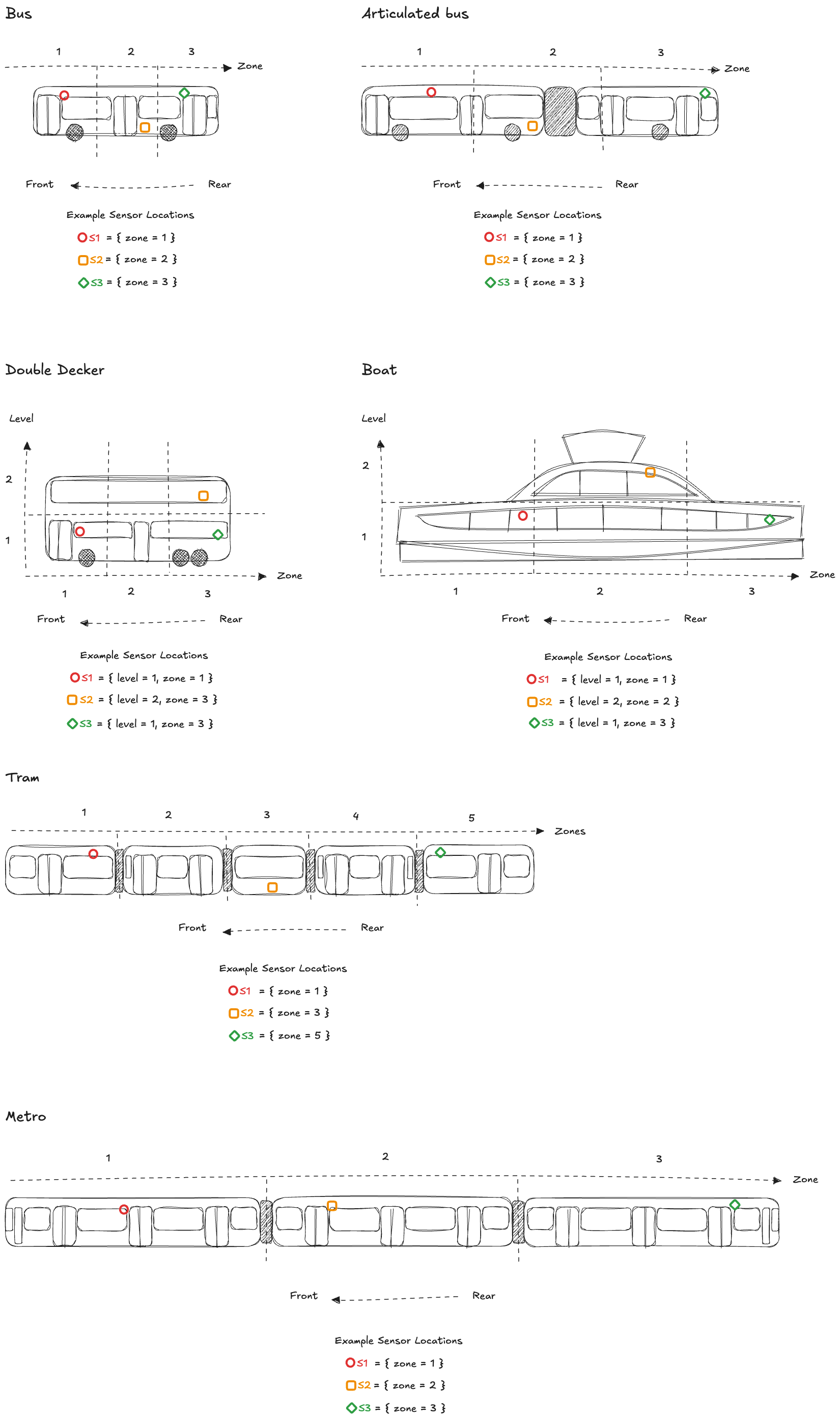 Operation IDsendTemperatureIndoor
Available only on servers:
objectAccepts the following message:
Message IDTemperatureIndoorobject [TemperatureIndoor]uid: https://schemas.ruter.no/adt/ota/api/v4.x/sensors/temperature-indoor/temperature-indoor.jsonSchema for indoor temperature sensor data. The value represents the measured air temperature in degrees Celsius (°C) at a specific location within the vehicle. Location is defined by the car, zone (front, middle, rear, driver cabin), and level (e.g. below platform, platform, or upper level).
Examples
#1 Example - Temperature indoor with sensor located in zone one
{
  "eventTimestamp": "2022-05-09T13:27:59.624Z",
  "traceId": "3841a268-0c03-4588-b476-211be0f26a0d",
  "messageNumber": 1,
  "sensorId": "XB7F-9T2M-L4FC-3R8Q",
  "zone": 1,
  "value": 20.7
}
#2 Example - Temperature indoor with sensor located in zone three on second level
{
  "eventTimestamp": "2022-05-09T13:27:59.624Z",
  "traceId": "3841a268-0c03-4588-b476-211be0f26a0d",
  "messageNumber": 1,
  "sensorId": "XB7F-9T2M-L4FC-3R8Q",
  "zone": 3,
  "level": 2,
  "value": 20.7
}
SEND sensors/temperature_outdoor
Temperature Outdoor Message
Field Value Central Topic {authorityId}/{operatorId}/{vehicleId}/adt/v4/sensors/temperature_outdoor Schema temperature-outdoor.json Maintainer Miljødata Producer PTO Consumer PTA Service Level ✅ External API. Restrictions apply. Only backward compatible changes may happen within the major version. Measurement of the external temperature around the vehicle.
Message Specifications
- Message frequency: Once per minute (every 60 seconds)
- Unit: Degrees Celsius (°C)
- Resolution: <= 1°C
Operation IDsendTemperatureOutdoorAvailable only on servers:
objectAccepts the following message:
Message IDTemperatureOutdoorobject [TemperatureOutdoor]uid: https://schemas.ruter.no/adt/ota/api/v4.x/sensors/temperature-outdoor/temperature-outdoor.jsonSchema for outdoor temperature sensor data
Examples
#1 Example - Temperature outdoor
{
  "eventTimestamp": "2022-05-09T13:27:59.624Z",
  "traceId": "3841a268-0c03-4588-b476-211be0f26a0d",
  "messageNumber": 1,
  "sensorId": "XB7F-9T2M-L4FC-3R8Q",
  "value": 20.7
}
SEND sensors/temperature_water
Temperature Water Message
Field Value Central Topic {authorityId}/{operatorId}/{vehicleId}/adt/v4/sensors/temperature_water Schema temperature-water.json Maintainer Miljødata Producer PTO Consumer PTA Service Level ✅ External API. Restrictions apply. Only backward compatible changes may happen within the major version. Describes the water temperature in Celsius, measured 1 meter below the water surface. The value should be a float with a resolution of 1°C or better.
Data specification
- Message frequency: 1 message per minute (1/min)
- Unit: Celsius
- Resolution: <= 1°C
- Measurement depth: 1 meter below the water surface
Operation IDsendTemperatureWaterAvailable only on servers:
objectAccepts the following message:
Message IDTemperatureWaterobject [TemperatureWater]uid: https://schemas.ruter.no/adt/ota/api/v4.x/sensors/temperature-water/temperature-water.jsonSchema for water temperature sensor data
Examples
#1 Example - Temperature water
{
  "eventTimestamp": "2022-05-09T13:27:59.624Z",
  "traceId": "3841a268-0c03-4588-b476-211be0f26a0d",
  "messageNumber": 1,
  "sensorId": "XB7F-9T2M-L4KP-3R8Q",
  "value": 18.5
}
SEND sensors/windscreen_wiper
Windscreen Wiper Active Message
Field Value Central Topic {authorityId}/{operatorId}/{vehicleId}/adt/v4/sensors/windscreen_wiper Schema windscreen-wiper.json Maintainer Miljødata Producer PTO Consumer PTA Service Level ✅ External API. Restrictions apply. Only backward compatible changes may happen within the major version. Describes the activity of the windscreen wipers.
Message Specifications
- Message frequency: On change
Operation IDsendWindscreenWiperAvailable only on servers:
objectAccepts the following message:
Message IDWindscreenWiperobject [WindscreenWiper]uid: https://schemas.ruter.no/adt/ota/api/v4.x/sensors/windscreen-wiper/windscreen-wiper.jsonSchema for windscreen wiper sensor data. The value represents the the active status of the windscreen wipers
Examples
#1 Example - Windscreen wiper
{
  "eventTimestamp": "2022-05-09T13:27:59.624Z",
  "traceId": "3841a268-0c03-4588-b476-211be0f26a0d",
  "messageNumber": 1,
  "sensorId": "XB7F-9T2M-L4FC-3R8Q",
  "value": true
}
Messages
- #1Message IDAvailableDestinationDisplaysobject [AvailableDestinationDisplays]uid: https://schemas.ruter.no/adt/ota/api/v4.x/di/available-destination-displays/available-destination-displays.json
- #2Message IDDestinationDisplayOverrideobject [DestinationDisplayOverride]uid: https://schemas.ruter.no/adt/ota/api/v4.x/di/override_attempt/destination_display/destination-display-override.json
Describes a request from MADT or other GUI to manually override the information shown on the destination display. It is up to the presenting system to decide how and for how long the override will apply. A rule could be until next journey begins or a new override_attempt/destination_display is received. The topic could be blanked (provided with a zero-byte payload) to indicate that any overriding information is no longer valid and that the destination display can return to normal
- #3Message IDActiveCabobject [ActiveCab]uid: https://schemas.ruter.no/adt/ota/api/v4.x/pe/active-cab/active-cab.json
Used to keep track of what direction the train is driving
- #4Message IDAudioobject [Audio]uid: https://schemas.ruter.no/adt/ota/api/v4.x/pe/audio/audio.json
This topic provides an audio message intended for passengers onboard the vehicle that should be played on speaker(s) defined in the speaker property of the payload.
- #5Message IDVixCardreaderDiagnosticsobject [VixCardreaderDiagnostics]uid: https://schemas.ruter.no/adt/ota/api/v4.x/pe/cardreader-diagnostics/vix/vix-cardreader_diagnostics.json
- #6Message IDDoorsIndividuallyobject [DoorsIndividually]uid: https://schemas.ruter.no/adt/ota/api/v4.x/pe/doors-individually/doors-individually.json
This object is used to represent a door individually.
- #7Message IDDpiAcknowledgeobject [DpiAcknowledge]uid: https://schemas.ruter.no/adt/ota/api/v4.x/pe/dpi/ack/dpi-acknowledge.json
The DPI Ack topic.
- #8Message IDDpiArrivingobject [DpiArriving]uid: https://schemas.ruter.no/adt/ota/api/v4.x/pe/dpi/arriving/dpi-arriving.json
For display of arriving information to passengers
- #9Message IDDpiCommandobject [DpiCommand]uid: https://schemas.ruter.no/adt/ota/api/v4.x/pe/dpi/command/dpi-command.json
Message sent to bus to control DPI functions
- #10Message IDDpiCommandResponseobject [DpiCommandResponse]uid: https://schemas.ruter.no/adt/ota/api/v4.x/pe/dpi/command_response/dpi-command_response.json
Message sent from vehicle as response to DPI commands
- #11Message IDDpiConnectionStatusobject [DpiConnectionStatus]uid: https://schemas.ruter.no/adt/ota/api/v4.x/pe/dpi/connection_status/dpi-connection-status.json
DPI Connection status topic
- #12Message IDDpiConnectionsobject [DpiConnections]uid: https://schemas.ruter.no/adt/ota/api/v4.x/pe/dpi/connections/dpi-connections.json
This schema defines the connection message sent as an MQTT message to buses
- #13Message IDDpiDiagnosticsobject [DpiDiagnostics]uid: https://schemas.ruter.no/adt/ota/api/v4.x/pe/dpi/diagnostics/dpi-diagnostics.json
- #14Message IDDpiDisplayStatusobject [DpiDisplayStatus]uid: https://schemas.ruter.no/adt/ota/api/v4.x/pe/dpi/display_status/dpi-display-status.json
DPI Display status topic
- #15Message IDDpiEtaobject [DpiEta]uid: https://schemas.ruter.no/adt/ota/api/v4.x/pe/dpi/eta/dpi-eta.json
Estimated time of arrival for future stops on a journey
- #16Message IDDpiExternaldisplayobject [DpiExternaldisplay]uid: https://schemas.ruter.no/adt/ota/api/v4.x/pe/dpi/externaldisplay/dpi-externaldisplay.json
Notification that the external displays should show new destination information
- #17Message IDDpiFeatureToggleobject [DpiFeatureToggle]uid: https://schemas.ruter.no/adt/ota/api/v4.x/pe/dpi/feature_toggle/dpi-feature-toggle.json
Message sent to vehicle to feature toggle DPI functions
- #18Message IDDpiJourneyobject [DpiJourney]uid: https://schemas.ruter.no/adt/ota/api/v4.x/pe/dpi/journey/dpi-journey.json
List of stops for current journey in block
- #19Message IDDpiKeyStopsobject [DpiKeyStops]uid: https://schemas.ruter.no/adt/ota/api/v4.x/pe/dpi/key_stops/dpi-key_stops.json
This schema defines the Key Stops message sent as an MQTT message to vehicles
- #20Message IDDpiLogsobject [DpiLogs]uid: https://schemas.ruter.no/adt/ota/api/v4.x/pe/dpi/logs/dpi-logs.json
Logs from the DPI client
- #21Message IDDpiNextstopobject [DpiNextstop]uid: https://schemas.ruter.no/adt/ota/api/v4.x/pe/dpi/nextstop/dpi-nextstop.json
Notification that vehicle has a new next stop
- #22Message IDDpiPaobject [DpiPa]uid: https://schemas.ruter.no/adt/ota/api/v4.x/pe/dpi/pa/dpi-pa.json
- #23Message IDStopButtonMessageobject [StopButton]uid: https://schemas.ruter.no/adt/ota/api/v4.x/sensors/stop-button/stop-button.json
Describes if passengers have requested that the bus should stop (stop button pressed).
- #24Message IDSalesCurrentStopobject [SalesCurrentStop]uid: https://schemas.ruter.no/adt/ota/api/v4.x/pe/sales/current_stop/sales-current_stop.json
- #25Message IDSalesDiagnosticsobject [SalesDiagnostics]uid: https://schemas.ruter.no/adt/ota/api/v4.x/pe/sales/diagnostics/sales-diagnostics.json
- #26Message IDSalesSlaobject [SalesSla]uid: https://schemas.ruter.no/adt/ota/api/v4.x/pe/sales/sla/sales-sla.json
- #27Message IDApiobject [Api]uid: https://schemas.ruter.no/adt/ota/api/v4.x/pe/vehicle/api/api.json
Vehicle API topic
- #28Message IDAccelerometerobject [Accelerometer]uid: https://schemas.ruter.no/adt/ota/api/v4.x/sensors/accelerometer/accelerometer.json
Schema for accelerometer sensor data. Accelerations are measured along the sensor's axes: X points forward, Y points left, and Z points upward. 'Forward' is defined relative to the vehicle's front (as configured or physically marked). All acceleration values are in units of g (where 1g ≈ 9.81 m/s²). Any divergence from the standard must be specified using the optional axis orientation overrides (fields xOrientation, yOrientation, and zOrientation).
- #29Message IDApcobject [Apc]uid: https://schemas.ruter.no/adt/ota/api/v4.x/sensors/apc/apc.json
Raw-data from door-sensor for later evaluation.
- #30Message IDChargingobject [Charging]uid: https://schemas.ruter.no/adt/ota/api/v4.x/sensors/charging/charging.json
Schema for vehicle charging data
- #31Message IDDoorobject [Door]uid: https://schemas.ruter.no/adt/ota/api/v4.x/sensors/door/door.json
Door status - indicates if passengers are able to open the doors (the door lock is released). When false, doors are locked and cannot be opened by passengers.
- #32Message IDEnergyConsumptionobject [EnergyConsumption]uid: https://schemas.ruter.no/adt/ota/api/v4.x/sensors/energy-consumption/energy-consumption.json
Schema for energy consumption sensor data. The value represents accumulated energy consumption in kilowatt-hours (kWh), including all onboard systems such as HVAC. The value should always accumulate over time.
- #33Message IDLocationobject [Location]uid: https://schemas.ruter.no/adt/ota/api/v4.x/sensors/location/location.json
Location sensor data
- #34Message IDOdometerobject [Odometer]uid: https://schemas.ruter.no/adt/ota/api/v4.x/sensors/odometer/odometer.json
Odometer data
- #35Message IDStateOfChargeobject [StateOfCharge]uid: https://schemas.ruter.no/adt/ota/api/v4.x/sensors/state-of-charge/state-of-charge.json
Schema for state of charge sensor data. The value represents the battery's charge level as a percentage (%), typically ranging from 0 to 100. The value should generally increase while charging and decrease during operation.
- #36Message IDStopButtonobject [StopButton]uid: https://schemas.ruter.no/adt/ota/api/v4.x/sensors/stop-button/stop-button.json
Describes if passengers have requested that the bus should stop (stop button pressed).
- #37Message IDTemperatureIndoorobject [TemperatureIndoor]uid: https://schemas.ruter.no/adt/ota/api/v4.x/sensors/temperature-indoor/temperature-indoor.json
Schema for indoor temperature sensor data. The value represents the measured air temperature in degrees Celsius (°C) at a specific location within the vehicle. Location is defined by the car, zone (front, middle, rear, driver cabin), and level (e.g. below platform, platform, or upper level).
- #38Message IDTemperatureOutdoorobject [TemperatureOutdoor]uid: https://schemas.ruter.no/adt/ota/api/v4.x/sensors/temperature-outdoor/temperature-outdoor.json
Schema for outdoor temperature sensor data
- #39Message IDTemperatureWaterobject [TemperatureWater]uid: https://schemas.ruter.no/adt/ota/api/v4.x/sensors/temperature-water/temperature-water.json
Schema for water temperature sensor data
- #40Message IDWindscreenWiperobject [WindscreenWiper]uid: https://schemas.ruter.no/adt/ota/api/v4.x/sensors/windscreen-wiper/windscreen-wiper.json
Schema for windscreen wiper sensor data. The value represents the the active status of the windscreen wipers