Ruters digitale plattform
This specification contains interfaces to be used between PTOs (operators) and Ruter. The API describes a set of MQTT topics which are used to distribute data onboard public transport vehicles/vessels as well as between the vehicle/vessel and Ruter’s Back Office or vv.
General information
Upgrades to the API
The API follows the upgrade cycles of ADT. Major releases are done more or less once a year and usually include breaking changes.
Minor/build releases are performed as continual deliveries and are non-breaking. New versions of this document will be published when new topics and/or fields are added.
Consumer Client Requirements
Clients consuming information posted on the topics must be tolerant to:
- That optional properties can be null or left out.
- That arrays can contain any number of elements including zero.
- That returned data can be extended with new properties without notice.
Quality of Service, Retained Flag and Persistence
Generally, QoS level 1 is applied for most topics and the retain flag is true for most topics. See the respective topic for precise info.
Subscribers should start with Clean Session set to True to assure that they get the latest information at reconnection (the retained info) and avoid first having to process a long queue of outdated old information that in reality hinders new relevant information to reach the subscriber.
Translation of topic names
Global topic names are generally written on the format of {recipient}/{sender}/{vehicleid}/{topic} to make it easy to identify the source and destination of the messages.
Local topic names have omitted the {recipient}/{sender}/{vehicleid} part in order to have onboard equipment pre-configured with vehicle independent settings.
All topic names must thus be rewritten local/global in the MQTT bridge according to a provided configuration file.
Data format
All data must be JSON and UTF-8 encoded.
Overview
The diagram below shows an overview of the most important messages that manage the assignment and journey of a vehicle.
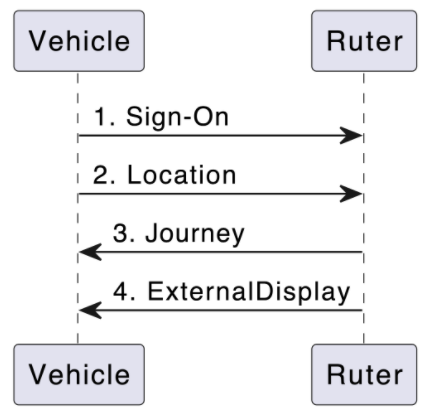
- The vehicle signs on. (In ADT4, this is a synchronous REST call.)
- Based on the location of the vehicle, Ruter calculates which journey in the assignment the vehicle is on, which stop it is going to next, etc.
- If the position matches a journey in the assignmment, Ruter sends a journey message to the vehicle,
- ...and Ruter changes external display
More info
For more information, please go to: Ruter’s ADT agreement.
Comments or suggestions
Please open an issue here: ADT-DOC Issues
Servers
- mqtt://mqtt.transhub.io/mqttmqttTranshub
Ruters central MQTT broker
objectstringrequiredThe mqtt broker is available through TCP (:8883) and Websockets (:9883)
Security:
- User/Password
Please reach out to rdp-support@ruter.no to request access.
Operations
SEND di/override_attempt/destination_display
Destination Display Override Message
Field Value Central Topic {authorityId}/{operatorId}/{vehicleId}/adt/v4/di/override_attempt/destination_display Schema destination-display-override.json Maintainer Assignment Producer PTO Consumer Assignment Service Level ✅ External API. Restrictions apply. Only backward compatible changes may happen within the major version. To construct a message, refer to the Available Destination Displays Message list and ensure that all fields provided in the list are included in the message.
If an entry contains publicCode, destination, and alternativeMessage, all three fields must be included exactly as specified in the list. The only additional fields you need to provide are a current eventTimestamp and a unique traceId.
Operation IDsendDestinationDisplayOverrideAvailable only on servers:
objectAccepts the following message:
Message IDDestinationDisplayOverrideobject [DestinationDisplayOverride]uid: https://schemas.ruter.no/adt/ota/api/v4.x/di/override_attempt/destination_display/destination-display-override.jsonDescribes a request from MADT or other GUI to manually override the information shown on the destination display. It is up to the presenting system to decide how and for how long the override will apply. A rule could be until next journey begins or a new override_attempt/destination_display is received. The topic could be blanked (provided with a zero-byte payload) to indicate that any overriding information is no longer valid and that the destination display can return to normal
Examples
#1 Example - Destination Display Override
{
  "eventTimestamp": "2023-04-10T16:45:33.901Z",
  "traceId": "3841a268-0c03-4588-b476-211be0f26a0d",
  "publicCode": "250",
  "destination": "  Oslo bussterminal",
  "alternativeMessage": "  Ingen påstigning"
}
SEND pe/active_cab
ActiveCab Message
Field Value Central Topic {authorityId}/{operatorId}/{vehicleId}/adt/v4/pe/active_cab Schema active-cab.json Maintainer DPI Producer PTO Consumer DPI, Progress Service Level ✅ External API. Restrictions apply. Only backward compatible changes may happen within the major version. Operation IDsendActiveCabAvailable only on servers:
objectAccepts the following message:
Message IDActiveCabobject [ActiveCab]uid: https://schemas.ruter.no/adt/ota/api/v4.x/pe/active-cab/active-cab.jsonUsed to keep track of what direction the train is driving
Examples
#1 Example - Active CAB
{
  "eventTimestamp": "2020-10-31T08:38:02.749Z",
  "traceId": "3841a268-0c03-4588-b476-211be0f26a0d",
  "activeCab": "c1"
}
RECEIVE pe/audio
Audio Message
Field Value Central Topic {operatorId}/{authorityId}/{vehicleId}/adt/v4/pe/audio Schema audio.json Maintainer DPI Producer DPI Consumer PTO Service Level ✅ External API. Restrictions apply. Only backward compatible changes may happen within the major version. The topic used for transmitting these audio messages is dedicated exclusively to audio playback through the vehicle's speaker system. The audio messages may contain an array of sound clips that should be played sequentially as they were received.
In some cases, multiple speaker groups may be targeted by the same audio message.
Audio Message Playback
- When a vehicle receives an MQTT message containing audio content, the PTO must play the audio, which can be in either OPUS or MP3 format.
- If the message defines an expiration timestamp that has passed, the audio content must not be played.
- If a message contains multiple audio files, these must be played in the order in which they appear in the message.
- MQTT messages with audio content must be processed synchronously, ensuring that new messages are only played after the previous one has finished.
Operation IDreceiveAudioAvailable only on servers:
objectAccepts the following message:
Message IDAudioobject [Audio]uid: https://schemas.ruter.no/adt/ota/api/v4.x/pe/audio/audio.jsonThis topic provides an audio message intended for passengers onboard the vehicle that should be played on speaker(s) defined in the speaker property of the payload.
Examples
#1 Example - Audio MP3
{
  "traceId": "3841a268-0c03-4588-b476-211be0f26a0d",
  "eventTimestamp": "2018-11-13T11:40:02.749Z",
  "expiryDateTime": "2018-11-13T08:40:32.249Z",
  "preferredStartDateTime": "2018-11-13T08:39:32.749Z",
  "ref": "RUT:StopPlace:03012453",
  "source": "campaign",
  "audio": [
    {
      "encoding": "MP3",
      "content": "SUQzBAAAAAAAI1RTU0UAAAAPAAADTGF2ZjU3...",
      "speakers": {
        "INTERNAL": 70
      }
    },
    {
      "encoding": "MP3",
      "content": "SUQzBAAAAAAAI1RTU0UAAAAPAAADTGF2ZjU3...",
      "speakers": {
        "INTERNAL": 70,
        "EXTERNAL": 40
      }
    }
  ]
}
#2 Example - Audio local files
{
  "traceId": "3841a268-0c03-4588-b476-211be0f26a0d",
  "eventTimestamp": "2018-11-13T11:40:02.749Z",
  "expiryDateTime": "2018-11-13T08:40:32.249Z",
  "preferredStartDateTime": "2018-11-13T08:39:32.749Z",
  "ref": "RUT:StopPlace:03012453",
  "source": "situation",
  "audio": [
    {
      "encoding": "OPUS",
      "contentUrl": "http://webserver.local/resources/safety_long.opus",
      "speakers": {
        "INTERNAL": 70
      }
    },
    {
      "encoding": "MP3",
      "content": "SUQzBAAAAAAAI1RTU0UAAAAPAAADTGF2ZjU3...",
      "speakers": {
        "INTERNAL": 70
      }
    }
  ]
}
SEND pe/cardreader_diagnostics/vix/{deviceRef}
VIX Card Reader Diagnostics MQTT Message
Field Value Central Topic {authorityId}/{operatorId}/{vehicleId}/adt/v4/pe/cardreader_diagnostics/vix/{deviceRef} Schema vix-cardreader_diagnostics.json Maintainer Betjent salg Producer VIX Consumer PTA Service Level ⛔ PTA internal API. No restrictions apply. May be removed or modified freely by the PTA Diagnostics message sent from any Vix-validator running Ruter-firmware in the vehicle. Can be used by both PTA and PTO to monitor the operational status of these units.
Operation IDsendVixCardreaderDiagnosticsAvailable only on servers:
objectdeviceRefstringrequiredAn unique ID of the unit.
objectAccepts the following message:
Message IDVixCardreaderDiagnosticsobject [VixCardreaderDiagnostics]uid: https://schemas.ruter.no/adt/ota/api/v4.x/pe/cardreader-diagnostics/vix/vix-cardreader_diagnostics.jsonExamples
#1 Example - VIX Card Reader Diagnostics
{
  "eventTimestamp": "2022-05-24T07:00:25Z",
  "traceId": "3841a268-0c03-4588-b476-211be0f26a0d",
  "deviceRef": "RUT1234",
  "inService": true
}
SEND pe/cbtc/trip_activated
CBTC Trip Activated Message
Field Value Central Topic {operatorId}/{authorityId}/{vehicleId}/adt/v4/pe/cbtc/trip_activated Schema trip-activated.json Maintainer Assignment Producer Sporveien / CBTC Consumer Assignment Service Level ✅ External API. Restrictions apply. Only backward compatible changes may happen within the major version. Published when the CBTC system activates a new trip. Contains enough information to uniquely identify the trip, used by Ruter's offline solution and matched with data stored onboard about the route plan.
When vehicles have been coupled, each vehicle must send this information.
Operation IDsendCbtcTripActivatedAvailable only on servers:
objectAccepts the following message:
Message IDTripActivatedobject [TripActivated]uid: https://schemas.ruter.no/adt/ota/api/v4.x/pe/cbtc/trip_activated/trip-activated.jsonPublished onboard when CBTC activates a new trip. Contains enough information to uniquely identify the trip, used by Ruter's offline solution and matched with data stored onboard about the route plan. When vehicles have been coupled, each vehicle must send this information.
Examples
#1 Example - CBTC trip activated
{
  "eventTimestamp": "2020-10-31T08:38:02.749Z",
  "traceId": "123412-cd5534-12332",
  "journeyDate": "2025-06-21",
  "datedVehicleJourneyRef": "401027"
}
SEND pe/cbtc/next_stop
CBTC Next Stop Message
Field Value Central Topic {operatorId}/{authorityId}/{vehicleId}/adt/v4/pe/cbtc/next_stop Schema next-stop.json Maintainer Assignment Producer Sporveien / CBTC Consumer Assignment Service Level ✅ External API. Restrictions apply. Only backward compatible changes may happen within the major version. When the vehicle starts to move with a defined destination, CBTC makes information available about the next stop of the vehicle. This information is published onboard so that the Ruter offline solution can access it.
When vehicles have been coupled, each vehicle must send this information.
Operation IDsendCbtcNextStopAvailable only on servers:
objectAccepts the following message:
Message IDCbtcNextStopobject [NextStop]uid: https://schemas.ruter.no/adt/ota/api/v4.x/pe/cbtc/next_stop/next-stop.jsonPublished when CBTC knows the next stop/quay of the vehicle, so that the Ruter offline solution can access it.
Examples
#1 Example - CBTC next stop
{
  "eventTimestamp": "2020-10-31T08:38:02.749Z",
  "platformTrackId": "3176"
}
SEND pe/cbtc/target_distance
CBTC Distance To Next Quay (Target) Message
Field Value Central Topic {operatorId}/{authorityId}/{vehicleId}/adt/v4/pe/cbtc/target_distance Schema target-distance.json Maintainer Assignment Producer Sporveien / CBTC Consumer Assignment Service Level ✅ External API. Restrictions apply. Only backward compatible changes may happen within the major version. When the vehicle has a known destination, CBTC publishes information about the remaining distance to the target every second.
Operation IDsendCbtcTargetDistanceAvailable only on servers:
objectAccepts the following message:
Message IDTargetDistanceobject [TargetDistance]uid: https://schemas.ruter.no/adt/ota/api/v4.x/pe/cbtc/target_distance/target-distance.jsonPublished every second when the vehicle has a known destination, with information about the remaining distance to the target.
Examples
#1 Example - CBTC distance to next quay (target)
{
  "eventTimestamp": "2020-10-31T08:38:02.749Z",
  "platformTrackId": "1234",
  "startDistance": 0,
  "targetDistance": 123123
}
SEND pe/rejected
Rejected Message
Field Value Central Topic {authorityId}/{operatorId}/{vehicleId}/adt/v4/pe/rejected Schema pe-rejected.json Maintainer DPI Producer PTO Consumer DPI Service Level ✅ External API. Restrictions apply. Only backward compatible changes may happen within the major version. The
pe/rejectedtopic is used by the external client to inform the DPI backoffice when an incoming message fails validation on the client side.A rejected message must reference the original rejected message via
rejectedMessageand include a machine-readablereasonCode. The optionalreasonDetailsfield may contain a human-readable explanation.reasonCodeDescription SCHEMA_VALIDATION_FAILEDThe message did not conform to the expected JSON Schema CONTENT_POLICY_VIOLATIONThe message was rejected due to prohibited content (e.g. words) Operation IDsendPeRejectedAvailable only on servers:
objectAccepts the following message:
Message IDPeRejectedobject [PeRejected]uid: https://schemas.ruter.no/adt/ota/api/v4.x/pe/rejected/pe-rejected.jsonPublished by the consumer when an incoming message fails validation.
Examples
#1 Example - PE Rejected
{
  "eventTimestamp": "2017-10-31T12:45:50.749Z",
  "traceId": "2ccf77aa-463f-4b98-ad19-61ec5d213e36",
  "rejectedMessage": {
    "topic": "pe/dpi/journey",
    "eventTimestamp": "2017-10-31T12:45:50.123Z",
    "traceId": "b88aaf6a-b15b-415a-8c44-ac7ad42de59e"
  },
  "reasonCode": "SCHEMA_VALIDATION_FAILED",
  "reasonDetails": "Property 'journeyRef' is required but was not present"
}
SEND pe/doors_individually
DoorsIndividually Message
Field Value Central Topic {authorityId}/{operatorId}/{vehicleId}/adt/v4/pe/doors_individually Schema doors-individually.json Maintainer Passasjertelling Producer PTO Consumer PTA Service Level ✅ External API. Restrictions apply. Only backward compatible changes may happen within the major version. This topic is used to track the individual status of doors. One use case is to improve the data quality of APC counts. See also topic sensors/door for status of anyDoorOpen/allDoorsClosed.
Operation IDsendDoorsIndividuallyAvailable only on servers:
objectAccepts the following message:
Message IDDoorsIndividuallyobject [DoorsIndividually]uid: https://schemas.ruter.no/adt/ota/api/v4.x/pe/doors-individually/doors-individually.jsonThis object is used to represent a door individually.
Examples
#1 Example - Door Individually
{
  "traceId": "3841a268-0c03-4588-b476-211be0f26a0d",
  "eventTimestamp": "2021-10-31T12:45:50.749Z",
  "messageNumber": 123456,
  "doorRef": "1",
  "isOpen": true
}
SEND pe/dpi/ack
Acknowledge Message
Field Value Central Topic {authorityId}/{operatorId}/{vehicleId}/adt/v4/pe/dpi/ack Schema dpi-acknowledge.json Maintainer DPI Producer PTO, DPI Consumer DPI Service Level ✅ External API. Restrictions apply. Only backward compatible changes may happen within the major version. The DPI Ack topic is used to inform the
PTA Backofficeabout the correct transfer and interpretation of messages to the vehicle.PTA shall receive an acknowledgment message for the following topics:
Topic Responsible for producing ack External display messages PTO Audio messages PTO Journey messages DPI application NextStop messages DPI application The ack message should be produced as soon as the message is received and validated. This is a confirmation that the system on board the vehicle have received the data and is capable of acting on it.
No confirmation message should be returned if the system is unable to playback the content. (e.g. invalid message format)
Operation IDsendDpiAcknowledgeAvailable only on servers:
objectAccepts the following message:
Message IDDpiAcknowledgeobject [DpiAcknowledge]uid: https://schemas.ruter.no/adt/ota/api/v4.x/pe/dpi/ack/dpi-acknowledge.jsonThe DPI Ack topic.
Examples
#1 Example - DPI Acknowledge
{
  "eventTimestamp": "2017-10-31T12:45:50.749Z",
  "traceId": "2ccf77aa-463f-4b98-ad19-61ec5d213e36",
  "clientId": "8fac6c64la4cap4b21R90d",
  "physicalId": "screen1",
  "messageReceived": {
    "topic": "pe/dpi/journey",
    "eventTimestamp": "2017-10-31T12:45:50.749Z",
    "traceId": "b88aaf6a-b15b-415a-8c44-ac7ad42de59e"
  }
}
RECEIVE pe/dpi/arriving
Arriving Message
Field Value Central Topic {operatorId}/{authorityId}/{vehicleId}/adt/v4/pe/dpi/arriving Schema dpi-arriving.json Maintainer DPI Producer DPI Consumer DPI Service Level ⛔ PTA internal API. No restrictions apply. May be removed or modified freely by the PTA Notice to passengers that the bus is approaching a stop.
Operation IDreceiveDpiArrivingAvailable only on servers:
objectAccepts the following message:
Message IDDpiArrivingobject [DpiArriving]uid: https://schemas.ruter.no/adt/ota/api/v4.x/pe/dpi/arriving/dpi-arriving.jsonFor display of arriving information to passengers
Examples
#1 Example - Arriving
{
  "eventTimestamp": "2024-11-28T13:51:06.337903113Z",
  "traceId": "1acad49e-da9c-4ecc-8704-7b881d6cccc9",
  "expiryTimestamp": "2024-11-28T13:51:21.337909232Z",
  "ref": "NSR:StopPlace:6671",
  "order": 29,
  "journeyRef": "RUT:ServiceJourney:011578-018334-132500-31-2-Weekday-125",
  "message": {
    "en": {
      "title": "Arriving at",
      "text": "Kastellet"
    },
    "no": {
      "title": "Ankommer",
      "text": "Kastellet"
    }
  }
}
RECEIVE pe/dpi/command
Command Message
Field Value Central Topic {operatorId}/{authorityId}/{vehicleId}/adt/v4/pe/dpi/command Schema dpi-command.json Maintainer DPI Producer DPI Consumer DPI Service Level ⛔ PTA internal API. No restrictions apply. May be removed or modified freely by the PTA This channel is highly unstable and should only be used by developers in TET.
This channel makes it possible for developers to debug the running application by providing real-time commands to it.
The results from each requested command is sent to pe/dpi/command_response.
Operation IDreceiveDpiCommandAvailable only on servers:
objectAccepts the following message:
Message IDDpiCommandobject [DpiCommand]uid: https://schemas.ruter.no/adt/ota/api/v4.x/pe/dpi/command/dpi-command.jsonMessage sent to bus to control DPI functions
Examples
#1 Example - DPI Command
{
  "eventTimestamp": "2025-04-03T13:18:26.337178538Z",
  "traceId": "2fccd221-f879-43e8-9e45-62abf54a9688",
  "clientId": "*",
  "command": "GET_STATUS"
}
SEND pe/dpi/command_response
Command response message
Responses generated from requests sent on
/pe/dpi/commandField Value Central Topic {authorityId}/{operatorId}/{vehicleId}/adt/v4/pe/dpi/command_response Schema dpi-command_response.json Maintainer DPI Producer DPI Consumer DPI Service Level ⛔ PTA internal API. No restrictions apply. May be removed or modified freely by the PTA This message is a response to another message sent on pe/dpi/command. It contains the result of the command.
Operation IDsendDpiCommandResponseAvailable only on servers:
objectAccepts the following message:
Message IDDpiCommandResponseobject [DpiCommandResponse]uid: https://schemas.ruter.no/adt/ota/api/v4.x/pe/dpi/command_response/dpi-command_response.jsonMessage sent from vehicle as response to DPI commands
Examples
#1 Example - DPI Command response
{
  "eventTimestamp": "2025-04-03T13:18:26.337178538Z",
  "traceId": "2fccd221-f879-43e8-9e45-62abf54a9688",
  "correlationId": "aeaa339e-cbd0-43d9-a4a8-7053d12e1a64",
  "clientId": "866f85ac-ab5a-48e2-b2db-5e9813e58a71",
  "command": "GET_FEATURES",
  "payload": {
    "feature_1": false,
    "feature_2": true
  }
}
SEND pe/dpi/connection_status
Connection Status Message
Field Value Central Topic {authorityId}/{operatorId}/{vehicleId}/adt/v4/pe/dpi/connection_status Schema dpi-connection-status.json Maintainer DPI Producer DPI Consumer DPI Service Level ⛔ PTA internal API. No restrictions apply. May be removed or modified freely by the PTA Connection messages sent when the DPI client connects and disconnects from the MQTT broker. It is used to monitor the connection status of the DPI client and detect screens where the browser may be in restart loop.
Operation IDsendDpiConnectionStatusAvailable only on servers:
objectAccepts the following message:
Message IDDpiConnectionStatusobject [DpiConnectionStatus]uid: https://schemas.ruter.no/adt/ota/api/v4.x/pe/dpi/connection_status/dpi-connection-status.jsonDPI Connection status topic
Examples
#1 Example - Connection Status disconnected
{
  "eventTimestamp": "2018-10-31T12:45:45Z",
  "traceId": "2de04b7c-321a-4ad2-b545-b8cb971e0550",
  "clientId": "ad71dba8-c881-11e8-a8d5-f2801f1b9fd1",
  "connected": false
}
#2 Example - Connection Status connected
{
  "eventTimestamp": "2018-10-31T12:45:45Z",
  "traceId": "2de04b7c-321a-4ad2-b545-b8cb971e0550",
  "clientId": "ad71dba8-c881-11e8-a8d5-f2801f1b9fd1",
  "connected": true
}
RECEIVE pe/dpi/connections
Connections Message
Field Value Central Topic {operatorId}/{authorityId}/{vehicleId}/adt/v4/pe/dpi/connections Schema dpi-connections.json Maintainer DPI Producer DPI Consumer DPI Service Level ⛔ PTA internal API. No restrictions apply. May be removed or modified freely by the PTA List of connections for the remaining stops on a journey with expected departures.
Operation IDreceiveDpiConnectionsAvailable only on servers:
objectAccepts the following message:
Message IDDpiConnectionsobject [DpiConnections]uid: https://schemas.ruter.no/adt/ota/api/v4.x/pe/dpi/connections/dpi-connections.jsonThis schema defines the connection message sent as an MQTT message to buses
Examples
#1 Example - Connections
{ "eventTimestamp": "2017-10-31T12:45:50.749Z", "traceId": "3841a268-0c03-4588-b476-211be0f26a0d", "expiryTimestamp": "2020-03-16T14:35:08.762206Z", "nextStop": { "stopPlaceId": "NSR:StopPlace:6498", "quayId": "NSR:Quay:11950" }, "journeyId": "RUT:ServiceJourney:60-138542-15631728", "routeId": "RUT:Route:60-4", "calls": [ { "name": "Tøyenkirken", "stopPlaceId": "NSR:StopPlace:6498", "quayId": "NSR:Quay:11950", "index": 4, "connections": [] }, { "name": "Tøyen skole", "stopPlaceId": "NSR:StopPlace:6480", "quayId": "NSR:Quay:11910", "index": 5, "connections": [] }, { "name": "Tøyen", "stopPlaceId": "NSR:StopPlace:6478", "quayId": "NSR:Quay:11908", "index": 6, "connections": [ { "line": { "id": "RUT:Line:20", "publicCode": "20", "transportMode": "bus" }, "direction": "1", "departures": [ { "destination": "Galgeberg", "text": "5 min", "departureTime": "2020-03-16T14:35:37Z", "delay": "PT1M37S", "journeyId": "RUT:ServiceJourney:20-131531-15685688" }, { "destination": "Galgeberg", "text": "10 min", "departureTime": "2020-03-16T14:40:58Z", "delay": "PT1M58S", "journeyId": "RUT:ServiceJourney:20-131531-15685689" }, { "destination": "Galgeberg", "text": "15:45", "departureTime": "2020-03-16T14:45:09Z", "delay": "PT1M9S", "journeyId": "RUT:ServiceJourney:20-131531-15685690" } ] }, { "line": { "id": "RUT:Line:20", "publicCode": "20", "transportMode": "bus" }, "quay": { "id": "NSR:Quay:11906", "description": "i Kjølberggata" }, "direction": "2", "departures": [ { "destination": "Skøyen", "text": "3 min", "departureTime": "2020-03-16T14:34:00Z", "delay": "PT0S", "journeyId": "RUT:ServiceJourney:20-131531-15685534" }, { "destination": "Skøyen", "text": "8 min", "departureTime": "2020-03-16T14:39:00Z", "delay": "PT0S", "journeyId": "RUT:ServiceJourney:20-131531-15685535" }, { "destination": "Skøyen", "text": "13 min", "departureTime": "2020-03-16T14:44:00Z", "delay": "PT0S", "journeyId": "RUT:ServiceJourney:20-131531-15685536" } ] } ] }, { "name": "Brinken", "stopPlaceId": "NSR:StopPlace:6562", "quayId": "NSR:Quay:12119", "index": 7, "connections": [] }, { "name": "Kampen kirke", "stopPlaceId": "NSR:StopPlace:6564", "quayId": "NSR:Quay:12123", "index": 8, "connections": [] }, { "name": "Kampen park", "stopPlaceId": "NSR:StopPlace:6571", "quayId": "NSR:Quay:12135", "index": 9, "connections": [] }, { "name": "Ensjøveien", "stopPlaceId": "NSR:StopPlace:6046", "quayId": "NSR:Quay:11097", "index": 10, "connections": [] }, { "name": "Tøyen stasjon", "stopPlaceId": "NSR:StopPlace:6044", "quayId": "NSR:Quay:11092", "index": 11, "connections": [] }, { "name": "Hasle kirke", "stopPlaceId": "NSR:StopPlace:6049", "quayId": "NSR:Quay:11101", "index": 12, "connections": [] }, { "name": "Hasle", "stopPlaceId": "NSR:StopPlace:6031", "quayId": "NSR:Quay:11076", "index": 13, "connections": [ { "line": { "id": "RUT:Line:21", "publicCode": "21", "transportMode": "bus" }, "quay": { "id": "NSR:Quay:11069", "publicCode": "D" }, "direction": "1", "departures": [ { "destination": "Helsfyr T", "text": "13 min", "departureTime": "2020-03-16T14:44:00Z", "delay": "PT0S", "journeyId": "RUT:ServiceJourney:21-131531-15685155" }, { "destination": "Helsfyr T", "text": "15:49", "departureTime": "2020-03-16T14:49:00Z", "delay": "PT0S", "journeyId": "RUT:ServiceJourney:21-131531-15685156" }, { "destination": "Helsfyr T", "text": "15:54", "departureTime": "2020-03-16T14:54:00Z", "delay": "PT0S", "journeyId": "RUT:ServiceJourney:21-131531-15685157" } ] }, { "line": { "id": "RUT:Line:21", "publicCode": "21", "transportMode": "bus" }, "quay": { "id": "NSR:Quay:11070", "publicCode": "C" }, "direction": "2", "departures": [ { "destination": "Tjuvholmen", "text": "13 min", "departureTime": "2020-03-16T14:44:00Z", "delay": "PT0S", "journeyId": "RUT:ServiceJourney:21-131531-15685274" }, { "destination": "Tjuvholmen", "text": "15:49", "departureTime": "2020-03-16T14:49:00Z", "delay": "PT0S", "journeyId": "RUT:ServiceJourney:21-131531-15685275" }, { "destination": "Tjuvholmen", "text": "15:54", "departureTime": "2020-03-16T14:54:00Z", "delay": "PT0S", "journeyId": "RUT:ServiceJourney:21-131531-15685276" } ] }, { "line": { "id": "RUT:Line:28", "publicCode": "28", "transportMode": "bus" }, "quay": { "id": "NSR:Quay:11075", "publicCode": "B" }, "direction": "2", "departures": [ { "destination": "Fornebu", "text": "15:47", "departureTime": "2020-03-16T14:47:00Z", "delay": "PT0S", "journeyId": "RUT:ServiceJourney:28-131531-15685026" }, { "destination": "Fornebu", "text": "15:54", "departureTime": "2020-03-16T14:54:00Z", "delay": "PT0S", "journeyId": "RUT:ServiceJourney:28-131531-15685039" }, { "destination": "Fornebu", "text": "16:02", "departureTime": "2020-03-16T15:02:00Z", "delay": "PT0S", "journeyId": "RUT:ServiceJourney:28-131531-15685027" } ] }, { "line": { "id": "RUT:Line:28", "publicCode": "28", "transportMode": "bus" }, "direction": "1", "departures": [ { "destination": "Økern T", "text": "15:48", "departureTime": "2020-03-16T14:48:00Z", "delay": "PT0S", "journeyId": "RUT:ServiceJourney:28-131531-15685014" }, { "destination": "Økern T", "text": "15:57", "departureTime": "2020-03-16T14:57:43Z", "delay": "PT1M43S", "journeyId": "RUT:ServiceJourney:28-131531-15685006" }, { "destination": "Økern T", "text": "16:03", "departureTime": "2020-03-16T15:03:00Z", "delay": "PT0S", "journeyId": "RUT:ServiceJourney:28-131531-15685015" } ] } ] }, { "name": "Haslevangen", "stopPlaceId": "NSR:StopPlace:6036", "quayId": "NSR:Quay:11080", "index": 14, "connections": [ { "line": { "id": "RUT:Line:28", "publicCode": "28", "transportMode": "bus" }, "direction": "1", "departures": [ { "destination": "Økern T", "text": "15:49", "departureTime": "2020-03-16T14:49:00Z", "delay": "PT0S", "journeyId": "RUT:ServiceJourney:28-131531-15685014" }, { "destination": "Økern T", "text": "15:58", "departureTime": "2020-03-16T14:58:43Z", "delay": "PT1M43S", "journeyId": "RUT:ServiceJourney:28-131531-15685006" }, { "destination": "Økern T", "text": "16:04", "departureTime": "2020-03-16T15:04:00Z", "delay": "PT0S", "journeyId": "RUT:ServiceJourney:28-131531-15685015" } ] }, { "line": { "id": "RUT:Line:28", "publicCode": "28", "transportMode": "bus" }, "quay": { "id": "NSR:Quay:11079" }, "direction": "2", "departures": [ { "destination": "Fornebu", "text": "15:46", "departureTime": "2020-03-16T14:46:00Z", "delay": "PT0S", "journeyId": "RUT:ServiceJourney:28-131531-15685026" }, { "destination": "Fornebu", "text": "15:53", "departureTime": "2020-03-16T14:53:00Z", "delay": "PT0S", "journeyId": "RUT:ServiceJourney:28-131531-15685039" }, { "destination": "Fornebu", "text": "16:01", "departureTime": "2020-03-16T15:01:00Z", "delay": "PT0S", "journeyId": "RUT:ServiceJourney:28-131531-15685027" } ] } ] }, { "name": "Økern", "stopPlaceId": "NSR:StopPlace:5907", "quayId": "NSR:Quay:10835", "index": 15, "connections": [ { "line": { "id": "RUT:Line:23", "publicCode": "23", "transportMode": "bus" }, "quay": { "id": "NSR:Quay:10834", "publicCode": "B" }, "direction": "1", "departures": [ { "destination": "Simensbråten", "text": "15:55", "departureTime": "2020-03-16T14:55:18Z", "delay": "PT18S", "journeyId": "RUT:ServiceJourney:23-137908-16794834" }, { "destination": "Simensbråten", "text": "16:05", "departureTime": "2020-03-16T15:05:00Z", "delay": "PT0S", "journeyId": "RUT:ServiceJourney:23-137908-16794835" }, { "destination": "Simensbråten", "text": "16:15", "departureTime": "2020-03-16T15:15:00Z", "delay": "PT0S", "journeyId": "RUT:ServiceJourney:23-137908-16794836" } ] }, { "line": { "id": "RUT:Line:23", "publicCode": "23", "transportMode": "bus" }, "quay": { "id": "NSR:Quay:10832", "publicCode": "A" }, "direction": "2", "departures": [ { "destination": "Lysaker", "text": "16:06", "departureTime": "2020-03-16T15:06:00Z", "delay": "PT0S", "journeyId": "RUT:ServiceJourney:23-137908-16794741" }, { "destination": "Lysaker", "text": "15:56", "departureTime": "2020-03-16T14:56:00Z", "delay": "PT0S", "journeyId": "RUT:ServiceJourney:23-137908-16794740" }, { "destination": "Lysaker", "text": "16:16", "departureTime": "2020-03-16T15:16:00Z", "delay": "PT0S", "journeyId": "RUT:ServiceJourney:23-137908-16794742" } ] }, { "line": { "id": "RUT:Line:24", "publicCode": "24", "transportMode": "bus" }, "quay": { "id": "NSR:Quay:10834", "publicCode": "B" }, "direction": "1", "departures": [ { "destination": "Brynseng T", "text": "15:55", "departureTime": "2020-03-16T14:55:46Z", "delay": "PT5M46S", "journeyId": "RUT:ServiceJourney:24-137908-16794944" }, { "destination": "Brynseng T", "text": "16:00", "departureTime": "2020-03-16T15:00:00Z", "delay": "PT0S", "journeyId": "RUT:ServiceJourney:24-137908-16794945" }, { "destination": "Brynseng T", "text": "16:10", "departureTime": "2020-03-16T15:10:00Z", "delay": "PT0S", "journeyId": "RUT:ServiceJourney:24-137908-16794946" } ] }, { "line": { "id": "RUT:Line:24", "publicCode": "24", "transportMode": "bus" }, "quay": { "id": "NSR:Quay:10832", "publicCode": "A" }, "direction": "2", "departures": [ { "destination": "Fornebu", "text": "16:11", "departureTime": "2020-03-16T15:11:00Z", "delay": "PT0S", "journeyId": "RUT:ServiceJourney:24-137908-16794982" }, { "destination": "Fornebu", "text": "16:41", "departureTime": "2020-03-16T15:41:00Z", "delay": "PT0S", "journeyId": "RUT:ServiceJourney:24-137908-16794985" }, { "destination": "Fornebu", "text": "16:31", "departureTime": "2020-03-16T15:31:00Z", "delay": "PT0S", "journeyId": "RUT:ServiceJourney:24-137908-16794984" } ] }, { "line": { "id": "RUT:Line:28", "publicCode": "28", "transportMode": "bus" }, "quay": { "id": "NSR:Quay:10832", "publicCode": "A" }, "direction": "2", "departures": [ { "destination": "Fornebu", "text": "16:43", "departureTime": "2020-03-16T15:43:00Z", "delay": "PT0S", "journeyId": "RUT:ServiceJourney:28-131531-15685030" }, { "destination": "Fornebu", "text": "16:05", "departureTime": "2020-03-16T15:05:00Z", "delay": "PT0S", "journeyId": "RUT:ServiceJourney:28-131531-15685040" }, { "destination": "Fornebu", "text": "16:35", "departureTime": "2020-03-16T15:35:00Z", "delay": "PT0S", "journeyId": "RUT:ServiceJourney:28-131531-15685042" } ] }, { "line": { "id": "RUT:Line:345", "publicCode": "345", "transportMode": "bus" }, "direction": "2", "departures": [ { "destination": "Vestvollen", "text": "15:50", "departureTime": "2020-03-16T14:50:00Z", "delay": "PT0S", "journeyId": "RUT:ServiceJourney:345-138458-16752823" }, { "destination": "Vestvollen", "text": "16:00", "departureTime": "2020-03-16T15:00:00Z", "delay": "PT0S", "journeyId": "RUT:ServiceJourney:345-138458-16752806" }, { "destination": "Vestvollen", "text": "16:01", "departureTime": "2020-03-16T15:01:22Z", "delay": "PT21M22S", "journeyId": "RUT:ServiceJourney:345-138458-16752805" } ] }, { "line": { "id": "RUT:Line:67", "publicCode": "67", "transportMode": "bus" }, "direction": "1", "departures": [ { "destination": "Lørenskog sentrum", "text": "15:51", "departureTime": "2020-03-16T14:51:00Z", "delay": "PT0S", "journeyId": "RUT:ServiceJourney:67-138542-15631987" }, { "destination": "Lørenskog sentrum", "text": "16:01", "departureTime": "2020-03-16T15:01:00Z", "delay": "PT0S", "journeyId": "RUT:ServiceJourney:67-138542-15631988" }, { "destination": "Lørenskog sentrum", "text": "16:11", "departureTime": "2020-03-16T15:11:00Z", "delay": "PT0S", "journeyId": "RUT:ServiceJourney:67-138542-15631989" } ] } ] }, { "name": "Økern næringspark", "stopPlaceId": "NSR:StopPlace:5916", "quayId": "NSR:Quay:10849", "index": 16, "connections": [] }, { "name": "Lånekassen", "stopPlaceId": "NSR:StopPlace:5918", "quayId": "NSR:Quay:10852", "index": 17, "connections": [] }, { "name": "Nedre Risløkka", "stopPlaceId": "NSR:StopPlace:5928", "quayId": "NSR:Quay:10872", "index": 18, "connections": [] }, { "name": "Rabbeveien", "stopPlaceId": "NSR:StopPlace:5930", "quayId": "NSR:Quay:10875", "index": 19, "connections": [] }, { "name": "Anton Tschudis vei", "stopPlaceId": "NSR:StopPlace:5932", "quayId": "NSR:Quay:10878", "index": 20, "connections": [] }, { "name": "Kroklia", "stopPlaceId": "NSR:StopPlace:5941", "quayId": "NSR:Quay:10894", "index": 21, "connections": [] }, { "name": "Øvre Risløkka", "stopPlaceId": "NSR:StopPlace:5943", "quayId": "NSR:Quay:10898", "index": 22, "connections": [] }, { "name": "Økernbråten", "stopPlaceId": "NSR:StopPlace:5945", "quayId": "NSR:Quay:10902", "index": 23, "connections": [ { "line": { "id": "RUT:Line:58", "publicCode": "58", "transportMode": "bus" }, "quay": { "id": "NSR:Quay:10901" }, "direction": "1", "departures": [ { "destination": "Tveita T", "text": "15:57", "departureTime": "2020-03-16T14:57:00Z", "delay": "PT0S", "journeyId": "RUT:ServiceJourney:58-138542-17261911" }, { "destination": "Tveita T", "text": "16:12", "departureTime": "2020-03-16T15:12:00Z", "delay": "PT0S", "journeyId": "RUT:ServiceJourney:58-138542-17261912" }, { "destination": "Tveita T", "text": "16:27", "departureTime": "2020-03-16T15:27:00Z", "delay": "PT0S", "journeyId": "RUT:ServiceJourney:58-138542-17261913" } ] } ] }, { "name": "Linne hotell", "stopPlaceId": "NSR:StopPlace:5952", "quayId": "NSR:Quay:10916", "index": 24, "connections": [] }, { "name": "Linderud T", "stopPlaceId": "NSR:StopPlace:5950", "quayId": "NSR:Quay:10911", "index": 25, "connections": [] }, { "name": "Veitvetstubben", "stopPlaceId": "NSR:StopPlace:5967", "quayId": "NSR:Quay:10946", "index": 26, "connections": [] }, { "name": "Linderud senter", "stopPlaceId": "NSR:StopPlace:5974", "quayId": "NSR:Quay:10960", "index": 27, "connections": [ { "line": { "id": "RUT:Line:25", "publicCode": "25", "transportMode": "bus" }, "quay": { "id": "NSR:Quay:10959" }, "direction": "1", "departures": [ { "destination": "Lørenskog stasjon", "text": "16:02", "departureTime": "2020-03-16T15:02:00Z", "delay": "PT0S", "journeyId": "RUT:ServiceJourney:25-138571-16843154" }, { "destination": "Lørenskog stasjon", "text": "16:09", "departureTime": "2020-03-16T15:09:00Z", "delay": "PT0S", "journeyId": "RUT:ServiceJourney:25-138571-16843009" }, { "destination": "Lørenskog stasjon", "text": "16:17", "departureTime": "2020-03-16T15:17:00Z", "delay": "PT0S", "journeyId": "RUT:ServiceJourney:25-138571-16843010" } ] }, { "line": { "id": "RUT:Line:31", "publicCode": "31", "transportMode": "bus" }, "quay": { "id": "NSR:Quay:10959" }, "direction": "1", "departures": [ { "destination": "Grorud T", "text": "16:04", "departureTime": "2020-03-16T15:04:11Z", "delay": "PT2M11S", "journeyId": "RUT:ServiceJourney:31-138571-15639652" }, { "destination": "Grorud T", "text": "16:12", "departureTime": "2020-03-16T15:12:01Z", "delay": "PT1H10M1S", "journeyId": "RUT:ServiceJourney:31-138571-15639647" }, { "destination": "Grorud T", "text": "16:14", "departureTime": "2020-03-16T15:14:00Z", "delay": "PT0S", "journeyId": "RUT:ServiceJourney:31-138571-15639653" } ] }, { "line": { "id": "RUT:Line:33", "publicCode": "33", "transportMode": "bus" }, "quay": { "id": "NSR:Quay:10959" }, "direction": "1", "departures": [ { "destination": "Ellingsrudåsen T", "text": "16:03", "departureTime": "2020-03-16T15:03:00Z", "delay": "PT0S", "journeyId": "RUT:ServiceJourney:33-138542-15632327" }, { "destination": "Ellingsrudåsen T", "text": "16:18", "departureTime": "2020-03-16T15:18:00Z", "delay": "PT0S", "journeyId": "RUT:ServiceJourney:33-138542-15632328" }, { "destination": "Ellingsrudåsen T", "text": "16:33", "departureTime": "2020-03-16T15:33:00Z", "delay": "PT0S", "journeyId": "RUT:ServiceJourney:33-138542-15632329" } ] } ] }, { "name": "Linderudsletta", "stopPlaceId": "NSR:StopPlace:5972", "quayId": "NSR:Quay:10956", "index": 28, "connections": [ { "line": { "id": "RUT:Line:25", "publicCode": "25", "transportMode": "bus" }, "direction": "2", "departures": [ { "destination": "Majorstuen", "text": "16:01", "departureTime": "2020-03-16T15:01:00Z", "delay": "PT0S", "journeyId": "RUT:ServiceJourney:25-138571-16843093" }, { "destination": "Majorstuen", "text": "16:09", "departureTime": "2020-03-16T15:09:00Z", "delay": "PT0S", "journeyId": "RUT:ServiceJourney:25-138571-16843094" }, { "destination": "Majorstuen", "text": "16:16", "departureTime": "2020-03-16T15:16:00Z", "delay": "PT0S", "journeyId": "RUT:ServiceJourney:25-138571-16843170" } ] }, { "line": { "id": "RUT:Line:31", "publicCode": "31", "transportMode": "bus" }, "direction": "2", "departures": [ { "destination": "Snarøya", "text": "16:07", "departureTime": "2020-03-16T15:07:00Z", "delay": "PT0S", "journeyId": "RUT:ServiceJourney:31-138571-15639845" }, { "destination": "Snarøya", "text": "16:19", "departureTime": "2020-03-16T15:19:00Z", "delay": "PT0S", "journeyId": "RUT:ServiceJourney:31-138571-15639846" }, { "destination": "Snarøya", "text": "16:27", "departureTime": "2020-03-16T15:27:31Z", "delay": "PT56M31S", "journeyId": "RUT:ServiceJourney:31-138571-15639842" } ] }, { "line": { "id": "RUT:Line:2031", "publicCode": "31E", "transportMode": "bus" }, "quay": { "id": "NSR:Quay:10950" }, "direction": "1", "departures": [ { "destination": "Kalbakken", "text": "16:03", "departureTime": "2020-03-16T15:03:55Z", "delay": "PT1M55S", "journeyId": "RUT:ServiceJourney:2031-138571-15640592" }, { "destination": "Kalbakken", "text": "16:12", "departureTime": "2020-03-16T15:12:00Z", "delay": "PT0S", "journeyId": "RUT:ServiceJourney:2031-138571-15640593" }, { "destination": "Kalbakken", "text": "16:22", "departureTime": "2020-03-16T15:22:00Z", "delay": "PT0S", "journeyId": "RUT:ServiceJourney:2031-138571-15640594" } ] }, { "line": { "id": "RUT:Line:33", "publicCode": "33", "transportMode": "bus" }, "direction": "2", "departures": [ { "destination": "Filipstad", "text": "16:09", "departureTime": "2020-03-16T15:09:00Z", "delay": "PT0S", "journeyId": "RUT:ServiceJourney:33-138542-15632358" }, { "destination": "Filipstad", "text": "16:24", "departureTime": "2020-03-16T15:24:00Z", "delay": "PT0S", "journeyId": "RUT:ServiceJourney:33-138542-15632359" }, { "destination": "Filipstad", "text": "16:39", "departureTime": "2020-03-16T15:39:00Z", "delay": "PT0S", "journeyId": "RUT:ServiceJourney:33-138542-15632360" } ] }, { "line": { "id": "RUT:Line:380", "publicCode": "380", "transportMode": "bus" }, "quay": { "id": "NSR:Quay:10955" }, "direction": "1", "departures": [ { "destination": "Oslo bussterminal", "text": "16:17", "departureTime": "2020-03-16T15:17:00Z", "delay": "PT0S", "journeyId": "RUT:ServiceJourney:380-136266-16659813" }, { "destination": "Oslo bussterminal", "text": "16:37", "departureTime": "2020-03-16T15:37:00Z", "delay": "PT0S", "journeyId": "RUT:ServiceJourney:380-136266-16659814" }, { "destination": "Oslo bussterminal", "text": "16:57", "departureTime": "2020-03-16T15:57:00Z", "delay": "PT0S", "journeyId": "RUT:ServiceJourney:380-136266-16659815" } ] }, { "line": { "id": "RUT:Line:380", "publicCode": "380", "transportMode": "bus" }, "quay": { "id": "NSR:Quay:10950" }, "direction": "2", "departures": [ { "destination": "Lillestrøm", "text": "16:17", "departureTime": "2020-03-16T15:17:00Z", "delay": "PT0S", "journeyId": "RUT:ServiceJourney:380-136266-16659969" }, { "destination": "Lillestrøm", "text": "16:37", "departureTime": "2020-03-16T15:37:00Z", "delay": "PT0S", "journeyId": "RUT:ServiceJourney:380-136266-16659970" }, { "destination": "Lillestrøm", "text": "16:57", "departureTime": "2020-03-16T15:57:00Z", "delay": "PT0S", "journeyId": "RUT:ServiceJourney:380-136266-16659971" } ] }, { "line": { "id": "RUT:Line:390", "publicCode": "390", "transportMode": "bus" }, "quay": { "id": "NSR:Quay:10950" }, "direction": "2", "departures": [ { "destination": "Kongskog", "text": "16:08", "departureTime": "2020-03-16T15:08:19Z", "delay": "PT42M19S", "journeyId": "RUT:ServiceJourney:390-136266-16660240" }, { "destination": "Nittedal sentrum", "text": "16:16", "departureTime": "2020-03-16T15:16:00Z", "delay": "PT0S", "journeyId": "RUT:ServiceJourney:390-136266-16660219" }, { "destination": "Nittedal sentrum", "text": "16:46", "departureTime": "2020-03-16T15:46:00Z", "delay": "PT0S", "journeyId": "RUT:ServiceJourney:390-136266-16660220" } ] }, { "line": { "id": "RUT:Line:390", "publicCode": "390", "transportMode": "bus" }, "quay": { "id": "NSR:Quay:10955" }, "direction": "1", "departures": [ { "destination": "Oslo bussterminal", "text": "16:03", "departureTime": "2020-03-16T15:03:04Z", "delay": "PT1M4S", "journeyId": "RUT:ServiceJourney:390-136266-16660178" }, { "destination": "Oslo bussterminal", "text": "16:17", "departureTime": "2020-03-16T15:17:00Z", "delay": "PT0S", "journeyId": "RUT:ServiceJourney:390-136266-16660203" }, { "destination": "Oslo bussterminal", "text": "16:32", "departureTime": "2020-03-16T15:32:00Z", "delay": "PT0S", "journeyId": "RUT:ServiceJourney:390-136266-16660179" } ] } ] }, { "name": "Kolåsbakken", "stopPlaceId": "NSR:StopPlace:5978", "quayId": "NSR:Quay:10969", "index": 29, "connections": [ { "line": { "id": "RUT:Line:25", "publicCode": "25", "transportMode": "bus" }, "quay": { "id": "NSR:Quay:10968" }, "direction": "1", "departures": [ { "destination": "Lørenskog stasjon", "text": "16:01", "departureTime": "2020-03-16T15:01:00Z", "delay": "PT0S", "journeyId": "RUT:ServiceJourney:25-138571-16843154" }, { "destination": "Lørenskog stasjon", "text": "16:08", "departureTime": "2020-03-16T15:08:00Z", "delay": "PT0S", "journeyId": "RUT:ServiceJourney:25-138571-16843009" }, { "destination": "Lørenskog stasjon", "text": "16:16", "departureTime": "2020-03-16T15:16:00Z", "delay": "PT0S", "journeyId": "RUT:ServiceJourney:25-138571-16843010" } ] }, { "line": { "id": "RUT:Line:25", "publicCode": "25", "transportMode": "bus" }, "direction": "2", "departures": [ { "destination": "Majorstuen", "text": "16:02", "departureTime": "2020-03-16T15:02:00Z", "delay": "PT0S", "journeyId": "RUT:ServiceJourney:25-138571-16843093" }, { "destination": "Majorstuen", "text": "16:10", "departureTime": "2020-03-16T15:10:00Z", "delay": "PT0S", "journeyId": "RUT:ServiceJourney:25-138571-16843094" }, { "destination": "Majorstuen", "text": "16:17", "departureTime": "2020-03-16T15:17:00Z", "delay": "PT0S", "journeyId": "RUT:ServiceJourney:25-138571-16843170" } ] }, { "line": { "id": "RUT:Line:31", "publicCode": "31", "transportMode": "bus" }, "quay": { "id": "NSR:Quay:10968" }, "direction": "1", "departures": [ { "destination": "Grorud T", "text": "16:02", "departureTime": "2020-03-16T15:02:05Z", "delay": "PT1M5S", "journeyId": "RUT:ServiceJourney:31-138571-15639652" }, { "destination": "Grorud T", "text": "16:11", "departureTime": "2020-03-16T15:11:01Z", "delay": "PT1H10M1S", "journeyId": "RUT:ServiceJourney:31-138571-15639647" }, { "destination": "Grorud T", "text": "16:14", "departureTime": "2020-03-16T15:14:24Z", "delay": "PT1M24S", "journeyId": "RUT:ServiceJourney:31-138571-15639653" } ] }, { "line": { "id": "RUT:Line:31", "publicCode": "31", "transportMode": "bus" }, "direction": "2", "departures": [ { "destination": "Snarøya", "text": "16:08", "departureTime": "2020-03-16T15:08:00Z", "delay": "PT0S", "journeyId": "RUT:ServiceJourney:31-138571-15639845" }, { "destination": "Snarøya", "text": "16:20", "departureTime": "2020-03-16T15:20:00Z", "delay": "PT0S", "journeyId": "RUT:ServiceJourney:31-138571-15639846" }, { "destination": "Snarøya", "text": "16:28", "departureTime": "2020-03-16T15:28:31Z", "delay": "PT56M31S", "journeyId": "RUT:ServiceJourney:31-138571-15639842" } ] }, { "line": { "id": "RUT:Line:33", "publicCode": "33", "transportMode": "bus" }, "direction": "2", "departures": [ { "destination": "Filipstad", "text": "16:09", "departureTime": "2020-03-16T15:09:00Z", "delay": "PT0S", "journeyId": "RUT:ServiceJourney:33-138542-15632358" }, { "destination": "Filipstad", "text": "16:24", "departureTime": "2020-03-16T15:24:00Z", "delay": "PT0S", "journeyId": "RUT:ServiceJourney:33-138542-15632359" }, { "destination": "Filipstad", "text": "16:39", "departureTime": "2020-03-16T15:39:00Z", "delay": "PT0S", "journeyId": "RUT:ServiceJourney:33-138542-15632360" } ] }, { "line": { "id": "RUT:Line:33", "publicCode": "33", "transportMode": "bus" }, "quay": { "id": "NSR:Quay:10968" }, "direction": "1", "departures": [ { "destination": "Ellingsrudåsen T", "text": "16:03", "departureTime": "2020-03-16T15:03:00Z", "delay": "PT0S", "journeyId": "RUT:ServiceJourney:33-138542-15632327" }, { "destination": "Ellingsrudåsen T", "text": "16:18", "departureTime": "2020-03-16T15:18:00Z", "delay": "PT0S", "journeyId": "RUT:ServiceJourney:33-138542-15632328" }, { "destination": "Ellingsrudåsen T", "text": "16:33", "departureTime": "2020-03-16T15:33:00Z", "delay": "PT0S", "journeyId": "RUT:ServiceJourney:33-138542-15632329" } ] } ] }, { "name": "Tonsenhagen", "stopPlaceId": "NSR:StopPlace:6008", "quayId": "NSR:Quay:11023", "index": 30, "connections": [ { "line": { "id": "RUT:Line:25", "publicCode": "25", "transportMode": "bus" }, "direction": "2", "departures": [ { "destination": "Majorstuen", "text": "16:19", "departureTime": "2020-03-16T15:19:00Z", "delay": "PT0S", "journeyId": "RUT:ServiceJourney:25-138571-16843170" }, { "destination": "Majorstuen", "text": "16:35", "departureTime": "2020-03-16T15:35:36Z", "delay": "PT1M36S", "journeyId": "RUT:ServiceJourney:25-138571-16843096" }, { "destination": "Majorstuen", "text": "16:42", "departureTime": "2020-03-16T15:42:00Z", "delay": "PT0S", "journeyId": "RUT:ServiceJourney:25-138571-16843097" } ] }, { "line": { "id": "RUT:Line:25", "publicCode": "25", "transportMode": "bus" }, "quay": { "id": "NSR:Quay:11024" }, "direction": "1", "departures": [ { "destination": "Lørenskog stasjon", "text": "16:15", "departureTime": "2020-03-16T15:15:00Z", "delay": "PT0S", "journeyId": "RUT:ServiceJourney:25-138571-16843010" }, { "destination": "Lørenskog stasjon", "text": "16:37", "departureTime": "2020-03-16T15:37:00Z", "delay": "PT0S", "journeyId": "RUT:ServiceJourney:25-138571-16843012" }, { "destination": "Lørenskog stasjon", "text": "16:45", "departureTime": "2020-03-16T15:45:00Z", "delay": "PT0S", "journeyId": "RUT:ServiceJourney:25-138571-16843013" } ] }, { "line": { "id": "RUT:Line:31", "publicCode": "31", "transportMode": "bus" }, "direction": "2", "departures": [ { "destination": "Fornebu", "text": "16:04", "departureTime": "2020-03-16T15:04:00Z", "delay": "PT0S", "journeyId": "RUT:ServiceJourney:31-138571-15639929" }, { "destination": "Fornebu", "text": "17:04", "departureTime": "2020-03-16T16:04:00Z", "delay": "PT0S", "journeyId": "RUT:ServiceJourney:31-138571-15639934" }, { "destination": "Fornebu", "text": "16:28", "departureTime": "2020-03-16T15:28:00Z", "delay": "PT0S", "journeyId": "RUT:ServiceJourney:31-138571-15639931" } ] }, { "line": { "id": "RUT:Line:31", "publicCode": "31", "transportMode": "bus" }, "quay": { "id": "NSR:Quay:11024" }, "direction": "1", "departures": [ { "destination": "Grorud T", "text": "16:48", "departureTime": "2020-03-16T15:48:00Z", "delay": "PT0S", "journeyId": "RUT:ServiceJourney:31-138571-15639656" }, { "destination": "Grorud T", "text": "16:12", "departureTime": "2020-03-16T15:12:00Z", "delay": "PT0S", "journeyId": "RUT:ServiceJourney:31-138571-15639653" }, { "destination": "Grorud T", "text": "16:58", "departureTime": "2020-03-16T15:58:28Z", "delay": "PT22M28S", "journeyId": "RUT:ServiceJourney:31-138571-15639655" } ] }, { "line": { "id": "RUT:Line:33", "publicCode": "33", "transportMode": "bus" }, "quay": { "id": "NSR:Quay:11024" }, "direction": "1", "departures": [ { "destination": "Ellingsrudåsen T", "text": "16:17", "departureTime": "2020-03-16T15:17:00Z", "delay": "PT0S", "journeyId": "RUT:ServiceJourney:33-138542-15632328" }, { "destination": "Ellingsrudåsen T", "text": "17:02", "departureTime": "2020-03-16T16:02:00Z", "delay": "PT0S", "journeyId": "RUT:ServiceJourney:33-138542-15632331" }, { "destination": "Ellingsrudåsen T", "text": "16:32", "departureTime": "2020-03-16T15:32:00Z", "delay": "PT0S", "journeyId": "RUT:ServiceJourney:33-138542-15632329" } ] }, { "line": { "id": "RUT:Line:33", "publicCode": "33", "transportMode": "bus" }, "direction": "2", "departures": [ { "destination": "Filipstad", "text": "16:10", "departureTime": "2020-03-16T15:10:00Z", "delay": "PT0S", "journeyId": "RUT:ServiceJourney:33-138542-15632358" }, { "destination": "Filipstad", "text": "16:40", "departureTime": "2020-03-16T15:40:00Z", "delay": "PT0S", "journeyId": "RUT:ServiceJourney:33-138542-15632360" }, { "destination": "Filipstad", "text": "16:25", "departureTime": "2020-03-16T15:25:00Z", "delay": "PT0S", "journeyId": "RUT:ServiceJourney:33-138542-15632359" } ] } ] } ] }
SEND pe/dpi/diagnostics
Diagnostics Message
Field Value Central Topic {authorityId}/{operatorId}/{vehicleId}/adt/v4/pe/dpi/diagnostics Schema dpi-diagnostics.json Maintainer DPI Producer DPI Consumer DPI Service Level ⛔ PTA internal API. No restrictions apply. May be removed or modified freely by the PTA Report to PTA BO about a screen.
The DPI application itself produces diagnostic messages. The payload is defined as an object with no pre-defined structure to provide flexibility.
Operation IDsendDpiDiagnosticsAvailable only on servers:
objectAccepts the following message:
Message IDDpiDiagnosticsobject [DpiDiagnostics]uid: https://schemas.ruter.no/adt/ota/api/v4.x/pe/dpi/diagnostics/dpi-diagnostics.jsonExamples
#1 Example - Diagnostics Heartbeat
{
  "eventTimestamp": "2019-10-09T10:16:07.000Z",
  "traceId": "3841a268-0c03-4588-b476-211be0f26a0d",
  "clientId": "638f47b7-d0d4-4043-9125-2dd8db6b8a84",
  "type": "HEARTBEAT",
  "payload": {
    "client": {
      "version": "2019-08-16T08-11-58Z",
      "display": "1",
      "windowHeight": 1080,
      "windowWidth": 1920
    },
    "routeId": "RUT:Route:0-54012"
  }
}
#2 Example - DPI Diagnostics
{
  "eventTimestamp": "2018-10-31T12:45:50.010Z",
  "traceId": "3841a268-0c03-4588-b476-211be0f26a0d",
  "clientId": "ad71dba8-c881-11e8-a8d5-f2801f1b9fd1",
  "type": "STATUS",
  "payload": {
    "version": {
      "application": "2018-10-03T12:45:50Z",
      "media": "2018-10-05T12:45:50Z"
    },
    "display": {
      "type": "1",
      "res": {
        "height": 360,
        "width": 1080
      }
    },
    "stats": {
      "logEntries": {
        "error": 0,
        "warning": 14,
        "info": 123
      },
      "lastLoaded": "2018-10-31T12:45:45Z",
      "pingFreq": 3600,
      "usedStorage": "124kb"
    }
  }
}
SEND pe/dpi/display_status
DPI Display Status
Field Value Central Topic {authorityId}/{operatorId}/{vehicleId}/adt/v4/pe/dpi/display_status Schema dpi-display-status.json Maintainer DPI Producer DPI Consumer PTO, DPI Service Level ✅ External API. Restrictions apply. Only backward compatible changes may happen within the major version. The DPI Display status topic is used to inform the Ruter BO about the current state (Tilstandsmelding) for DPI.
This messages is produced every fifth minute and every time a message is received on
pe/dpi/journeyand used in SLA measurement.Operation IDsendDpiDisplayStatusAvailable only on servers:
objectAccepts the following message:
Message IDDpiDisplayStatusobject [DpiDisplayStatus]uid: https://schemas.ruter.no/adt/ota/api/v4.x/pe/dpi/display_status/dpi-display-status.jsonDPI Display status topic
Examples
#1 Example - DPI Display Status
{
  "eventTimestamp": "2025-05-20T15:45:22.789Z",
  "traceId": "cd5cfa81-8e44-4205-b6be-a753259b8976",
  "type": "DISPLAY_STATUS",
  "browser": {
    "userAgent": "Mozilla/5.0 (X11; Linux x86_64) AppleWebKit/537.36 (KHTML, like Gecko) Chrome/73.0.3683.75 Safari/537.36"
  },
  "client": {
    "url": "http://webserver.local/app?clientId=bdfc2922-38e6-4dec-9421-da902277e645&physicalId=127.0.0.1#/display/1",
    "version": "2025-05-12T08-21-51Z",
    "screenTypeId": "1",
    "clientId": "bdfc2922-38e6-4dec-9421-da902277e645",
    "physicalId": "127.0.0.1",
    "connectivity": "ONLINE"
  },
  "media": {
    "version": "2025-05-14T10:17:21Z"
  },
  "journey": {
    "traceId": "550e8400-e29b-41d4-a716-446655440002",
    "journeyRef": "820-2025-05-20T07:45:00+02:00",
    "assignmentId": "ab599917ed214472a40c79c18e6cb6b0"
  }
}
SEND pe/dpi/emergency
Emergency Message To Passengers
Field Value Central Topic {operatorId}/{authorityId}/{vehicleId}/adt/v4/pe/dpi/emergency Schema emergency.json Maintainer DPI Producer M4 / MADT Consumer DPI Service Level ✅ External API. Restrictions apply. Only backward compatible changes may happen within the major version. Sporveien is required to provide the public with an evacuation message in case an emergency occurs. This message overrides the display on Ruter's DPI screens onboard the vehicle.
This message is among those that will be sent by the MADT when the driver has selected an "Emergency message". It will often be sent together with
pe/audio(one of several pre-recorded audio messages stored onboard in a configuration file for the MADT). This message, and an audio message, must be sent repeatedly by the MADT every X seconds (where X is a configurable setting from the message definition file), until the driver disables the emergency message. Some of the emergency messages contain external signage which is to override whatever is currently set.The message is broadcast from the MADT. The consumer is Ruter's DPI application running in browser in displays onboard the vehicle. The message direction is "out", because the message should be forwarded from the vehicle to the backoffice systems, as the driver triggering an emergency is important information to keep track of.
It is expected that the MADT will send one message to enable the emergency message. When the driver cancels the emergency message from the MADT, this same message (
pe/dpi/emergency) must be sent withenabledset to Booleanfalse.Operation IDsendDpiEmergencyAvailable only on servers:
objectAccepts the following message:
Message IDDpiEmergencyobject [Emergency]uid: https://schemas.ruter.no/adt/ota/api/v4.x/pe/dpi/emergency/emergency.jsonEmergency message to passengers. Sporveien is required to provide the public with an evacuation message in case an emergency occurs. This message overrides the display on Ruter's DPI screens onboard the vehicle. This message is among those that will be sent by the MADT when the driver has selected an "Emergency message". It will often be sent together with pe/audio (one of several pre-recorded audio messages stored onboard in a configuration file for the MADT). This message, and an audio message, must be sent repeatedly by the MADT until the driver disables the emergency message.
Examples
#1 Example - Emergency message enabled
{
  "eventTimestamp": "2017-10-31T08:38:02.749Z",
  "traceId": "3841a268-0c03-4588-b476-211be0f26a0d",
  "enabled": true,
  "icon": "EXCLAMATION",
  "message": {
    "en": {
      "title": "afsdf",
      "text": "Lorem ipsum dolor sit amet"
    },
    "no": {
      "title": "afsdf",
      "text": "Lorem ipsum dolor sit amet"
    }
  }
}
#2 Example - Emergency message disabled
{
  "eventTimestamp": "2017-10-31T08:40:12.749Z",
  "traceId": "9841b268-0c03-1337-b476-211be0f26a0d",
  "enabled": false,
  "icon": "EXCLAMATION",
  "message": {
    "en": {
      "title": "afsdf",
      "text": "Lorem ipsum dolor sit amet"
    },
    "no": {
      "title": "afsdf",
      "text": "Lorem ipsum dolor sit amet"
    }
  }
}
RECEIVE pe/dpi/eta
Eta Message
Field Value Central Topic {operatorId}/{authorityId}/{vehicleId}/adt/v4/pe/dpi/eta Schema dpi-eta.json Maintainer DPI Producer DPI Consumer DPI Service Level ⛔ PTA internal API. No restrictions apply. May be removed or modified freely by the PTA Estimated arrival at the remaining stops.
Operation IDreceiveDpiEtaAvailable only on servers:
objectAccepts the following message:
Message IDDpiEtaobject [DpiEta]uid: https://schemas.ruter.no/adt/ota/api/v4.x/pe/dpi/eta/dpi-eta.jsonEstimated time of arrival for future stops on a journey
Examples
#1 Example - Eta
{
  "eventTimestamp": "2026-06-04T13:20:55.653945494Z",
  "traceId": "bca6ee72-6ca7-49d1-8ecf-3fde8b34f17e",
  "status": "NORMAL",
  "estimatedCalls": [
    {
      "eta": "2026-06-04T13:18:33.000Z",
      "stopPlaceId": "NSR:StopPlace:5900",
      "text": "Nå"
    },
    {
      "eta": "2026-06-04T13:19:38.000Z",
      "stopPlaceId": "NSR:StopPlace:5917",
      "text": "1 min"
    },
    {
      "eta": "2026-06-04T13:21:38.000Z",
      "stopPlaceId": "NSR:StopPlace:5935",
      "text": "1 min"
    },
    {
      "eta": "2026-06-04T13:22:38.000Z",
      "stopPlaceId": "NSR:StopPlace:6086",
      "text": "1 min"
    },
    {
      "eta": "2026-06-04T13:24:38.000Z",
      "stopPlaceId": "NSR:StopPlace:6068",
      "text": "3 min"
    },
    {
      "eta": "2026-06-04T13:26:38.000Z",
      "stopPlaceId": "NSR:StopPlace:6051",
      "text": "5 min"
    },
    {
      "eta": "2026-06-04T13:28:38.000Z",
      "stopPlaceId": "NSR:StopPlace:6473",
      "text": "7 min"
    },
    {
      "eta": "2026-06-04T13:30:38.000Z",
      "stopPlaceId": "NSR:StopPlace:6488",
      "text": "9 min"
    },
    {
      "eta": "2026-06-04T13:31:38.000Z",
      "stopPlaceId": "NSR:StopPlace:3990",
      "text": "10 min"
    },
    {
      "eta": "2026-06-04T13:32:38.000Z",
      "stopPlaceId": "NSR:StopPlace:4029",
      "text": "11 min"
    },
    {
      "eta": "2026-06-04T13:34:38.000Z",
      "stopPlaceId": "NSR:StopPlace:4067",
      "text": "13 min"
    },
    {
      "eta": "2026-06-04T13:37:38.000Z",
      "stopPlaceId": "NSR:StopPlace:4452",
      "text": "15:37"
    },
    {
      "eta": "2026-06-04T13:39:38.000Z",
      "stopPlaceId": "NSR:StopPlace:6332",
      "text": "15:39"
    },
    {
      "eta": "2026-06-04T13:40:38.000Z",
      "stopPlaceId": "NSR:StopPlace:6342",
      "text": "15:40"
    },
    {
      "eta": "2026-06-04T13:42:38.000Z",
      "stopPlaceId": "NSR:StopPlace:6149",
      "text": "15:42"
    },
    {
      "eta": "2026-06-04T13:45:38.000Z",
      "stopPlaceId": "NSR:StopPlace:6073",
      "text": "15:45"
    },
    {
      "eta": "2026-06-04T13:46:38.000Z",
      "stopPlaceId": "NSR:StopPlace:6057",
      "text": "15:46"
    },
    {
      "eta": "2026-06-04T13:48:38.000Z",
      "stopPlaceId": "NSR:StopPlace:6035",
      "text": "15:48"
    },
    {
      "eta": "2026-06-04T13:50:38.000Z",
      "stopPlaceId": "NSR:StopPlace:58163",
      "text": "15:50"
    },
    {
      "eta": "2026-06-04T13:52:38.000Z",
      "stopPlaceId": "NSR:StopPlace:5905",
      "text": "15:52"
    },
    {
      "eta": "2026-06-04T13:54:38.000Z",
      "stopPlaceId": "NSR:StopPlace:5922",
      "text": "15:54"
    },
    {
      "eta": "2026-06-04T13:55:38.000Z",
      "stopPlaceId": "NSR:StopPlace:5936",
      "text": "15:55"
    },
    {
      "eta": "2026-06-04T13:56:38.000Z",
      "stopPlaceId": "NSR:StopPlace:5947",
      "text": "15:56"
    },
    {
      "eta": "2026-06-04T13:57:38.000Z",
      "stopPlaceId": "NSR:StopPlace:5963",
      "text": "15:57"
    },
    {
      "eta": "2026-06-04T14:00:38.000Z",
      "stopPlaceId": "NSR:StopPlace:5803",
      "text": "16:00"
    },
    {
      "eta": "2026-06-04T14:01:38.000Z",
      "stopPlaceId": "NSR:StopPlace:5810",
      "text": "16:01"
    },
    {
      "eta": "2026-06-04T14:02:38.000Z",
      "stopPlaceId": "NSR:StopPlace:5829",
      "text": "16:02"
    },
    {
      "eta": "2026-06-04T14:03:38.000Z",
      "stopPlaceId": "NSR:StopPlace:5848",
      "text": "16:03"
    },
    {
      "eta": "2026-06-04T14:04:38.000Z",
      "stopPlaceId": "NSR:StopPlace:5780",
      "text": "16:04"
    },
    {
      "eta": "2026-06-04T14:06:38.000Z",
      "stopPlaceId": "NSR:StopPlace:5705",
      "text": "16:06"
    },
    {
      "eta": "2026-06-04T14:07:38.000Z",
      "stopPlaceId": "NSR:StopPlace:5720",
      "text": "16:07"
    },
    {
      "eta": "2026-06-04T14:11:38.000Z",
      "stopPlaceId": "NSR:StopPlace:5730",
      "text": "16:11"
    }
  ]
}
RECEIVE pe/dpi/externaldisplay
Externaldisplay Message
Field Value Central Topic {operatorId}/{authorityId}/{vehicleId}/adt/v4/pe/dpi/externaldisplay Schema dpi-externaldisplay.json Maintainer DPI Producer DPI Consumer PTO Service Level ✅ External API. Restrictions apply. Only backward compatible changes may happen within the major version. Message to be shown on the external destination display. Usually line number (publicCode) and routeName, with support for alternative message.
Operation IDreceiveDpiExternaldisplayAvailable only on servers:
objectAccepts the following message:
Message IDDpiExternaldisplayobject [DpiExternaldisplay]uid: https://schemas.ruter.no/adt/ota/api/v4.x/pe/dpi/externaldisplay/dpi-externaldisplay.jsonNotification that the external displays should show new destination information
Examples
#1 Example - External Display
{
  "eventTimestamp": "2017-10-31T08:38:02.749Z",
  "traceId": "3841a268-0c03-4588-b476-211be0f26a0d",
  "publicCode": "20",
  "destination": "Galgeberg",
  "alternativeMessage": "Duis aute irure dolor"
}
#2 Example - External Display - Deadrun
{
  "eventTimestamp": "2021-03-04T15:08:07.519Z",
  "traceId": "3841a268-0c03-4588-b476-211be0f26a0d",
  "destination": "Ikke i trafikk"
}
RECEIVE pe/dpi/feature_toggle
Feature Toggle Message
Field Value Central Topic {operatorId}/{authorityId}/{vehicleId}/adt/v4/pe/dpi/feature_toggle Schema dpi-feature-toggle.json Maintainer DPI Producer DPI Consumer DPI Service Level ⛔ PTA internal API. No restrictions apply. May be removed or modified freely by the PTA Message with all active and inactive features.
Operation IDreceiveDpiFeatureToggleAvailable only on servers:
objectAccepts the following message:
Message IDDpiFeatureToggleobject [DpiFeatureToggle]uid: https://schemas.ruter.no/adt/ota/api/v4.x/pe/dpi/feature_toggle/dpi-feature-toggle.jsonMessage sent to vehicle to feature toggle DPI functions
Examples
#1 Example - DPI Feature Toggle
{
  "eventTimestamp": "2025-05-20T09:07:39.927Z",
  "traceId": "f59a4ade-1e65-4b02-8def-edd3641852e8",
  "features": {
    "qr_feedback": true,
    "other_feedback": false
  }
}
RECEIVE pe/dpi/journey
Journey Message
Field Value Central Topic {operatorId}/{authorityId}/{vehicleId}/adt/v4/pe/dpi/journey Schema dpi-journey.json Maintainer DPI Producer DPI Consumer DPI Service Level ⛔ PTA internal API. No restrictions apply. May be removed or modified freely by the PTA Message containing the stops included in the journey, connections to other lines, positions ++.
Operation IDreceiveDpiJourneyAvailable only on servers:
objectAccepts the following message:
Message IDDpiJourneyobject [DpiJourney]uid: https://schemas.ruter.no/adt/ota/api/v4.x/pe/dpi/journey/dpi-journey.jsonList of stops for current journey in block
Examples
#1 Example - Journey
{
  "eventTimestamp": "2025-03-15T07:59:00.000Z",
  "traceId": "3841a268-0c03-4588-b476-211be0f26a0d",
  "journeyId": "RUT:ServiceJourney:31-117215-13227462",
  "journeyRef": "31001-2025-03-15T08:00:00+01:00",
  "assignmentId": "ab599917ed214472a40c79c18e6cb6b0",
  "route": {
    "id": "RUT:Route:31-1041",
    "name": "Fornebu vest-Tonsenhagen",
    "line": {
      "id": "RUT:Line:31",
      "name": "Snarøya - Fornebu - Tonsenhagen - Grorud",
      "publicCode": "31",
      "color": {
        "default": {
          "background": "#E60000",
          "text": "#FFFFFF"
        },
        "dark": {
          "background": "#E60000",
          "text": "#FFFFFF"
        }
      }
    },
    "journeyPatternRef": "RUT:JourneyPattern:011579",
    "stopPlaces": [
      {
        "id": "RUT:StopPlace:02190017",
        "name": "Fornebu vest",
        "cancelled": false,
        "location": {
          "latitude": 12.33345,
          "longitude": 12.33345
        },
        "tariffZones": [
          "OST:TariffZone:227",
          "RUT:TariffZone:1"
        ],
        "plannedDepartureTime": "2025-03-15T08:00:00Z"
      },
      {
        "id": "RUT:StopPlace:03010013",
        "name": "Jernbanetorget",
        "cancelled": false,
        "location": {
          "latitude": 12.33345,
          "longitude": 12.33345
        },
        "tariffZones": [
          "RUT:TariffZone:1"
        ],
        "plannedArrivalTime": "2025-03-15T08:22:00Z",
        "plannedDepartureTime": "2025-03-15T08:23:00Z"
      },
      {
        "id": "RUT:StopPlace:03012345",
        "name": "Tonsenhagen",
        "cancelled": false,
        "location": {
          "latitude": 12.33345,
          "longitude": 12.33345
        },
        "tariffZones": [
          "RUT:TariffZone:1"
        ],
        "plannedArrivalTime": "2025-03-15T08:45:00Z"
      }
    ]
  }
}
RECEIVE pe/dpi/key_stops
Key Stops Message
Field Value Central Topic {operatorId}/{authorityId}/{vehicleId}/adt/v4/pe/dpi/key_stops Schema dpi-key_stops.json Maintainer DPI Producer DPI Consumer DPI Service Level ⛔ PTA internal API. No restrictions apply. May be removed or modified freely by the PTA List of X number of most trafficked stops in the rest of the journey. Based on predicted number of passengers leaving on each stop
Operation IDreceiveDpiKeyStopsAvailable only on servers:
objectAccepts the following message:
Message IDDpiKeyStopsobject [DpiKeyStops]uid: https://schemas.ruter.no/adt/ota/api/v4.x/pe/dpi/key_stops/dpi-key_stops.jsonThis schema defines the Key Stops message sent as an MQTT message to vehicles
Examples
#1 Example - Key Stops
{
  "eventTimestamp": "2022-05-10T10:35:16.708Z",
  "traceId": "3841a268-0c03-4588-b476-211be0f26a0d",
  "id": "RUT:ServiceJourney:18-164036-22694106",
  "lineId": "RUT:Line:18",
  "linePublicCode": "18",
  "stopPlaces": [
    {
      "stopPlaceId": "NSR:StopPlace:3986",
      "stopPlaceIndex": 11,
      "boarding": {
        "predictedValue": 0.33333334,
        "qualityIndicator": "GOOD"
      },
      "alighting": {
        "predictedValue": 5.233333,
        "qualityIndicator": "GOOD"
      }
    },
    {
      "stopPlaceId": "NSR:StopPlace:6258",
      "stopPlaceIndex": 16,
      "boarding": {
        "predictedValue": 1.4375,
        "qualityIndicator": "GOOD"
      },
      "alighting": {
        "predictedValue": 0.28125,
        "qualityIndicator": "GOOD"
      }
    },
    {
      "stopPlaceId": "NSR:StopPlace:6269",
      "stopPlaceIndex": 20,
      "boarding": {
        "predictedValue": 6.6968083,
        "qualityIndicator": "GOOD"
      },
      "alighting": {
        "predictedValue": 12.484042,
        "qualityIndicator": "GOOD"
      }
    },
    {
      "stopPlaceId": "NSR:StopPlace:6266",
      "stopPlaceIndex": 26,
      "boarding": {
        "predictedValue": 1.5,
        "qualityIndicator": "GOOD"
      },
      "alighting": {
        "predictedValue": 0.4375,
        "qualityIndicator": "GOOD"
      }
    }
  ]
}
SEND pe/dpi/logs
Command Message
Field Value Central Topic {authorityId}/{operatorId}/{vehicleId}/adt/v4/pe/dpi/logs Schema dpi-logs.json Maintainer DPI Producer DPI Consumer DPI Service Level ⛔ PTA internal API. No restrictions apply. May be removed or modified freely by the PTA Logs from the DPI client are published to this topic. The payload includes the log level and message, and may include a stack trace when available.
Operation IDsendDpiLogsAvailable only on servers:
objectAccepts the following message:
Message IDDpiLogsobject [DpiLogs]uid: https://schemas.ruter.no/adt/ota/api/v4.x/pe/dpi/logs/dpi-logs.jsonLogs from the DPI client
Examples
#1 Example - DPI Logs
{
  "eventTimestamp": "2017-10-31T12:45:50.749Z",
  "traceId": "3841a268-0c03-4588-b476-211be0f26a0d",
  "payload": {
    "level": "ERROR",
    "message": "Connection timed out"
  }
}
RECEIVE pe/dpi/nextstop
Nextstop Message
Field Value Central Topic {operatorId}/{authorityId}/{vehicleId}/adt/v4/pe/dpi/nextstop Schema dpi-nextstop.json Maintainer DPI Producer DPI Consumer DPI Service Level ⛔ PTA internal API. No restrictions apply. May be removed or modified freely by the PTA Next stop on the buss route after leaving a stop.
Operation IDreceiveDpiNextstopAvailable only on servers:
objectAccepts the following message:
Message IDDpiNextstopobject [DpiNextstop]uid: https://schemas.ruter.no/adt/ota/api/v4.x/pe/dpi/nextstop/dpi-nextstop.jsonNotification that vehicle has a new next stop
Examples
#1 Example - NextStop
{
  "eventTimestamp": "2017-10-31T08:38:02.749Z",
  "traceId": "3841a268-0c03-4588-b476-211be0f26a0d",
  "stopPlaceId": "RUT:StopPlace:03012453",
  "index": 0
}
RECEIVE pe/dpi/pa
Pa Message
Field Value Central Topic {operatorId}/{authorityId}/{vehicleId}/adt/v4/pe/dpi/pa Schema dpi-pa.json Maintainer DPI Producer DPI Consumer DPI Service Level ⛔ PTA internal API. No restrictions apply. May be removed or modified freely by the PTA Message to be shown on internal displays. May contain references to videos, html, images, text etc.
Operation IDreceiveDpiPaAvailable only on servers:
objectAccepts the following message:
Message IDDpiPaobject [DpiPa]uid: https://schemas.ruter.no/adt/ota/api/v4.x/pe/dpi/pa/dpi-pa.jsonExamples
#1 Example - Passenger Announcement - Clear display
{
  "eventTimestamp": "2022-05-09T13:27:59.624Z",
  "traceId": "3841a268-0c03-4588-b476-211be0f26a0d",
  "ref": "CLEAR_SCREEN"
}
#2 Example - Passenger Announcement - Multiple contents
{
  "eventTimestamp": "2022-05-09T13:27:59.624Z",
  "traceId": "3841a268-0c03-4588-b476-211be0f26a0d",
  "ref": "757fd8b4-2e57-4ad3-9aee-76e793c514d9",
  "content": [
    {
      "type": "IMAGE",
      "duration": 5,
      "src": "../media/logo.png"
    },
    {
      "type": "HTML",
      "duration": 10,
      "src": "../media/kampanje.html"
    }
  ]
}
#3 Example - Passenger Announcement - Text
{
  "eventTimestamp": "2022-05-09T13:27:59.624Z",
  "traceId": "3841a268-0c03-4588-b476-211be0f26a0d",
  "ref": "757fd8b4-2e57-4ad3-9aee-76e793c514d9",
  "content": [
    {
      "type": "TEXT",
      "duration": 10,
      "colorScheme": "INFO",
      "icon": "ARROW_UP",
      "iconAnchor": "LEFT",
      "message": {
        "no": {
          "title": "Tittel på melding",
          "paragraphs": [
            "En tekst",
            "En annen tekst"
          ]
        }
      }
    }
  ]
}
#4 Example - Passenger Announcement - Video
{
  "eventTimestamp": "2022-05-09T13:27:59.624Z",
  "traceId": "3841a268-0c03-4588-b476-211be0f26a0d",
  "ref": "757fd8b4-2e57-4ad3-9aee-76e793c514d9",
  "content": [
    {
      "type": "VIDEO",
      "duration": 10,
      "src": "../media/1080p_Ruter_Takk.mp4"
    }
  ]
}
RECEIVE pe/vehicle/api
Vehicle API
Field Value Central Topic {operatorId}/{authorityId}/{vehicleId}/adt/v4/pe/vehicle/api Schema api.json Maintainer DPI Producer DPI Consumer DPI, Betjent salg Service Level ⛔ PTA internal API. No restrictions apply. May be removed or modified freely by the PTA Message used by the PTA to distribute information about the vehicle and it's supported APIs as provided by the PTO.
Operation IDreceiveApiAvailable only on servers:
objectAccepts the following message:
Message IDApiobject [Api]uid: https://schemas.ruter.no/adt/ota/api/v4.x/pe/vehicle/api/api.jsonVehicle API topic
Examples
#1 Example - Vehicle API
{
  "eventTimestamp": "2021-03-04T15:08:07.519Z",
  "traceId": "2ccf77aa-463f-4b98-ad19-61ec5d213e36",
  "authorityId": "ruter",
  "operatorRef": "nobina",
  "vehicleId": "VNE5046N40M039404",
  "apiVersion": "3"
}
SEND status/coupling
Coupling Message
Field Value Central Topic {authorityId}/{operatorId}/{vehicleId}/adt/v4/status/coupling Schema coupling.json Maintainer Sporveien / DRIV Producer Sporveien / DRIV Consumer Sporveien / DRIV Service Level ⛔ PTA internal API. No restrictions apply. May be removed or modified freely by the PTA M4 cars can be coupled ("connected") with each other, and they can be decoupled ("disconnected"). Both vehicles being connected or disconnected must send information. Hence, each coupling/decoupling action will result in two such messages - one from each vehicle.
The message topic from each vehicle contains the vehicle number of that vehicle. The
carIdandwithCarIdfields refer to the individual cars (parts) of the vehicle (MC1, M, or MC2).Motivation: Connecting and disconnecting carriages is key information required in backend systems, for example for DRIV.
Operation IDsendCouplingAvailable only on servers:
objectAccepts the following message:
Message IDCouplingobject [Coupling]uid: https://schemas.ruter.no/adt/ota/api/v4.x/status/coupling/coupling.jsonSent from both vehicles when M4 cars are coupled or decoupled. Vehicles can be coupled ("connected") with each other, and they can be decoupled ("disconnected"). Both vehicles being connected or disconnected must send information, so each coupling/decoupling action results in two such messages - one from each vehicle.
Examples
#1 Example - Coupling from 40002
{
  "eventTimestamp": "2025-05-27T08:38:02.749Z",
  "traceId": "3841a268-0c03-4588-b476-211be0f26a0d",
  "carId": "41002",
  "withCarId": "41001",
  "coupled": false
}
#2 Example - Coupling from 40001
{
  "eventTimestamp": "2025-05-27T08:38:02.749Z",
  "traceId": "9841b268-0c03-1337-b476-211be0f26a0d",
  "carId": "41001",
  "withCarId": "41002",
  "coupled": false
}
SEND status/offline
Signal From MADT (Driver) To Use Offline Passenger Information
Field Value Central Topic {authorityId}/{operatorId}/{vehicleId}/adt/v4/status/offline Schema offline.json Maintainer Sporveien Producer Sporveien Consumer Sporveien Service Level ⛔ PTA internal API. No restrictions apply. May be removed or modified freely by the PTA Ruter delivers a solution for limited passenger information to be used onboard. This message triggers use of the offline solution. The message flow for audio and external signage will be:
- Ruter publishes:
pe/audio - Sporveien backoffice republishes this as
pe/online/audio - Ruter's onboard component listens on
pe/online/audio- When state is "online", Ruter's offline solution republishes the message on the M4 MQTT broker as
pe/audio(the standard ADT audio message) - When state is "offline", Ruter's component will publish
pe/audiowithout any signal from the landside
- When state is "online", Ruter's offline solution republishes the message on the M4 MQTT broker as
This message is triggered from the MADT screen by the driver. When the driver exits "offline" mode in the MADT, the message should first be published with
offline = false. When the vehicle is first powered on, it should immediately send a message withoffline = false.Note that the message is "retained". The last message of this type published will remain on the broker. Any new subscribing client will receive it. The topic is specified as "bridged", even though it most likely will not be sent out of the vehicle, as the vehicle will not have a network connection when this occurs.
Operation IDsendOfflineAvailable only on servers:
objectAccepts the following message:
Message IDOfflineobject [Offline]uid: https://schemas.ruter.no/adt/ota/api/v4.x/status/offline/offline.jsonSignal from MADT (driver) to use offline passenger information. Ruter delivers a solution for limited passenger information to be used onboard. This message triggers use of the offline solution. The message is retained - the last message of this type published will remain on the broker, and any new subscribing client will receive it.
Examples
#1 Example - Offline signal from MADT
{
  "eventTimestamp": "2020-10-31T08:38:02.749Z",
  "source": "MADT",
  "offline": true
}
- Ruter publishes:
SEND status/doors/available
Describe Which Doors Will Open At The Next Stop
Field Value Central Topic {authorityId}/{operatorId}/{vehicleId}/adt/v4/status/doors/available Schema doors-available.json Maintainer Sporveien Producer Sporveien Consumer Sporveien Service Level ✅ External API. Restrictions apply. Only backward compatible changes may happen within the major version. CBTC onboard, physically locking/blocking doors, and the vehicle itself will determine which doors can or cannot open when approaching a stop. This message broadcasts that information as a list of the doors that will open at the next stop, a list of doors that will not open, and a list of doors with errors.
For example, at a stop which is long enough for the entire vehicle, all the doors on the right-hand side will open. At some stops that are too short for the entire vehicle, only the front-most doors will open.
Motivation: This will likely be used by Ruter to display a visual indication in the DPI application showing passengers whether a door will open at the next stop or not.
When several vehicles are connected ("coupled") each vehicle should send its own individual
status/doors/availablemessage. It is important that this message be published for the next stop/quay as soon as possible on leaving the current stop/quay.Operation IDsendDoorsAvailableAvailable only on servers:
objectAccepts the following message:
Message IDDoorsAvailableobject [DoorsAvailable]uid: https://schemas.ruter.no/adt/ota/api/v4.x/status/doors/available/doors-available.jsonDescribes which doors will open at the next stop. CBTC onboard, physically locking/blocking doors, and the vehicle itself will determine which doors can or cannot open when approaching a stop. This message broadcasts that information as a list of the doors that will open at the next stop, a list of doors that will not open, and a list of doors with errors.
Examples
#1 Example - Doors available at next stop
{
  "eventTimestamp": "2021-10-31T12:45:50.749Z",
  "traceId": "3841a268-0c03-4588-b476-211be0f26a0d",
  "messageNumber": 12345,
  "availableDoorRefList": [
    "1",
    "3",
    "5",
    "7",
    "9",
    "10"
  ],
  "unavailableDoorRefList": [
    "2",
    "4",
    "6",
    "8",
    "11",
    "12"
  ],
  "errorDoorRefList": [
    "2",
    "4",
    "6",
    "8",
    "11",
    "12"
  ]
}
SEND status/door_request_open
Report Which Doors Were Requested To Open Using Button
Field Value Central Topic {authorityId}/{operatorId}/{vehicleId}/adt/v4/status/door_request_open Schema door-request-open.json Maintainer Sporveien Producer Sporveien Consumer Sporveien Service Level ✅ External API. Restrictions apply. Only backward compatible changes may happen within the major version. This message is sent with
requestOpenequal to Boolean True when the button on the door is pressed, requesting that it be opened at the next stop.The message is sent with
requestOpenequal to Boolean False for all doors that were previously requested opened (i.e., a message of this type withrequestOpen = truewas sent for thisdoorRef) when the door lock is enabled (sensors/dooris sent withisOpen=false).Motivation: It should be possible for the passenger information application (DPI) on the screen above the door to listen to this message onboard, and display whether the door will open or not. This is in addition to the button lighting up, signaling that the door will open on reaching the platform/quay.
This should be sent even if the door is on the list of doors that should be disabled (or is locked) at the next stop.
Operation IDsendDoorRequestOpenAvailable only on servers:
objectAccepts the following message:
Message IDDoorRequestOpenobject [DoorRequestOpen]uid: https://schemas.ruter.no/adt/ota/api/v4.x/status/door_request_open/door-request-open.jsonReport which doors were requested to open using the door button. This topic is used to track whether the passengers have pressed the door_request button.
Examples
#1 Example - Door request open
{
  "traceId": "3841a268-0c03-4588-b476-211be0f26a0d",
  "eventTimestamp": "2021-10-31T12:45:50.749Z",
  "doorRef": "12",
  "requestOpen": true
}
SEND sensors/apc/{sensorId}
Apc Message
Field Value Central Topic {authorityId}/{operatorId}/{vehicleId}/adt/v4/sensors/apc/{sensorId} Schema apc.json Maintainer Passasjertelling Producer PTO Consumer PTA Service Level ✅ External API. Restrictions apply. Only backward compatible changes may happen within the major version. Operation IDsendApcAvailable only on servers:
objectsensorIdstringrequiredIdentification of the physical sensor, e.g. serial number
objectAccepts the following message:
Message IDApcobject [Apc]uid: https://schemas.ruter.no/adt/ota/api/v4.x/sensors/apc/apc.jsonRaw-data from door-sensor for later evaluation.
Examples
#1 Example - APC Sensors
{
  "traceId": "3841a268-0c03-4588-b476-211be0f26a0d",
  "eventTimestamp": "2023-10-31T12:45:50.749Z",
  "messageNumber": 123456,
  "doorRef": "1",
  "alightingCount": 23,
  "boardingCount": 12,
  "categoryActivities": [
    {
      "categoryRef": "ADULT",
      "alightingCount": 23,
      "boardingCount": 9
    },
    {
      "categoryRef": "CHILD",
      "alightingCount": 0,
      "boardingCount": 3
    }
  ]
}
SEND sensors/door
Door Message
Field Value Central Topic {authorityId}/{operatorId}/{vehicleId}/adt/v4/sensors/door Schema door.json Maintainer Passasjertelling Producer PTO Consumer PTA Service Level ✅ External API. Restrictions apply. Only backward compatible changes may happen within the major version. Frequency: on change
Operation IDsendDoorAvailable only on servers:
objectAccepts the following message:
Message IDDoorobject [Door]uid: https://schemas.ruter.no/adt/ota/api/v4.x/sensors/door/door.jsonDoor status - indicates if passengers are able to open the doors (the door lock is released). When false, doors are locked and cannot be opened by passengers.
Examples
#1 Example - Door Sensor
{
  "traceId": "3841a268-0c03-4588-b476-211be0f26a0d",
  "eventTimestamp": "2017-10-31T12:45:50.749Z",
  "messageNumber": 123456,
  "doorOpen": true
}
SEND sensors/location
Location Message
Field Value Central Topic {authorityId}/{operatorId}/{vehicleId}/adt/v4/sensors/location Schema location.json Maintainer Progress Producer PTO Consumer PTA Service Level ✅ External API. Restrictions apply. Only backward compatible changes may happen within the major version. Describes the GNSS navigation receiver feedback in metric format.
The GNSS type is expected to be GPS. The GNSS coordinate system is expected be “WGS84”. Negative values is used south of the equator and west of Greenwich.
Frequency is expected to be at 1 message per second.
Operation IDsendLocationAvailable only on servers:
objectAccepts the following message:
Message IDLocationobject [Location]uid: https://schemas.ruter.no/adt/ota/api/v4.x/sensors/location/location.jsonLocation sensor data
Examples
#1 Example - Location
{
  "traceId": "3841a268-0c03-4588-b476-211be0f26a0d",
  "eventTimestamp": "2017-10-31T12:45:50.749Z",
  "latitudeDegree": 59.251356,
  "longitudeDegree": 11.581231,
  "altitude": 124,
  "messageNumber": 12345,
  "speedOverGround": 15.3,
  "trackDegreeTrue": 324,
  "signalQuality": 1,
  "numberOfSatellites": 12,
  "hdop": 2.4
}
SEND sensors/odometer
Odometer Message
Field Value Central Topic {authorityId}/{operatorId}/{vehicleId}/adt/v4/sensors/odometer Schema odometer.json Maintainer Progress Producer PTO Consumer PTA Service Level ✅ External API. Restrictions apply. Only backward compatible changes may happen within the major version. Describes an odometer value in meters based on total vehicle distance or similar. Absolute value of less importance but should be increasing within the scope of a journey.
Frequency is expected to be at 1 message per second.
Operation IDsendOdometerAvailable only on servers:
objectAccepts the following message:
Message IDOdometerobject [Odometer]uid: https://schemas.ruter.no/adt/ota/api/v4.x/sensors/odometer/odometer.jsonOdometer data
Examples
#1 Example - Odometer
{
  "traceId": "3841a268-0c03-4588-b476-211be0f26a0d",
  "eventTimestamp": "2017-11-30T23:45:52.006Z",
  "distance": 23434556,
  "messageNumber": 12345
}
SEND sensors/temperature_indoor
Temperature Indoor Message
Field Value Central Topic {authorityId}/{operatorId}/{vehicleId}/adt/v4/sensors/temperature_indoor Schema temperature-indoor.json Maintainer Miljødata Producer PTO Consumer PTA Service Level ✅ External API. Restrictions apply. Only backward compatible changes may happen within the major version. Describes the measured air temperature inside a vehicle. Each message corresponds to one physical sensor and includes contextual information that indicates its approximate location, based on defined temperature zones along the vehicle’s length and its vertical level if applicable.
Message Specifications
- Message frequency: 6 times per minute (every 10 seconds)
- Unit: Degrees Celsius (°C)
- Resolution: <= 1°C
Location Semantics
To support consistent interpretation across vehicle types, each temperature message includes:
Field Type Description zoneIntPosition along the vehicle’s length. Divided into zones (starting from front = 1). Zone0is reserved exclusively for the driver's cabin.levelIntVertical level of the sensor. Only applicable for multi-level vehicles. If not provided, it will be interpreted as 1(platform level).Note: All zones are approximate and not intended to represent exact physical locations. They serve to provide a general understanding of where a sensor is located within the vehicle.
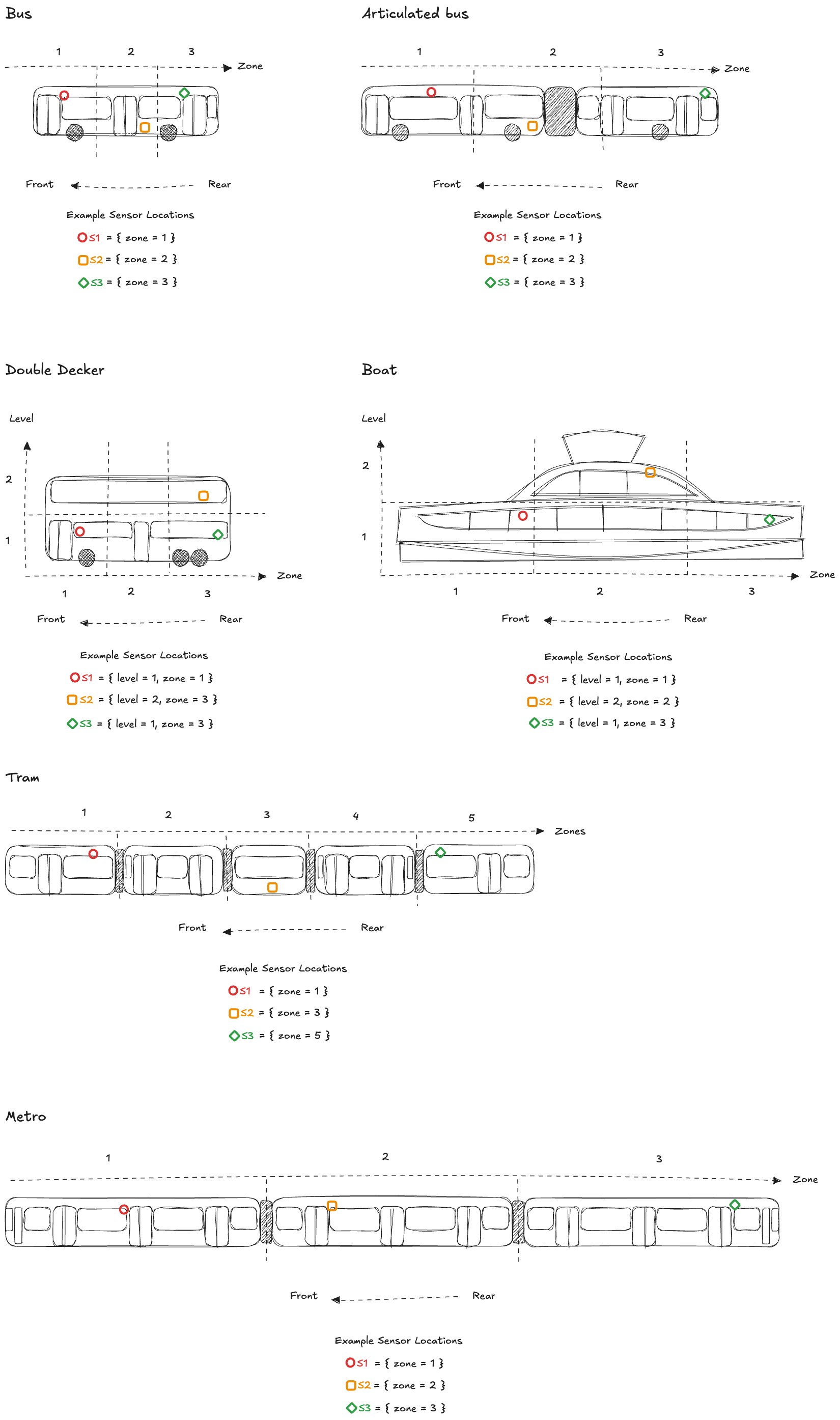 Operation IDsendTemperatureIndoor
Available only on servers:
objectAccepts the following message:
Message IDTemperatureIndoorobject [TemperatureIndoor]uid: https://schemas.ruter.no/adt/ota/api/v4.x/sensors/temperature-indoor/temperature-indoor.jsonSchema for indoor temperature sensor data. The value represents the measured air temperature in degrees Celsius (°C) at a specific location within the vehicle. Location is defined by the car, zone (front, middle, rear, driver cabin), and level (e.g. below platform, platform, or upper level).
Examples
#1 Example - Temperature indoor with sensor located in zone one
{
  "eventTimestamp": "2022-05-09T13:27:59.624Z",
  "traceId": "3841a268-0c03-4588-b476-211be0f26a0d",
  "messageNumber": 1,
  "sensorId": "XB7F-9T2M-L4FC-3R8Q",
  "zone": 1,
  "value": 20.7
}
#2 Example - Temperature indoor with sensor located in zone three on second level
{
  "eventTimestamp": "2022-05-09T13:27:59.624Z",
  "traceId": "3841a268-0c03-4588-b476-211be0f26a0d",
  "messageNumber": 1,
  "sensorId": "XB7F-9T2M-L4FC-3R8Q",
  "zone": 3,
  "level": 2,
  "value": 20.7
}
SEND sensors/temperature_outdoor
Temperature Outdoor Message
Field Value Central Topic {authorityId}/{operatorId}/{vehicleId}/adt/v4/sensors/temperature_outdoor Schema temperature-outdoor.json Maintainer Miljødata Producer PTO Consumer PTA Service Level ✅ External API. Restrictions apply. Only backward compatible changes may happen within the major version. Measurement of the external temperature around the vehicle.
Message Specifications
- Message frequency: Once per minute (every 60 seconds)
- Unit: Degrees Celsius (°C)
- Resolution: <= 1°C
Operation IDsendTemperatureOutdoorAvailable only on servers:
objectAccepts the following message:
Message IDTemperatureOutdoorobject [TemperatureOutdoor]uid: https://schemas.ruter.no/adt/ota/api/v4.x/sensors/temperature-outdoor/temperature-outdoor.jsonSchema for outdoor temperature sensor data
Examples
#1 Example - Temperature outdoor
{
  "eventTimestamp": "2022-05-09T13:27:59.624Z",
  "traceId": "3841a268-0c03-4588-b476-211be0f26a0d",
  "messageNumber": 1,
  "sensorId": "XB7F-9T2M-L4FC-3R8Q",
  "value": 20.7
}
SEND sensors/accelerometer
Accelerometer Message
Field Value Central Topic {authorityId}/{operatorId}/{vehicleId}/adt/v4/sensors/accelerometer Schema accelerometer.json Maintainer Miljødata Producer PTO Consumer PTA Service Level ✅ External API. Restrictions apply. Only backward compatible changes may happen within the major version. Expects a message that provides aggregated acceleration measurements over a 10-second interval. Each payload must include the minimum, maximum, and average acceleration values along the X, Y, and Z axes.
Message Specifications
- Message Frequency: 6 messages per minute (every 10 seconds)
- Unit: All acceleration values are reported in g (1 g ≈ 9.81 m/s²)
- Sampling Bandwidth: ≥ 100 Hz
- Resolution: ≤ 0.01 g
Expected Orientation
By default, the schema assumes the accelerometer is mounted so that:
- X-axis points forward (toward the vehicle’s front)
- Y-axis points left (toward the vehicle’s left side)
- Z-axis points up (toward the vehicle’s roof)
If no orientation override fields are present, consumers should interpret the numerical values according to these defaults.
Orientation Overrides
Producers may optionally set
xOrientation,yOrientationorzOrientation, each of which must be one of the six values: F (forward), B (backward), L (left), R (right), U (up) or D (down). If none are provided, the system assumesxOrientation = "F",yOrientation = "L", andzOrientation = "U".For a valid override, exactly one axis must be aligned along the forward/backward direction (F or B), exactly one along the up/down direction (U or D), and exactly one along the left/right direction (L or R). In other words, among the three fields there must be one value from { F, B }, one from { U, D }, and one from { L, R }. Any other combination is considered invalid and must be corrected before publishing.
Operation IDsendAccelerometerAvailable only on servers:
objectAccepts the following message:
Message IDAccelerometerobject [Accelerometer]uid: https://schemas.ruter.no/adt/ota/api/v4.x/sensors/accelerometer/accelerometer.jsonSchema for accelerometer sensor data. Accelerations are measured along the sensor's axes: X points forward, Y points left, and Z points upward. 'Forward' is defined relative to the vehicle's front (as configured or physically marked). All acceleration values are in units of g (where 1g ≈ 9.81 m/s²). Any divergence from the standard must be specified using the optional axis orientation overrides (fields xOrientation, yOrientation, and zOrientation).
Examples
#1 Example - Accelerometer with no orientation overrides
{
  "eventTimestamp": "2025-05-13T12:00:00.000Z",
  "traceId": "baf3d8ac-1234-4e0c-9e9e-abc123def456",
  "messageNumber": 27,
  "sensorId": "SN-456789",
  "xMin": -0.059570834,
  "xMax": 0.108400127,
  "xAvg": 0.027750913,
  "yMin": 0.023440518,
  "yMax": 0.129880276,
  "yAvg": 0.073010342,
  "zMin": 0.878910442,
  "zMax": 1.109380158,
  "zAvg": 0.993550981
}
#2 Example - Accelerometer with x and Y orientation override
{
  "eventTimestamp": "2025-05-13T12:00:00.000Z",
  "traceId": "baf3d8ac-1234-4e0c-9e9e-abc123def456",
  "messageNumber": 27,
  "sensorId": "SN-456789",
  "xMin": 0.023440518,
  "xMax": 0.129880276,
  "xAvg": 0.073010342,
  "yMin": 0.059570834,
  "yMax": -0.108400127,
  "yAvg": -0.027750913,
  "zMin": 0.878910442,
  "zMax": 1.109380158,
  "zAvg": 0.993550981,
  "xOrientation": "L",
  "yOrientation": "B"
}
#3 Example - Accelerometer with X, Y and Z orientation override
{
  "eventTimestamp": "2025-05-13T12:00:00.000Z",
  "traceId": "baf3d8ac-1234-4e0c-9e9e-abc123def456",
  "messageNumber": 27,
  "sensorId": "SN-456789",
  "yMin": 0.059570834,
  "yMax": -0.108400127,
  "yAvg": -0.027750913,
  "xMin": -0.023440518,
  "xMax": 0.129880276,
  "xAvg": 0.073010342,
  "zMin": -0.878910442,
  "zMax": -1.109380158,
  "zAvg": -0.993550981,
  "xOrientation": "R",
  "yOrientation": "B",
  "zOrientation": "D"
}
SEND sensors/simple_location
Simple Location Message
Field Value Central Topic ruter/sporveien_tbane/{vehicleId}/adt/v4/sensors/simple_location Schema simple-location.json Maintainer Progress Producer PTO Consumer PTA Service Level ✅ External API. Restrictions apply. Only backward compatible changes may happen within the major version. Simplified position data for metro vehicles. Published upon receipt of a position message from the train, regardless of whether the message is received through CBTC or CMCS.
The GNSS coordinate system is expected to be "WGS84". Negative values are used south of the equator and west of Greenwich.
Frequency: on change (triggered by incoming position message from train).
Operation IDsendSimpleLocationAvailable only on servers:
objectAccepts the following message:
Message IDSimpleLocationobject [SimpleLocation]uid: https://schemas.ruter.no/adt/ota/api/v4.x/sensors/simple-location/simple-location.jsonSimplified position data for metro vehicles. Published upon receipt of a position message from the train, regardless of whether the message is received through CBTC or CMCS.
Examples
#1 Example - Simple Location
{
  "traceId": "f47ac10b-58cc-4372-a567-0e02b2c3d479",
  "eventTimestamp": "2025-04-11T14:32:45.123Z",
  "messageNumber": 1542,
  "latitudeDegree": 59.911491,
  "longitudeDegree": 10.757933,
  "dataSource": "CBTC"
}
Messages
- #1Message IDDestinationDisplayOverrideobject [DestinationDisplayOverride]uid: https://schemas.ruter.no/adt/ota/api/v4.x/di/override_attempt/destination_display/destination-display-override.json
Describes a request from MADT or other GUI to manually override the information shown on the destination display. It is up to the presenting system to decide how and for how long the override will apply. A rule could be until next journey begins or a new override_attempt/destination_display is received. The topic could be blanked (provided with a zero-byte payload) to indicate that any overriding information is no longer valid and that the destination display can return to normal
- #2Message IDActiveCabobject [ActiveCab]uid: https://schemas.ruter.no/adt/ota/api/v4.x/pe/active-cab/active-cab.json
Used to keep track of what direction the train is driving
- #3Message IDAudioobject [Audio]uid: https://schemas.ruter.no/adt/ota/api/v4.x/pe/audio/audio.json
This topic provides an audio message intended for passengers onboard the vehicle that should be played on speaker(s) defined in the speaker property of the payload.
- #4Message IDVixCardreaderDiagnosticsobject [VixCardreaderDiagnostics]uid: https://schemas.ruter.no/adt/ota/api/v4.x/pe/cardreader-diagnostics/vix/vix-cardreader_diagnostics.json
- #5Message IDTripActivatedobject [TripActivated]uid: https://schemas.ruter.no/adt/ota/api/v4.x/pe/cbtc/trip_activated/trip-activated.json
Published onboard when CBTC activates a new trip. Contains enough information to uniquely identify the trip, used by Ruter's offline solution and matched with data stored onboard about the route plan. When vehicles have been coupled, each vehicle must send this information.
- #6Message IDCbtcNextStopobject [NextStop]uid: https://schemas.ruter.no/adt/ota/api/v4.x/pe/cbtc/next_stop/next-stop.json
Published when CBTC knows the next stop/quay of the vehicle, so that the Ruter offline solution can access it.
- #7Message IDTargetDistanceobject [TargetDistance]uid: https://schemas.ruter.no/adt/ota/api/v4.x/pe/cbtc/target_distance/target-distance.json
Published every second when the vehicle has a known destination, with information about the remaining distance to the target.
- #8Message IDDoorsIndividuallyobject [DoorsIndividually]uid: https://schemas.ruter.no/adt/ota/api/v4.x/pe/doors-individually/doors-individually.json
This object is used to represent a door individually.
- #9Message IDDpiAcknowledgeobject [DpiAcknowledge]uid: https://schemas.ruter.no/adt/ota/api/v4.x/pe/dpi/ack/dpi-acknowledge.json
The DPI Ack topic.
- #10Message IDDpiArrivingobject [DpiArriving]uid: https://schemas.ruter.no/adt/ota/api/v4.x/pe/dpi/arriving/dpi-arriving.json
For display of arriving information to passengers
- #11Message IDDpiCommandobject [DpiCommand]uid: https://schemas.ruter.no/adt/ota/api/v4.x/pe/dpi/command/dpi-command.json
Message sent to bus to control DPI functions
- #12Message IDDpiCommandResponseobject [DpiCommandResponse]uid: https://schemas.ruter.no/adt/ota/api/v4.x/pe/dpi/command_response/dpi-command_response.json
Message sent from vehicle as response to DPI commands
- #13Message IDDpiConnectionStatusobject [DpiConnectionStatus]uid: https://schemas.ruter.no/adt/ota/api/v4.x/pe/dpi/connection_status/dpi-connection-status.json
DPI Connection status topic
- #14Message IDDpiConnectionsobject [DpiConnections]uid: https://schemas.ruter.no/adt/ota/api/v4.x/pe/dpi/connections/dpi-connections.json
This schema defines the connection message sent as an MQTT message to buses
- #15Message IDDpiDiagnosticsobject [DpiDiagnostics]uid: https://schemas.ruter.no/adt/ota/api/v4.x/pe/dpi/diagnostics/dpi-diagnostics.json
- #16Message IDDpiDisplayStatusobject [DpiDisplayStatus]uid: https://schemas.ruter.no/adt/ota/api/v4.x/pe/dpi/display_status/dpi-display-status.json
DPI Display status topic
- #17Message IDDpiEmergencyobject [Emergency]uid: https://schemas.ruter.no/adt/ota/api/v4.x/pe/dpi/emergency/emergency.json
Emergency message to passengers. Sporveien is required to provide the public with an evacuation message in case an emergency occurs. This message overrides the display on Ruter's DPI screens onboard the vehicle. This message is among those that will be sent by the MADT when the driver has selected an "Emergency message". It will often be sent together with pe/audio (one of several pre-recorded audio messages stored onboard in a configuration file for the MADT). This message, and an audio message, must be sent repeatedly by the MADT until the driver disables the emergency message.
- #18Message IDDpiEtaobject [DpiEta]uid: https://schemas.ruter.no/adt/ota/api/v4.x/pe/dpi/eta/dpi-eta.json
Estimated time of arrival for future stops on a journey
- #19Message IDDpiExternaldisplayobject [DpiExternaldisplay]uid: https://schemas.ruter.no/adt/ota/api/v4.x/pe/dpi/externaldisplay/dpi-externaldisplay.json
Notification that the external displays should show new destination information
- #20Message IDDpiFeatureToggleobject [DpiFeatureToggle]uid: https://schemas.ruter.no/adt/ota/api/v4.x/pe/dpi/feature_toggle/dpi-feature-toggle.json
Message sent to vehicle to feature toggle DPI functions
- #21Message IDDpiJourneyobject [DpiJourney]uid: https://schemas.ruter.no/adt/ota/api/v4.x/pe/dpi/journey/dpi-journey.json
List of stops for current journey in block
- #22Message IDDpiKeyStopsobject [DpiKeyStops]uid: https://schemas.ruter.no/adt/ota/api/v4.x/pe/dpi/key_stops/dpi-key_stops.json
This schema defines the Key Stops message sent as an MQTT message to vehicles
- #23Message IDDpiLogsobject [DpiLogs]uid: https://schemas.ruter.no/adt/ota/api/v4.x/pe/dpi/logs/dpi-logs.json
Logs from the DPI client
- #24Message IDDpiNextstopobject [DpiNextstop]uid: https://schemas.ruter.no/adt/ota/api/v4.x/pe/dpi/nextstop/dpi-nextstop.json
Notification that vehicle has a new next stop
- #25Message IDDpiPaobject [DpiPa]uid: https://schemas.ruter.no/adt/ota/api/v4.x/pe/dpi/pa/dpi-pa.json
- #26Message IDPeRejectedobject [PeRejected]uid: https://schemas.ruter.no/adt/ota/api/v4.x/pe/rejected/pe-rejected.json
Published by the consumer when an incoming message fails validation.
- #27Message IDApiobject [Api]uid: https://schemas.ruter.no/adt/ota/api/v4.x/pe/vehicle/api/api.json
Vehicle API topic
- #28Message IDCouplingobject [Coupling]uid: https://schemas.ruter.no/adt/ota/api/v4.x/status/coupling/coupling.json
Sent from both vehicles when M4 cars are coupled or decoupled. Vehicles can be coupled ("connected") with each other, and they can be decoupled ("disconnected"). Both vehicles being connected or disconnected must send information, so each coupling/decoupling action results in two such messages - one from each vehicle.
- #29Message IDOfflineobject [Offline]uid: https://schemas.ruter.no/adt/ota/api/v4.x/status/offline/offline.json
Signal from MADT (driver) to use offline passenger information. Ruter delivers a solution for limited passenger information to be used onboard. This message triggers use of the offline solution. The message is retained - the last message of this type published will remain on the broker, and any new subscribing client will receive it.
- #30Message IDDoorsAvailableobject [DoorsAvailable]uid: https://schemas.ruter.no/adt/ota/api/v4.x/status/doors/available/doors-available.json
Describes which doors will open at the next stop. CBTC onboard, physically locking/blocking doors, and the vehicle itself will determine which doors can or cannot open when approaching a stop. This message broadcasts that information as a list of the doors that will open at the next stop, a list of doors that will not open, and a list of doors with errors.
- #31Message IDDoorRequestOpenobject [DoorRequestOpen]uid: https://schemas.ruter.no/adt/ota/api/v4.x/status/door_request_open/door-request-open.json
Report which doors were requested to open using the door button. This topic is used to track whether the passengers have pressed the door_request button.
- #32Message IDApcobject [Apc]uid: https://schemas.ruter.no/adt/ota/api/v4.x/sensors/apc/apc.json
Raw-data from door-sensor for later evaluation.
- #33Message IDDoorobject [Door]uid: https://schemas.ruter.no/adt/ota/api/v4.x/sensors/door/door.json
Door status - indicates if passengers are able to open the doors (the door lock is released). When false, doors are locked and cannot be opened by passengers.
- #34Message IDLocationobject [Location]uid: https://schemas.ruter.no/adt/ota/api/v4.x/sensors/location/location.json
Location sensor data
- #35Message IDSimpleLocationobject [SimpleLocation]uid: https://schemas.ruter.no/adt/ota/api/v4.x/sensors/simple-location/simple-location.json
Simplified position data for metro vehicles. Published upon receipt of a position message from the train, regardless of whether the message is received through CBTC or CMCS.
- #36Message IDOdometerobject [Odometer]uid: https://schemas.ruter.no/adt/ota/api/v4.x/sensors/odometer/odometer.json
Odometer data
- #37Message IDTemperatureIndoorobject [TemperatureIndoor]uid: https://schemas.ruter.no/adt/ota/api/v4.x/sensors/temperature-indoor/temperature-indoor.json
Schema for indoor temperature sensor data. The value represents the measured air temperature in degrees Celsius (°C) at a specific location within the vehicle. Location is defined by the car, zone (front, middle, rear, driver cabin), and level (e.g. below platform, platform, or upper level).
- #38Message IDTemperatureOutdoorobject [TemperatureOutdoor]uid: https://schemas.ruter.no/adt/ota/api/v4.x/sensors/temperature-outdoor/temperature-outdoor.json
Schema for outdoor temperature sensor data
- #39Message IDAccelerometerobject [Accelerometer]uid: https://schemas.ruter.no/adt/ota/api/v4.x/sensors/accelerometer/accelerometer.json
Schema for accelerometer sensor data. Accelerations are measured along the sensor's axes: X points forward, Y points left, and Z points upward. 'Forward' is defined relative to the vehicle's front (as configured or physically marked). All acceleration values are in units of g (where 1g ≈ 9.81 m/s²). Any divergence from the standard must be specified using the optional axis orientation overrides (fields xOrientation, yOrientation, and zOrientation).